
Centipid Billing System 2026: Smarter ISP Management for the Future
Discover Centipid Billing System 2026: Smarter ISP Management for the Future. This complete guide covers implementation, MikroTik integration, & M-Pesa

SkySurf had a familiar problem. Customers paid, then waited, then called, and every delay made the ISP look disorganised even when the network itself was fine.
That's why Centipid Billing System 2026: Smarter ISP Management for the Future matters less as a software upgrade and more as an operational fix. In Kenya, billing isn't just about invoices. It's tied directly to activation speed, trust, support load, and whether a customer renews quietly or starts shopping around.
Beyond Billing How to Solve ISP Churn in 2026
SkySurf's issue wasn't bandwidth. It was friction between payment, confirmation, and access restoration. M-Pesa payments took too long to confirm, routers were out of sync with account status, and staff kept correcting billing mistakes manually instead of handling actual customer support.
That pattern is common. A customer pays and expects service to come back immediately. If that doesn't happen, they don't care whether the delay came from finance, support, or the router. They only see an ISP that took their money and left them offline.

Why this gets worse as you grow
Kenya's market size makes this a real operating problem, not a niche annoyance. The Communications Authority of Kenya reported 48.0 million internet subscriptions by the quarter ending December 2025, with mobile data taking the vast majority and fixed broadband remaining smaller but growing, as noted by Centipid's overview of ISP billing needs in Kenya. For operators, that mix means you're dealing with both high-volume prepaid behaviour and recurring billing expectations in the same market.
That has a practical consequence. Your billing platform has to handle fast collections, instant account actions, and customer communication without staff babysitting every transaction.
Practical rule: If payment and reconnection aren't tied together, your support desk becomes a reconciliation team.
A lot of operators still treat churn as a pricing problem. Sometimes it is. More often, it starts with avoidable irritation. Delayed activation after payment, duplicate reminders sent to paid users, expired vouchers that weren't meant to expire, or PPPoE users left disconnected after a successful renewal. Those are small failures, but customers remember them.
What actually works
The fix is straightforward, but the implementation must be disciplined:
Automate payment confirmation: Don't rely on staff to match messages and update accounts.
Link billing to access control: The account state and router state must agree.
Send receipts fast: Customers trust a system that acknowledges payment immediately.
Reduce manual interventions: Every manual exception creates another opportunity for error.
For teams also running managed access environments, I've found it useful to compare ISP onboarding logic with device and access control models outside telecom. The Splash Access Meraki guide is useful for understanding how tightly managed access workflows reduce operational chaos, even though the deployment model is different.
If you want a simpler breakdown of the customer and billing side before touching routers, the Centipid guide on managing ISP customers and billing is a sensible place to start.
Your First 60 Minutes with Centipid
The first mistake many ISPs make is connecting routers before defining the commercial side. That creates confusion fast. The cleaner approach is to set up the business logic first, then let the network follow it.
If you've just opened the dashboard, resist the urge to click straight into device onboarding. Start with the settings that decide how accounts are billed, renewed, and paid.
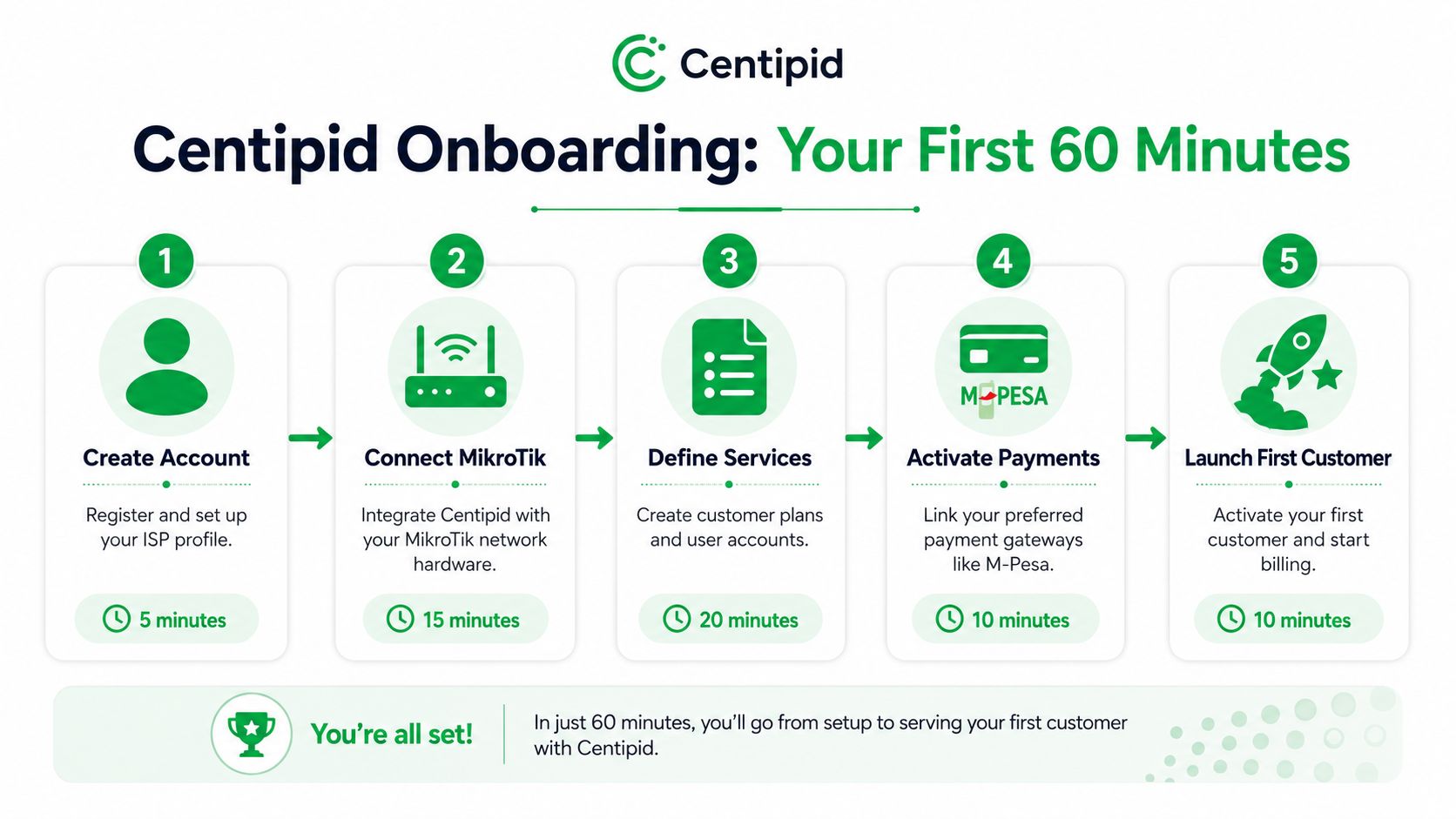
Set the commercial rules first
In the first hour, I'd focus on four items in this order:
Company profile Add your business identity, billing details, and the basics that appear on invoices and customer records.
Service packages Create the plans you sell. Monthly fibre plans, capped packages, hotspot access, installation-linked subscriptions, or voucher products.
Payment methods Enable the gateways you intend to use before importing live customers. If a customer record lands in the system without a valid payment path, you've created a problem before go-live.
Notification behaviour Check how receipts, reminders, and account messages are sent. Many customer disputes start because the system worked, but the communication didn't.
What to avoid in the first hour
The common failure points are predictable:
Importing customers too early: If your package names and payment settings aren't final, imported accounts often need cleanup.
Using test data carelessly: Temporary plans and dummy users tend to linger and confuse staff later.
Skipping one live payment test: Until one payment hits and triggers the expected account action, you don't yet know the setup is correct.
Don't migrate blind. Build the plans, connect the payment path, and test one account end to end before you involve real subscribers.
I also tell teams to assign one person to own naming conventions from day one. Package names, branch labels, router names, and customer groups should be consistent. If they aren't, reporting becomes messy and troubleshooting takes longer than it should.
A practical way to use the first session
A useful rhythm for the first session looks like this:
First pass: Configure the essentials quickly
Second pass: Review each package and gateway like a customer would experience it
Final pass: Test a single journey from account creation to payment to activation
That approach keeps the dashboard from feeling overloaded. It also prevents the usual trap where teams assume setup is complete because the interface looks populated.
If you like lightweight onboarding checklists for new platforms, the Hyperleap AI getting started guide is a good example of how staged setup reduces operator error. The product is different, but the onboarding principle is the same.
For feature specifics and menu paths, use the Centipid documentation. It's better to confirm the current workflow there than rely on memory from an older deployment.
Linking Centipid with Your MikroTik Network
Operationally, the system starts paying for itself. If billing and MikroTik stay separate, your team keeps doing duplicate work. One side tracks money. The other side controls access. Staff end up bridging the gap manually.
That's fine with a handful of customers. It breaks down once you have renewals, overdue accounts, mixed plan types, and multiple routers.
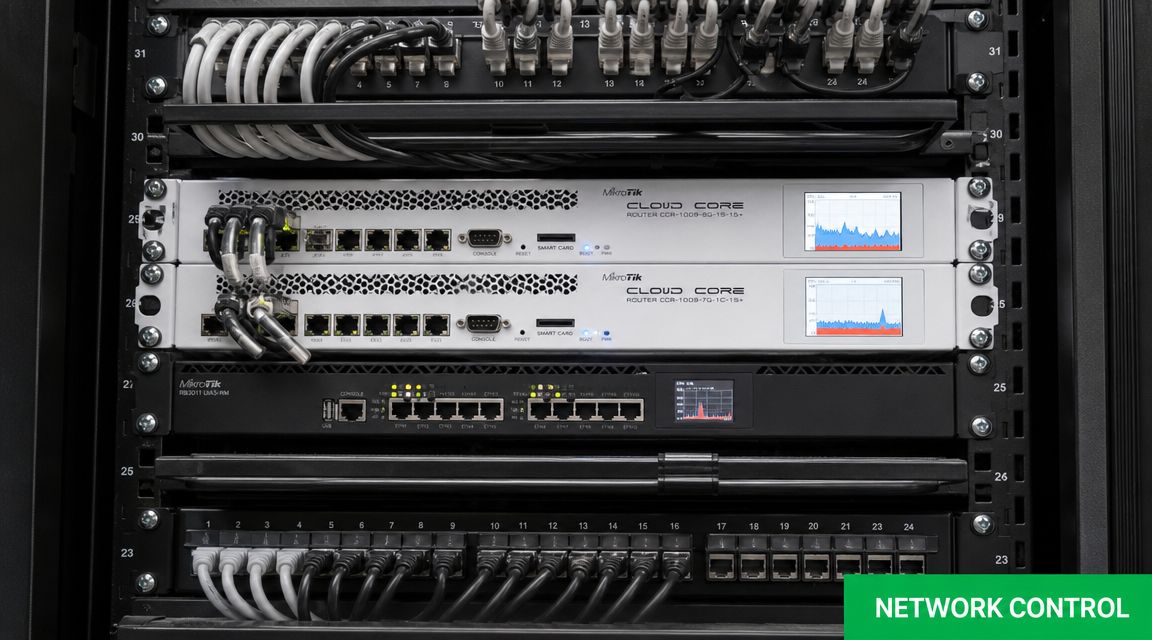
The sequence that avoids trouble
A practical implementation sequence is documented in Centipid's MikroTik deployment guidance: reset and baseline the MikroTik, verify upstream connectivity, link the router to the billing platform, then auto-provision hotspot or PPPoE services and firewall rules. Once the router is onboarded, the system downloads and executes configuration scripts, creates hotspot or PPPoE servers, and applies bridge, port, and firewall policy automatically. That materially lowers operator error compared with manual CLI configuration.
That sequence matters. If you skip the baseline and inherit old rules from a reused router, you can spend hours chasing strange behaviour that has nothing to do with billing.
What I check before linking a router
Before onboarding a MikroTik device, I verify these points:
Clean baseline: Remove old test configs, dead NAT rules, and obsolete hotspot remnants.
Stable upstream: If upstream is unstable, onboarding failures can look like billing problems.
Correct service model: Decide early whether that router is serving PPPoE, hotspot, or a mixed deployment.
Naming discipline: Use router names and site labels your support team will understand at a glance.
A lot of engineers trust themselves to configure everything manually. The problem isn't skill. It's consistency. On the fifth router, under pressure, a small omission becomes a customer outage.
Manual CLI work gives you control. Automated provisioning gives you repeatability. Growing ISPs usually need the second more than the first.
Where automation helps most
The biggest gains usually show up in three places:
Area | Manual approach problem | Automated outcome |
|---|---|---|
Customer activation | Staff create or edit accounts one by one | Service profiles are applied consistently |
Suspension and restoration | Paid users may stay offline until someone checks | Account state changes follow billing status |
Firewall and service policy | Rules differ across routers over time | Policy stays standardised across sites |
This doesn't remove the need for engineering judgement. You still need to understand your bridges, uplinks, user model, and failover behaviour. What changes is that you stop wasting engineering time on repetitive setup work that a billing-linked platform can handle more consistently.
If you need a deeper look at the router side, the Centipid MikroTik resource is the internal reference I'd point junior admins to before a live rollout.
Activating Payments with M-Pesa and Vouchers
For most Kenyan ISPs, this is the section that determines whether customers stay calm or start calling. Payment friction kills goodwill faster than most network issues. If a customer can pay but not get back online quickly, the billing stack has failed even if the money arrived.
The fix is to make payment, confirmation, and activation part of one workflow instead of three separate tasks handled by different people.
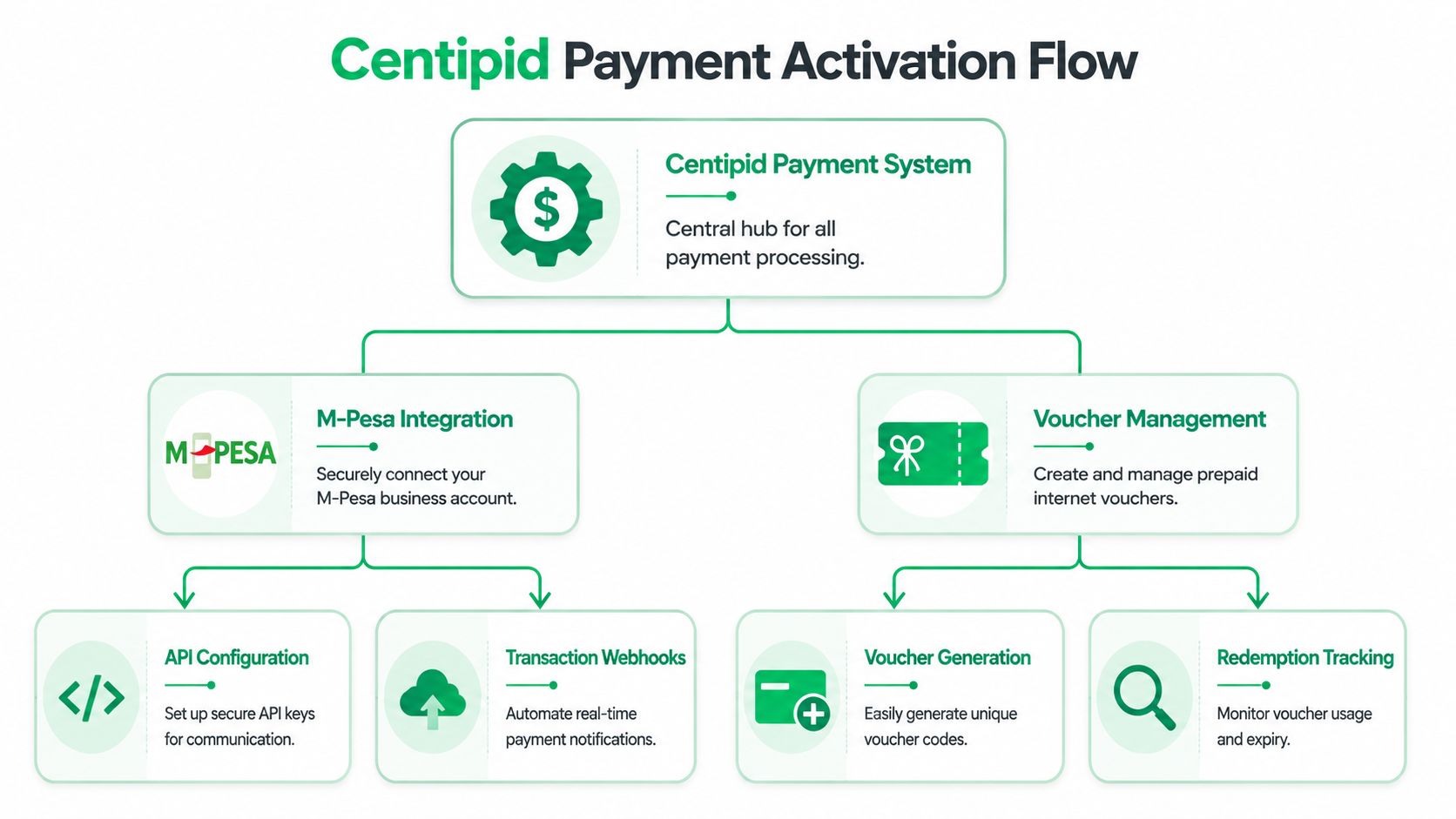
M-Pesa setup that works in practice
The cleanest setup is the one where a customer pays through the expected channel, the system confirms the payment, the account state updates, and the service changes immediately. That's the experience customers now expect.
In live deployments, I always recommend testing these scenarios before launch:
A standard renewal payment: Confirm that the account extends correctly.
An overdue account payment: Make sure restoration happens without staff intervention.
A wrong reference or edge-case payment: Check how your team identifies and resolves exceptions.
Receipt delivery: Verify that the customer gets confirmation in a format they can trust.
The platform features published on Centipid's Lipa na M-Pesa portal guide are useful here because they show the payment side from the operator's perspective, not just the customer's.
Don't treat vouchers as a side feature
Vouchers are still useful in hotels, hostels, events, estates, and temporary access environments. They also help when you want staff or resellers to sell access without exposing the full billing dashboard.
A practical voucher setup should define:
Validity logic: Time-based access, data-based access, or both
Redemption rules: One device, one session, or broader use depending on your hotspot policy
Operational ownership: Who generates vouchers, who distributes them, and who handles complaints
I've seen operators create good voucher products and then ruin them with weak controls. They generate codes in bulk but don't track who issued them. That turns a payment tool into an audit headache.
A voucher system works best when finance, support, and front-desk staff all use the same rules for expiry, refunds, and replacement.
Plans and reminders matter as much as the gateway
Many billing problems aren't gateway problems at all. They come from badly designed service plans. If your plan names are unclear, your pricing structure is messy, or renewals behave differently across similar products, payment disputes rise.
Good plan design usually includes a mix of:
Simple recurring plans for residential subscribers
Top-up friendly products where capped usage is common
Controlled hotspot packages for shared environments
Then add reminders carefully. Customers should receive useful prompts, not a flood of messages that make the ISP look desperate or confused. A reminder before due date is helpful. A second reminder after successful payment is not.
When this is configured well, billing stops feeling like a monthly scramble and starts behaving like a repeatable revenue process.
Your Step-by-Step ISP Migration Plan
Most ISPs don't fear the new billing system. They fear the move. That fear is justified because a bad migration can create duplicate accounts, failed activations, wrong balances, and angry customers in the same week.
The safest migration is boring. It's controlled, staged, and slightly slower than your sales team would prefer.
The six-phase approach I recommend
Start with a backup. Every customer record, plan assignment, payment history note, and account identifier should be exported before anyone touches the live environment. If something goes wrong, you need a way back.
Then configure the new environment first. Build your plans, payment settings, notifications, and router links before migrating subscribers. A half-built billing system is not a migration target.
After that, test one live account from end to end. Not a screenshot test. A real workflow. Create the account, assign the plan, pay, confirm service behaviour, and check the receipt trail.
Move in small batches, not one dramatic cutover
The mistake I see most often is trying to move everyone in one night. Don't do it. Move a small subscriber batch first, confirm the expected behaviour, then move the next group.
The content owner's field guidance is sensible here. Start with 20 to 50 subscribers in the first batch, fix anything odd, then continue. That's not a universal magic number for every ISP, but it's a practical operating range for catching issues without putting the whole network under stress.
Phase | Action | Key Pitfall to Avoid |
|---|---|---|
Backup data | Export customer details, packages, and payment history | Assuming old records are clean enough without review |
Set up Centipid first | Configure plans, billing logic, and payments before migration | Importing customers into an unfinished system |
Test before go-live | Run one complete live test account | Treating dashboard status as proof everything works |
Move in batches | Start with a small subscriber group | Migrating the full base at once |
Inform customers | Send a clear notice and support contact | Keeping customers in the dark during changeover |
Monitor for seven days | Review dashboard activity and complaints daily | Assuming silence means success |
Communication is part of migration
Customers don't need a long technical explanation. They need a short message that tells them the billing and payment experience has been upgraded, what to expect, and where to get help if something looks wrong.
I'd keep that message simple:
What changed: Billing or payment process upgrade
What customers should do: Keep using the normal payment path unless told otherwise
What to watch for: Receipts, activation timing, login details if relevant
Where to call: One reliable support number or channel
The first week after migration decides whether customers see the change as progress or disruption.
For seven days after cutover, check the dashboard every morning. Look for failed activations, unmatched payments, duplicate reminders, and unusually noisy support categories. Most migration issues don't need a rebuild. They need quick correction before they spread.
Advanced Management Security and Compliance
Once billing and provisioning are stable, the next challenge is control. Not just network control, but financial control, staff control, and compliance control. Many deployments often remain weak in these areas because teams stop at “payments work” and never tighten the rest of the operation.
A billing platform should help you run multiple sites from one place, keep customer and payment records organised, and make reporting usable for both operations and finance. If it can't do that, the admin burden just moves to another spreadsheet.
Security and management after go-live
For day-two operations, I look at three things first:
Role discipline: Staff should only access the functions they need.
Site structure: Branches, routers, and customer groups should be separated cleanly.
Report hygiene: Revenue, overdue accounts, and account actions should be easy to review without exporting raw data every time.
The technical setup might be sound and still create risk if everyone shares one admin login or if no one can trace who changed a package or reversed an account action.
If your payment mix includes card channels or other dispute-prone methods beyond mobile money, operational teams should also understand the basics of fighting chargebacks. It's not a direct substitute for telecom billing controls, but it's useful context for handling reversals and payment disputes more carefully.
The compliance gap buyers keep asking about
One of the most important unanswered buyer questions in Kenya is compliance. As discussed in Centipid's Kenya-focused billing analysis, a major underserved angle is regulatory and tax compliance in Kenya for ISP billing automation, because most existing Centipid-facing content does not explain how the system handles Kenyan tax documentation, eTIMS or e-invoicing, data retention, or audit trails for telecom or VAT compliance. That matters because digital records and electronic invoicing have become more operationally important, and buyers need clear guidance on whether the billing platform can produce compliant invoices.
That is the right concern. Buyers shouldn't only ask whether invoices are automated. They should ask whether invoices fit local accounting practice, how mobile-money receipts reconcile, what happens with reversals, and whether month-end records are easy to audit.
A good internal checklist for Kenyan operators includes:
Invoice format: Does it meet your accountant's and tax team's needs?
Payment reconciliation: Can M-Pesa receipts be matched clearly to subscriber accounts?
Reversals and adjustments: Is there a traceable record of what changed and why?
Retention: Can your team preserve the records needed for review or audit?
The Centipid guide on MikroTik RADIUS billing setup is useful on the technical side, but compliance decisions still need joint input from operations, finance, and whoever handles tax process in your business.
A billing system can automate a lot. It can't remove your responsibility to define clean internal controls. In practice, the strongest operators are the ones that treat billing, network access, finance, and compliance as one workflow rather than four separate departments.
If you're reviewing billing options for a Kenyan ISP or hotspot business, Centipid Technologies Ltd. provides a platform built for automated invoicing, payment handling, MikroTik-linked access control, and centralised ISP operations. Start with a small test environment, validate the payment and router workflows carefully, and treat compliance questions as part of the buying decision, not an afterthought.