Automatic Invoicing Software for ISPs & Hotspots
Discover the best automatic invoicing software for ISPs and hotspot operators. Automate billing, integrate MikroTik, and manage payments effortlessly.

If you're running a small ISP or hotspot business, billing probably steals more time than it should. One day you're checking M-Pesa messages, the next you're matching bank transfers, then you're opening MikroTik to disable non-payers one by one because the spreadsheet still says “unpaid”. None of that grows the network. It only keeps the lights on.
That's where automatic invoicing software stops being an admin tool and starts becoming an operations tool. For an ISP, it isn't just about sending invoices. It connects subscriber records, payment collection, service status, and RouterOS actions so billing stops living in five separate places.
Why Manual Invoicing Is Holding Your ISP Back
The pattern is familiar. A subscriber pays through mobile money but forgets the account reference. Another sends a partial bank transfer. A hotspot voucher expires, but the customer insists they already paid. Someone on your team updates the spreadsheet, but the router profile is still active. By the end of the week, your staff are doing detective work instead of managing service quality.

Manual invoicing costs more than most operators realise. The average cost to process a single invoice manually ranges from USD 9.40 to USD 15, and 39% of all manually processed invoices contain errors according to Quadient's AP automation statistics. For a subscription business, those errors don't just delay payment. They trigger support calls, disputes, and avoidable disconnections.
What manual billing looks like in the field
In many growing ISP setups, billing work gets split across too many tools:
Spreadsheets for balances: Staff update subscriber status manually and hope no row is missed.
Phone messages for payment proof: Customers send screenshots, then someone has to verify them.
RouterOS for enforcement: Suspension and reactivation happen after payment checks, often late.
Email and SMS reminders by hand: Follow-up depends on who remembered to send them.
That setup works for a while. Then invoice volume grows, support tickets rise, and billing becomes the bottleneck.
Practical rule: If a customer can pay but still stay disconnected until a staff member notices, your billing process is already too manual.
Automatic invoicing software fixes this by turning billing into a workflow. Invoices are generated on schedule, reminders go out automatically, payments are reconciled faster, and service actions follow rules instead of memory. If you're already trying to improve support alongside billing, this guide on using AI for 24/7 customer assistance is worth a look because billing and customer communication usually fail together.
A lot of operators first look for “invoice software” and end up buying something built for general business use. That usually leaves out subscriber lifecycle control. A more relevant starting point is this guide on how to manage ISP customers and billing, because ISP billing has to tie payment status to actual service delivery.
Understanding Automatic Invoicing Software
Generic invoicing tools send bills. Automatic invoicing software for ISPs does more than that. It acts like an air traffic controller for revenue. It coordinates subscriber accounts, billing cycles, payment gateways, taxes, service plans, and access control so each part moves in the right order.
More than a PDF generator
In an ISP environment, the billing system sits between the customer, your payment channels, and your network. A new subscriber signs up, selects a package, receives an invoice or recurring bill, pays through a supported method, and the system updates service status. If the subscriber doesn't pay, the same system can trigger reminders and eventually enforce policy.
That's a very different job from standard office invoicing.
A proper setup usually handles these flows together:
Subscriber records: Identity, plan, site, package, and billing cycle
Recurring billing: Monthly charges, prorated starts, renewals, and due dates
Collections logic: Reminders, overdue handling, and account follow-up
Payment reconciliation: Matching incoming payments to the right subscriber
Network actions: Activation, suspension, speed policy, quota handling, and reactivation
Billing software for an ISP should answer one question quickly. “Has this customer paid, and should they be online right now?”
Where financial control meets network control
This is also where many teams make the wrong buying decision. They choose a finance-first tool that looks polished but has no operational link to the network. The result is a beautiful invoice and a manual suspension process. That's not automation. That's just digitised paperwork.
For operators who want a broader finance view, including how automated billing improves control over collections and cash handling, the Resolut guide to financial control adds useful context. For ISPs, though, the missing layer is always service enforcement.
The market is clearly moving in this direction. The global invoice processing software market was valued at USD 49.04 billion in 2026 and is projected to grow at a CAGR of 17.7% through 2030 according to the invoice processing software market report. The reason is easy to understand from the operator side. Teams want fewer manual touchpoints, tighter workflows, and better accuracy.
What good software changes day to day
Once automatic invoicing software is set up properly, your team stops chasing routine tasks. They work exceptions instead. That's the shift that matters.
A support agent no longer needs to ask finance whether a payment came in. A network admin doesn't need to log in just to suspend overdue accounts manually. The subscriber can often see the invoice, pay it, and get service restored through one flow.
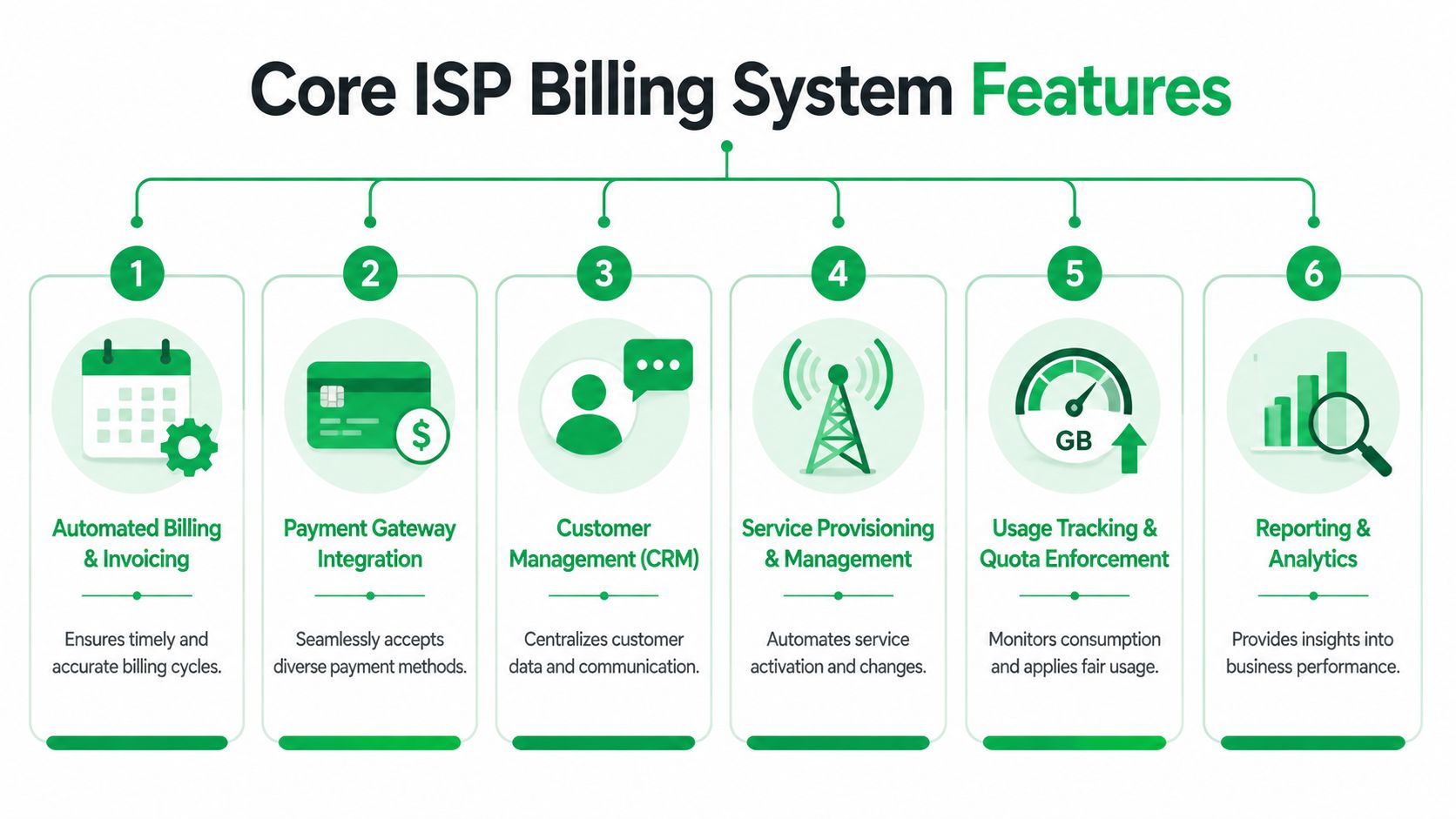
Core Features Every ISP Billing System Needs
A billing system for an ISP has to do more than issue invoices on time. It has to protect revenue, reduce support noise, and keep the network aligned with account status. If a platform can't do those things, it's not solving the underlying problem.
Recurring billing that matches how ISPs actually charge
Recurring billing is the foundation. The system should create invoices automatically based on the subscriber's package and billing date, including prorated starts where needed. That removes the monthly scramble of generating charges by hand.
For fixed wireless, fibre, PPPoE, and hotspot operations, consistency matters more than invoice design. If charges are generated late, cash collection slips immediately.
Smart follow-up on overdue accounts
A good billing system doesn't stop at invoice creation. It should handle reminders before and after due dates, then move overdue accounts into controlled dunning sequences. A lot of revenue leakage happens in manual environments during this phase.
What works is staged follow-up:
Early reminder: Warn before the due date so genuine forgetfulness doesn't become suspension.
Overdue notice: Send a clear message when payment is late and show the amount due.
Final action point: Trigger a service rule only after the grace policy is reached.
What doesn't work is relying on staff to remember who to chase and when.
Multi-gateway support for real collections
For ISPs in East Africa and similar markets, this feature isn't optional. Customers pay through different channels, and many of them switch methods depending on convenience. Your billing stack needs to reconcile mobile money, bank transfers, and other payment routes without creating manual cleanup work later.
One practical example is integrating customer payments with a Lipa na M-Pesa portal workflow, so collection happens through a method customers already trust. That reduces friction at the point where billing succeeds or fails.
Localisation and control
Local billing realities matter. The software should support the right currency setup, tax handling, invoice formatting, and account rules for the markets where you operate. This becomes even more important for operators serving multiple locations or crossing borders.
Security, reporting, and auditability
You need role control, payment logs, invoice history, and clear reporting. Not because it sounds enterprise-grade, but because billing disputes are much easier to resolve when the system records what happened.
Here's the short version of what to look for:
Feature | Why it matters in ISP operations |
|---|---|
Automated recurring invoices | Keeps billing cycles consistent without staff intervention |
Dunning workflows | Reduces missed follow-up and late collection gaps |
Multi-gateway payments | Matches how subscribers actually pay |
Local tax and currency support | Prevents workarounds and manual invoice edits |
Reporting and logs | Helps resolve disputes and monitor collections |
A billing platform should reduce routine human decisions. If the team still needs to decide every month who gets billed, reminded, suspended, and restored, the software isn't doing enough.
Automatic Invoicing for MikroTik Networks
Automatic invoicing software provides significant utility for network operators beyond traditional finance applications. Within a MikroTik environment, billing delivers tangible value when it triggers specific network behavior. This integration ensures that the invoice, payment, and RouterOS policy function as a single, unified chain.

Linking billing to access control
For PPPoE and hotspot deployments, the billing platform should communicate with MikroTik RouterOS through supported integration methods so subscriber state changes can trigger service actions. In practice, that means:
New account created: The subscriber profile is provisioned with the correct service policy.
Payment received: The account stays active or is restored automatically.
Invoice overdue: The system applies the suspension rule defined in your policy.
Plan changed: Speed, quota, or profile settings update without manual rework.
This model matters because manual handoffs are where mistakes pile up. For ISPs in the KE region, integrating automatic invoicing with MikroTik RouterOS can reduce billing errors by up to 60% through automated RADIUS-based actions such as usage-based throttling at 95% quota via /queue tree commands, as described in this telecom billing automation reference.
PPPoE and hotspot automation in practice
If you manage PPPoE subscribers, the cleanest setup is simple. The billing system owns the account state. RouterOS enforces it. When payment is current, the user authenticates normally. When the account becomes overdue past your rules, access changes automatically based on the service policy you configured.
For hotspot operators, the same principle applies to vouchers, session access, and expiry handling. Instead of manually checking who paid and updating access by hand, the system manages validity and status centrally.
A useful technical reference for that pattern is the MikroTik RADIUS server workflow, especially if you're tying subscriber authentication to a billing-driven access policy.
Keep the billing system as the source of truth for subscriber status. Don't let staff update balances in one tool and service state in another.
Quotas, shaping, and plan enforcement
A lot of billing trouble is really plan enforcement trouble. When package definitions are loose, support gets flooded with “slow internet” and “why am I disconnected” tickets that start as commercial problems and end up looking technical.
A better setup ties package rules to service logic:
Quota-aware plans: The system can monitor package usage and apply policy near the threshold.
Speed mapping: Subscriber plans should map cleanly to the correct bandwidth profile.
Grace logic: Short grace periods can reduce support noise without weakening collection discipline.
Self-service cuts support load
Subscriber portals matter more than most operators think. When customers can log in, see balances, download invoices, pay online, and request plan changes, your team gets fewer repetitive calls.
The actual gain isn't cosmetic. It's operational. A subscriber who can solve their own billing issue at night doesn't create a support ticket for the morning shift. In practice, that means fewer manual reinstatements and fewer calls asking whether payment has reflected.
Centipid Technologies Ltd. provides this type of ISP billing workflow through a cloud billing system built for MikroTik RouterOS, including recurring invoicing, payment handling, subscriber self-service, and network policy enforcement, as described on the Centipid billing documentation.
Your Evaluation Checklist for ISP Billing Software
Buying billing software is easy. Replacing the wrong one is expensive. The safest approach is to evaluate it like an operations platform, not just an accounting tool.
What to inspect before you commit
The biggest mistake I see is choosing software based on invoice appearance, then discovering the team still has to reconcile payments manually and suspend subscribers by hand. A cleaner test is to ask what the system automates without staff intervention.
Use this checklist when comparing vendors:
Feature/Criteria | Importance | Questions to Ask |
|---|---|---|
MikroTik integration depth | Critical | Does it support real service automation, or only manual exports and status tracking? |
Payment gateway options | Critical | Does it support the payment methods your subscribers already use, including local mobile money and bank workflows? |
Recurring billing flexibility | High | Can it handle monthly cycles, mid-cycle signups, package changes, and grace policies cleanly? |
Dunning and suspensions | High | Can reminders, overdue handling, and service restrictions run automatically based on rules? |
Multi-location support | High | Can you separate branches or sites while still viewing consolidated reporting? |
Reporting and analytics | High | Can you see unpaid accounts, active plans, collections, and service status without exporting spreadsheets? |
Data migration process | High | How are subscribers, plans, balances, and payment history moved into the new system? |
Technical support quality | High | Will support help with billing logic and router integration, or only basic account setup? |
Localisation | Medium | Can the system handle your currency, taxes, invoice format, and market-specific workflows? |
Pricing model | Medium | Does the cost still make sense as you add subscribers or locations? |
Red flags to take seriously
Some products look fine in a demo but fail in daily use. Watch for these signs:
Generic billing focus: Good for SaaS or retail, weak for ISP service enforcement.
No local payment fit: Subscribers can't pay the way they normally do.
Weak migration support: You'll end up rebuilding plans and subscriber records manually.
Reporting by export only: If every answer needs a spreadsheet download, your staff will avoid checking the data.
The right billing platform should remove operator effort at the points where money and service meet. That's the test that matters.
If a vendor can't explain exactly how payments trigger account state changes, keep looking.
Simple Steps for Implementation and Migration
Most operators delay switching because they assume migration will break service. In practice, the biggest risk comes from rushing the setup, not from the software itself. A phased rollout is usually straightforward if you prepare the billing data properly.
Start with clean subscriber data
Before touching the new system, export and review your current records. Remove duplicate accounts, confirm plan names, and check outstanding balances. If your old process mixes active and inactive customers in the same sheet, separate them first.
That prep work saves time later because your package mapping and payment rules depend on clean inputs.
Configure billing before network enforcement
Set up products, billing cycles, taxes, invoice templates, payment channels, and reminder logic first. Don't begin with automatic suspension rules on day one. First make sure invoices generate correctly and payments map to the right accounts.
For KE-region ISPs, automating with multi-gateway support such as M-Pesa can lead to 45% faster invoice processing, and 25% of subscriber loss in manual operations stems from billing friction and payment delays, according to this billing automation reference for emerging-market workflows.
A useful planning reference is this overview of an ISP subscriber management system, especially if your current records are spread across billing notes, router comments, and mobile money messages.
Connect the network in stages
Once billing logic looks right, connect RouterOS integration for a limited group first. Use a test batch of subscribers or one site before moving the whole network. Watch plan mapping, payment reflection, suspension rules, and restoration flow.
A sensible rollout looks like this:
Import accounts: Bring in subscriber records and package assignments.
Enable invoices and reminders: Let the system handle communication first.
Test payment reflection: Confirm each gateway updates the right account.
Apply service automation: Turn on suspensions and restorations after validation.
Run one overlap cycle: Keep the old process visible for one billing cycle to catch gaps.
Start with automation for visibility, then move to automation for enforcement. That order avoids unnecessary customer disruption.
Frequently Asked Questions About ISP Billing
Can I start with only a few subscribers
Yes. Small operators usually benefit early because manual billing pain shows up quickly when one person handles support, collections, and network admin. What matters isn't size. It's whether your current process forces you to repeat the same billing work every month.
Is automatic invoicing software secure enough for customer billing
It can be, if the platform gives you proper user permissions, payment records, audit trails, and controlled access to subscriber data. The weak point is often not the software. It's the workaround outside it, such as sharing spreadsheets, forwarding payment screenshots, or letting multiple staff edit customer balances informally.
What if I need help connecting MikroTik
That should be part of your evaluation before purchase. Don't assume every billing vendor understands PPPoE, hotspot access, RADIUS flow, or RouterOS policy mapping. Ask how they handle account state changes, profile assignment, suspensions, and restorations in real deployments.
Will automation remove the need for staff follow-up completely
No. It removes routine work, not judgement. Your team will still handle disputes, failed payments, unusual customer requests, and package changes that need review. The difference is that staff spend time on exceptions instead of repeating the same invoice and reminder process every month.
Is a self-service portal really necessary
For many operators, yes. When subscribers can check balances, make payments, and see account status on their own, support calls drop and restoration happens faster. That's especially useful outside office hours when billing issues would otherwise sit in a queue.
If you're ready to stop managing billing through spreadsheets, payment messages, and manual RouterOS actions, Centipid Technologies Ltd. is one option built specifically for ISP and hotspot operations. It supports recurring invoicing, subscriber management, multi-gateway payments, MikroTik-driven service control, and self-service billing workflows that fit growing providers.