Hotspot Billing Software: The Ultimate ISP Guide 2026
A complete guide to hotspot billing software for ISPs. Learn about features, MikroTik integration, payment flows, and how to choose the right system.

Most hotspot operators don't start with a system. They start with a workaround.
A staff member writes voucher codes in a notebook. Payments come in through cash, direct transfer, or a mobile money message someone checks by hand. A customer says they paid but still can't browse. Another says the voucher expired too early. Ultimately, someone has to match payments, usernames, and router activity manually. That setup works for a while, then it turns into a support queue.
The problem isn't only billing. It's control. Once you have multiple access points, different packages, and many short sessions, a manual hotspot setup starts leaking time and revenue. You need one place to handle user access, payment confirmation, service limits, and records you can trust when a customer disputes a session.
Beyond Manual Vouchers The Rise of Hotspot Automation
The usual first version of a hotspot business is simple. Put up a MikroTik hotspot, create a few usernames, print or send vouchers, and collect payment however you can. For a single café or a small estate, that feels manageable.
Then the cracks show. Staff create duplicate vouchers. Users share codes. A customer tops up, but activation waits until someone sees the payment. Another customer gets disconnected and wants extra time added manually. The router is doing access control, but the business side is still running on memory, screenshots, and guesswork.
That's where hotspot billing software stops being a nice extra and becomes operating infrastructure.
Kenya already has the user and payment base to make this model commercially serious. The Communications Authority of Kenya reported 67.3 million mobile subscriptions, 1.42 million fixed internet subscriptions, and 20.8 million active mobile money subscriptions in Q4 2023/24, which makes automated access control and payment collection practical at scale for paid Wi-Fi and voucher-based access models, as noted in this market overview of hotspot billing software.
What manual operations usually break first
Payment reconciliation: Someone has to confirm whether a payment matches a package and a user.
Voucher handling: Paper slips, copied codes, and manually extended sessions create errors fast.
Support response: Staff spend time checking router status instead of solving the actual complaint.
Growth: A setup built around one person's memory doesn't survive multiple sites.
Practical rule: If your staff must check messages before a user can get online, your hotspot isn't automated yet.
A proper voucher workflow should be generated, tracked, redeemed, and audited from one system. If you still rely on handwritten or loosely managed codes, this guide on managing internet vouchers is a useful reference point for what a cleaner process looks like.
Automation doesn't remove network work. It removes repetitive admin work that keeps dragging the network team into billing problems.
What Is Hotspot Billing Software Really
Hotspot billing software is not just a payment tool. It is the control layer that turns a Wi-Fi network into a service you can sell, limit, monitor, and support.
Think of it as the network's digital manager. It identifies the user, checks what they've paid for, applies the right access rules, and records what they consumed. If any one of those steps is missing, the operator ends up filling the gap manually.

The core job is AAA
Engineers usually reduce the whole workflow to AAA.
Function | What it means in practice | Why it matters |
|---|---|---|
Authentication | The system checks who is trying to log in | Stops anonymous or unauthorised access |
Authorisation | The system decides what package, speed, time, or data limit applies | Enforces the product the customer actually bought |
Accounting | The system records session details and usage | Supports billing, reporting, and dispute handling |
That's why a billing platform sits closer to operations than many people first assume. It isn't there just to raise invoices after the fact. It's involved at the moment of access.
More than a captive portal
Many operators confuse a captive portal with a billing system. A captive portal is only the front door. It shows the login page, package options, or payment prompt. Essential work happens behind it, where the system validates payment status, applies limits, and tracks the session.
Modern deployments centre on captive portals, voucher authorisation, real-time usage tracking, and automated invoicing, because those are the mechanics that turn internet access into repeatable revenue. For a deeper look at the broader business role of these platforms, this article on ISP billing software is worth reading.
A hotspot with no accounting is just controlled access. A hotspot with accounting becomes a business.
When evaluating hotspot billing software, ask one blunt question: if a customer's payment, access status, and usage history are in different places, who stitches them together when something goes wrong? If the answer is “my staff”, the system is still too manual.
Essential Features and Modules for ISP Success
A hotspot ISP usually feels the strain first in support and cash collection. One customer paid on M-Pesa but is still blocked. Another has a handwritten voucher code that was already reused. Staff start checking SMS messages, router sessions, and spreadsheets just to answer a basic question. Good hotspot billing software removes that mess by keeping customer records, payments, access rules, and service actions in one operational system.
Subscriber and account management
The first module to judge is the customer record.
For a small hotspot, it is tempting to split work across the router, a payment phone, and a voucher notebook. That setup breaks down fast once the number of daily transactions rises. Staff need one place to see service status, package, payment history, current balance, session history, and any manual adjustments made for that account.
In high mobile money markets such as Kenya, this matters even more. Operators handle many low-value payments, short renewals, and frequent customer questions about whether a payment reflected. If the billing system cannot tie a payment to a user account and then tie that account to active service, support load grows with every new hotspot site.
Plan creation and policy control
Package design affects both sales and support. The software should let you create plans that match how people buy internet in the field, not just how billing systems prefer to classify products.
Common examples include:
Time-based access for shops, cafés, bus stages, and waiting areas
Volume-based access for users who care more about data than clock time
Recurring subscriptions for apartments, hostels, estates, and small offices
Hybrid plans that combine validity periods with data caps
Speed-tier packages for separating entry-level access from premium service
The hard part is not creating the package name. The hard part is enforcing it reliably on the network without manual intervention. On MikroTik deployments, policy control needs to stay aligned with RADIUS attributes, hotspot user status, and rate limits. A proper MikroTik RADIUS server setup guide helps clarify what the billing platform must pass to the router and what the router must enforce consistently.
Poor policy design creates expensive exceptions. A package that expires at midnight may look simple in the admin panel, but it will generate avoidable complaints if customers usually buy late in the evening and expect a full session window.
Billing and payment modules
Billing modules decide whether revenue collection stays disciplined or turns into a daily reconciliation exercise. The system should handle invoicing, renewals, payment posting, service suspension, reminders, and account changes from one interface.
For operators serving prepaid hotspot users, voucher support still matters, but it should not be the only path. Mobile money integration, wallet handling, and automatic payment matching reduce the amount of staff time spent confirming who paid and what service should be activated. That is one reason platforms built for this operating model are easier to scale than generic software that assumes cards, bank debits, or monthly invoicing are the default.
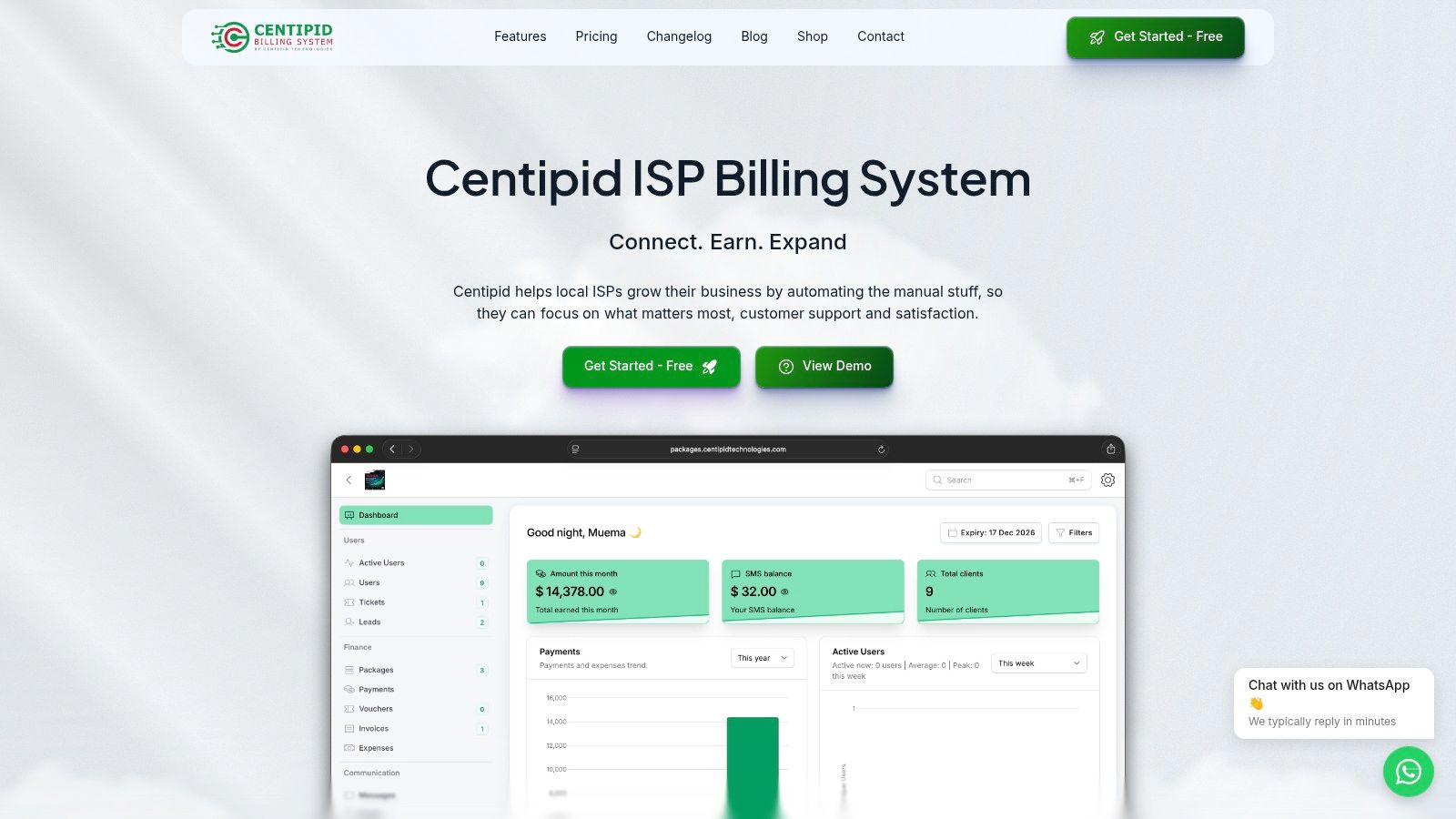
Centipid ISP Billing System includes voucher-based and account-based hotspot access, usage tracking, bandwidth policy enforcement, and MikroTik hotspot setup through its documented platform and setup materials at Centipid documentation. That mix is useful because the commercial side and the router side need to stay synchronized if you want fewer billing disputes and fewer midnight support calls.
Reporting that helps operations
Reports should help the support desk, finance team, and network team answer practical questions fast.
Useful reporting includes package sales trends, failed or delayed payments, customer balances, unusual session behaviour, hotspot-level usage patterns, and repeated service issues at a specific site. That is the difference between reporting for curiosity and reporting for action.
Good reporting also exposes where manual work is still hiding. If staff keep correcting expired users by hand, or if one hotspot generates a high share of payment complaints, the report should make that visible early. If you are also reviewing how to watch the systems around the billing stack, the guide on migrating from Prometheus for monitoring is a useful reference for monitoring trade-offs beyond the router itself.
Understanding the Technical Architecture and Integrations
Most hotspot problems become easier once you understand the packet path and the decision path. The user sees a login page. The router sees a client trying to pass traffic. The billing system sees an identity, a package, and a policy to enforce.
That chain has to stay tight.

How a hotspot session actually starts
A typical MikroTik-based flow is straightforward:
The user joins the Wi-Fi network.
The access point or router intercepts traffic because the user is not yet authorised.
The captive portal appears and asks for login, voucher details, or payment.
The billing system checks the request against user records, package rules, and payment state.
RADIUS returns an access decision to the network device.
The router enforces policy such as session time, speed profile, or data allowance.
Usage records flow back continuously so the system can track and account for the session.
Modern hotspot architectures depend on real-time AAA and bandwidth policy enforcement, typically using RADIUS to manage the connection. The system authenticates users through a captive portal, then continuously tracks session start and stop events and usage counters, which supports voucher authorisation and tiered packages for multi-site ISPs and campus-style deployments, as outlined in Aradial's RADIUS hotspot architecture guide.
Why MikroTik fits this model well
MikroTik RouterOS is popular because it gives small and midsize operators tight control without enterprise complexity. For hotspot work, that usually means one device can handle captive portal logic, user redirection, and enforcement while still fitting modest budgets.
The mistake is assuming RouterOS alone is enough as the business grows. RouterOS is excellent at network control. It is not, by itself, your finance desk, self-service portal, collection workflow, or customer ledger.
For operators building around MikroTik, this guide to a MikroTik RADIUS server setup is a practical starting point for understanding the control relationship between router and billing platform.
Keep the router focused on enforcement. Keep the billing system focused on identity, payment, and service logic.
Integrations that matter in real operations
A hotspot stack becomes easier to run when these pieces are connected properly:
RADIUS integration: Needed for centralised authentication and accounting.
Payment gateway integration: Lets package purchase trigger access without manual confirmation.
Database and reporting layer: Keeps session records, package mappings, and billing history consistent.
Operational tooling: Monitoring, alerts, and service desk workflows reduce blind spots.
If you're reviewing the underlying environment as part of a wider rollout, external guidance on network infrastructure services can help frame the physical and logical dependencies around switching, wireless coverage, and access reliability.
Decoding Billing Models and Payment Workflows
A hotspot starts to feel broken when customers have paid, but still need to find a staff member before they can get online. That gap between payment and activation is where support queues grow, vouchers get shared loosely, and revenue goes missing.
The billing model needs to match how people buy access. A commuter buying 2 hours at a stage café behaves differently from a family in a residential estate, and both are different again from students in a hostel. Operators who copy one package structure across every site usually end up creating avoidable exceptions for staff to clean up.
Three billing models that work differently
Model | Where it fits | Operational notes |
|---|---|---|
Prepaid vouchers | Cafés, shops, waiting lounges, short sessions | Fast for casual users, but voucher generation, expiry, and resale control need discipline |
Recurring subscriptions | Estates, hostels, repeat users | Better for stable revenue, easier forecasting, fewer repeat purchase questions |
Hybrid access | Mixed-use venues | Useful where residents need monthly plans and visitors still need short-term access |
Prepaid works where the customer wants speed and does not expect an account relationship. Subscriptions work where continuity matters and customers expect service to renew without buying again every few days. Hybrid setups are common in Kenyan estates and mixed commercial sites because one network often serves tenants, visitors, and small shops at the same time.
The trade-off is simple. Vouchers are easy to start with, but they create more operational handling as volume grows. Subscriptions reduce repeat admin, but they need cleaner customer records, suspension rules, and failed-payment handling.
Payment workflows that reduce support load
A good payment flow is short and predictable. The customer connects, sees the available package, pays through the method they already use, and gets access immediately if the transaction is valid.
In high mobile money markets, that means designing around M-Pesa first, not treating it as an optional extra. Manual confirmation by checking SMS messages or till statements does not scale. It slows activation, creates room for mistakes, and ties up staff who should be dealing with actual faults. For operators reviewing practical options, this guide to ISP billing with M-Pesa mobile money integration shows how payment confirmation can feed directly into service activation.
Centipid Billing is built around that operational reality. The value is not the payment button on the portal. The value is what happens after payment, package mapping, account update, access grant, and a usable record when a customer calls later asking what they bought.
What works in the field, and what usually breaks
Works well: Real-time payment confirmation tied to the exact package selected.
Works well: Clear package names, expiry terms, and limits shown before payment.
Works well: Separate logic for walk-in users and long-term subscribers on the same network.
Usually breaks: Staff manually extending sessions after customers forward payment messages.
Usually breaks: Shared voucher stock with weak expiry control and no audit trail.
Usually breaks: One billing plan copied across cafés, estates, schools, and guest networks.
Payment design also affects compliance and dispute handling. If the system cannot show what was paid, when it was paid, and what service was activated, every complaint turns into guesswork. Operators that need stronger process controls alongside regulatory compliance management should treat payment records and service logs as part of the same operating system, not separate admin tasks.
Good billing workflows collect money fast, activate service without staff intervention, and leave behind records your team can trust. That is what turns a hotspot from a side operation run on vouchers into a service that can grow without becoming a support mess.
Security Compliance and Fair Use Policies
Most hotspot operators think about security after the first serious dispute. A customer says they paid for access they didn't fully receive. Another claims the package ended too early. Someone shares a voucher widely and saturates the connection. At that point, the issue isn't only network performance. It's whether your records, controls, and user rules are defensible.
That's why fair use policy and logging belong inside your billing design, not as an afterthought.
Fair use is part of service quality
A key challenge in dense environments such as cafés, schools, estates, and community networks is managing vouchers, expiring access, and fair-use policies in a way that prevents customer disputes and revenue leakage. As operators move beyond simple access-selling, the focus shifts to disciplined usage management and revenue assurance, which is exactly the gap effective hotspot billing software is meant to address, as noted by HotspotSystem's hotspot billing guidance.
A fair use policy does three jobs at once:
Protects shared capacity: One user shouldn't consume the experience of everyone else.
Creates predictable package rules: Customers can see what they bought and what happens at the limit.
Reduces argument: Clear session and usage records help support staff respond with facts.
Compliance is operational, not decorative
Compliance sounds abstract until you have to answer a complaint, review access logs, or prove when a service was active. Then it becomes practical very quickly.
You need clear records of who authenticated, what plan was active, when service was granted, and what usage the system recorded. You also need to handle payment-related information and customer account access carefully. Even if your setup is small, weak controls can create outsized support and trust problems.
Teams that need a wider governance lens often look at broader approaches to regulatory compliance management so they can map technical controls to business obligations.
The controls that save support time
The most useful safeguards are usually simple:
Expiry enforcement: Sessions and vouchers should end when the policy says they end.
Usage logging: Support staff need session history that isn't assembled from several systems.
Portal hygiene: Keep the login and payment experience organised, consistent, and limited to what users need.
Abuse controls: Restrict sharing patterns and apply bandwidth policy fairly across plans.
When customers trust the rules and staff can see the evidence, disputes become shorter and less emotional. That's good for operations and good for the brand.
How to Select and Deploy Your Hotspot Billing Software
A familiar failure pattern shows up during growth. The first site works well enough with printed vouchers, manual M-Pesa checks, and a staff member who knows every workaround. Then a second and third site go live, support calls increase, payment errors pile up, and nobody can answer a simple question like whether a customer paid, logged in, or hit a plan limit.
That is the point where software choice becomes an operations decision, not a feature comparison. For ISPs working in mobile-money-heavy markets such as Kenya, the billing platform has to match how revenue is collected in the field, how MikroTik routers are already deployed, and how quickly staff can resolve disputes without digging through WhatsApp messages, spreadsheet entries, and router logs.
What to check before you commit
Start with the parts that create support work if they go wrong.
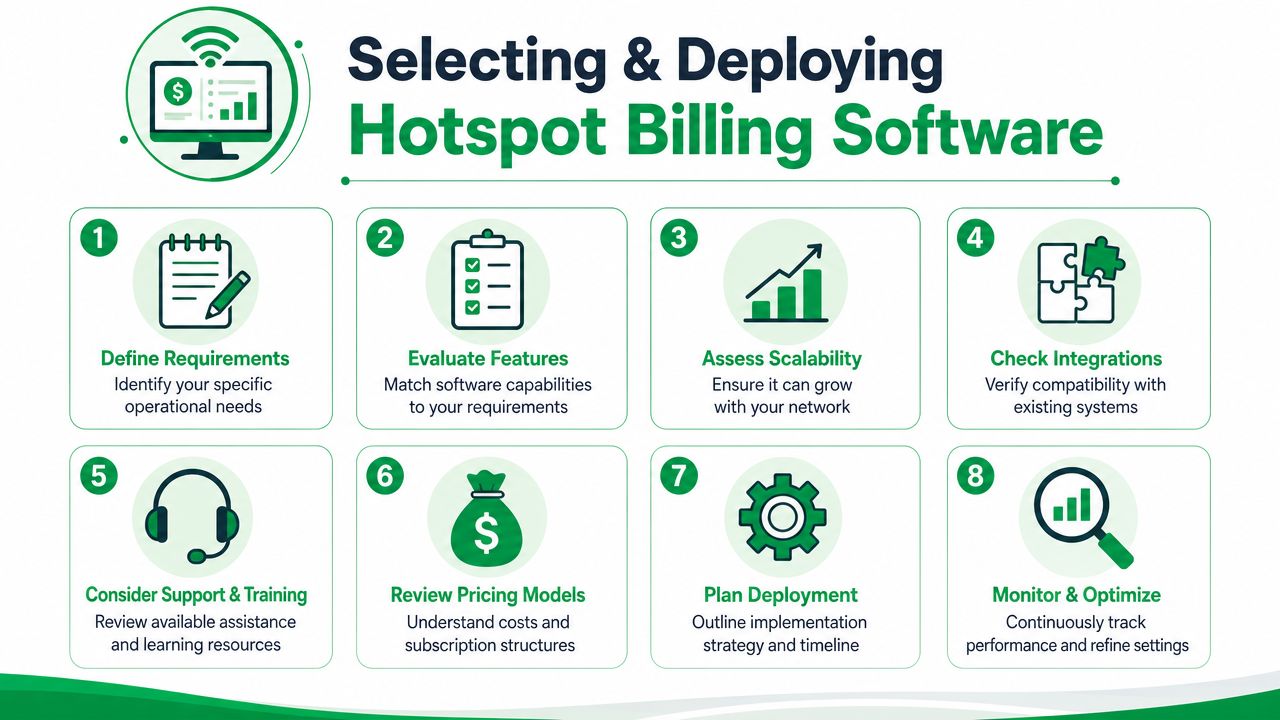
MikroTik fit: Confirm native support for RouterOS, hotspot workflows, profile enforcement, and the way you already provision sites. A platform that only works cleanly in a lab will become expensive in the field.
Mobile money workflow: In Kenya and similar markets, card support is secondary for many operators. The real test is whether mobile money payments post cleanly, quickly, and with a clear customer reference.
Product mapping: Your plans may include timed access, recurring subscriptions, capped packages, vouchers, or location-specific offers. If package logic is awkward, staff will start creating exceptions by hand.
Support visibility: Frontline staff need one screen that shows account status, payment history, session details, and current plan. If they have to jump between systems, ticket handling slows down.
Multi-site control: Central visibility matters early. Once each location develops its own workaround, standardisation becomes harder.
Failure handling: Ask what happens when payment confirmation is delayed, a router drops off, or a customer buys a package twice. Good systems reduce edge-case cleanup.
A short demo is not enough. Use your own tariff structure, your own payment flow, and one real MikroTik during evaluation.
How to deploy without creating chaos
Roll out in stages. That keeps mistakes small and gives the support team time to learn the billing record, not just the captive portal.
A practical deployment sequence looks like this:
Audit the current operation and write down every manual step, including voucher creation, payment confirmation, plan activation, and refund handling.
Clean the product catalogue before migration. Remove duplicate plans, unclear expiry rules, and special-case pricing that only one staff member understands.
Pilot one site with one payment method and a limited package set.
Test operations, not just login. Check late payment confirmation, duplicate payments, interrupted sessions, expired packages, and customer complaints.
Train support staff first because they will absorb the confusion if the rollout is rushed.
Expand site by site only after reports, package enforcement, and reconciliation are stable.
Deployment timelines vary with router condition, payment integration quality, and how messy the existing setup is. Centralised hotspot billing platforms can be deployed quickly in a controlled environment, but field conditions usually determine the actual schedule. A rushed cutover saves a few days and can create months of support debt.
One metric matters more than teams expect. Measure how many manual actions disappear after launch. If staff still need to confirm payments by hand or activate users one by one, the platform is not fixing the core problem.
If a vendor offers a trial, treat it as a live pilot. Run real transactions, connect an active MikroTik site, let support staff handle real customer cases, and review whether the system reduces admin work. That is how operators find the difference between software that looks polished and software that survives daily use.
If you are replacing a manual hotspot process or planning a MikroTik-based rollout with mobile money collection, Centipid Technologies Ltd. offers a billing platform for PPPoE and hotspot operations with central policy control, billing automation, captive portal workflows, and a 14-day trial that can be used for a live pilot before full deployment.