At its core, ISP billing software is the operational brain that connects your network equipment, your subscribers, and your finances into a single, cohesive system. It’s what allows an internet service provider to move beyond chaotic manual methods and into reliable, scalable operations.
What Exactly Is ISP Billing Software?
Imagine trying to run a bustling bus station with just a notepad and a mobile phone. You’re juggling passenger details, tracking who paid for which route, and manually telling drivers who to let on board. It would be a complete mess, missed payments, incorrect services, and frustrated customers. For many growing ISPs, this is exactly what their daily operations feel like.
This is where ISP billing software steps in, acting as the central control room for your entire business. It's far more than a simple invoicing tool; it’s the operational hub that directs the flow between your network, your customers, and your money.
The diagram below shows how these three critical areas are woven together by the software.
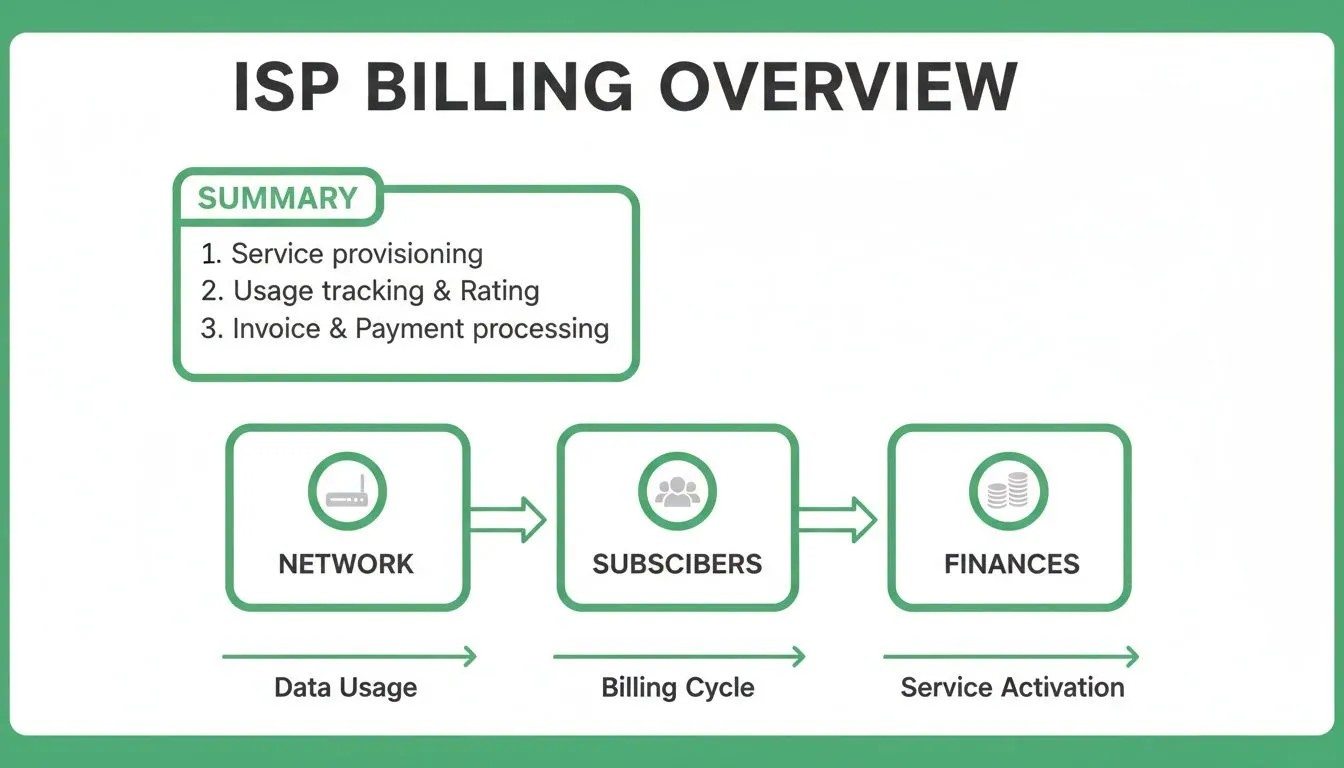
As you can see, the platform sits at the centre. An action in one area, like a customer paying their bill, instantly triggers a reaction in another, such as automatically restoring their internet connection.
The Big Leap: From Manual Chaos to Automated Control
For anyone who has managed an ISP manually, the jump to an integrated system is night and day. Spreadsheets, M-PESA statements, and manual router logins are replaced by a unified dashboard that does the heavy lifting for you.
The table below contrasts the painful reality of manual processes with the efficiency gained from a proper billing platform like Centipid.
| Operational Area | Manual Process (Without Software) | Automated Process (With Centipid Billing) |
|---|---|---|
| New Customer Setup | Manually configure router, record details in a spreadsheet, send invoice. | Customer self-registers online; system auto-provisions service on payment. |
| Billing & Invoicing | Manually generate and send invoices one by one or in clunky batches. | Invoices are generated and sent automatically on a set schedule. |
| Payment Collection | Cross-reference M-PESA texts with customer names and outstanding bills. | Payments are automatically reconciled; service is activated instantly. |
| Service Disconnection | Log in to the router to manually disable access for non-paying customers. | The system automatically suspends service after a grace period. |
| Reporting | Spend hours compiling data from different sources to see revenue or growth. | Get real-time financial and subscriber reports with a single click. |
This isn’t just about saving time; it's about building a professional, reliable service that can grow without collapsing under its own administrative weight.
Connecting Your Network and Your Customers
At its heart, ISP billing software is designed to talk directly to your network equipment. For the many providers in Kenya using MikroTik routers, this communication is the most critical function. It ends the tedious and error-prone process of logging into routers to manage individual users.
A purpose-built platform like Centipid Billing translates your business rules into network commands. When a new customer signs up and pays through your portal, the system instantly tells the correct router to create that user’s account, applying the speed limits and rules for their chosen plan. You can find detailed guides on how this works at docs.centipidbilling.com. Human error is eliminated, and service delivery becomes immediate.
This direct network automation is the key difference between simply sending bills and truly managing an ISP. It transforms your network from a static asset into a dynamic system that responds to your business needs in real time.
Automating the Entire Subscriber Journey
From the moment a potential customer finds your website to the day they might upgrade their plan, the billing system manages their entire journey without constant human intervention.
This hands-off lifecycle, fully supported by systems like those detailed on centipidbilling.com, covers several key stages:
- Onboarding: New subscribers can browse plans and sign up themselves through a self-service portal, any time of day.
- Billing: The system generates and dispatches invoices automatically on a recurring schedule (e.g., monthly).
- Service Enforcement: Internet access is granted the moment payment is confirmed and suspended automatically if a bill is not paid on time.
- Plan Changes: Customers can upgrade or downgrade their plans on their own, and the software handles the prorated charges perfectly.
This level of automation is what enables you to scale. Instead of hiring more administrative staff for every 100 new customers, you can let the software handle the repetitive work. This frees up your team to focus on bigger goals, like expanding the network, improving customer support, and growing the business.
Key Capabilities of Modern ISP Billing Software

When we talk about proper ISP billing software, we’re not just talking about a tool that sends out invoices. We're talking about the central nervous system of your entire operation. A good system is built on a few core capabilities that all work in harmony to automate your business, freeing you up to focus on growth instead of getting bogged down in manual tasks.
Think of it this way: each feature is a specialist on your team. One handles customer onboarding, another manages the money, and a third makes sure everyone pays on time. Together, they turn a chaotic, paper-driven process into a smooth, efficient machine.
Subscriber Management and Service Provisioning
Everything starts with your customers. At its core, subscriber management is your complete digital record for every person on your network. It’s a single, organised place that holds all their contact details, service plans, payment history, and current account status.
But it goes much deeper than just being a fancy address book. This is where you actually connect a customer to your service. You can create different packages, like a "Home Basic 10 Mbps" plan, and assign them to subscribers with a couple of clicks, whether they connect via PPPoE or a Hotspot.
The real magic here is automation. When a new customer signs up, the system should do more than just create a profile. It should automatically provision their service on the network. For instance, a platform like Centipid can create the user's credentials directly on your MikroTik router the moment their account is activated, as detailed at docs.centipidbilling.com.
This is what allows you to scale. Instead of your technicians manually setting up every new user, the software handles it instantly, creating a much better experience for both your team and your customers.
Automated Billing and Smart Invoicing
Let's be honest, chasing payments and manually creating invoices is a nightmare. It's slow, prone to costly human errors, and a drain on your time. An ISP billing software's primary job is to take this entire burden off your shoulders.
This isn’t just about sending one-off bills. It’s a full-cycle system that includes:
- Recurring Invoicing: The software automatically generates and sends out professional invoices to all your subscribers on a set schedule, like the first of every month. No more forgetting a customer or sending a bill late.
- Prorated Charges: What if someone signs up on the 15th of the month? The system automatically calculates the partial charge for the remaining billing period. This ensures billing is fair from day one and looks far more professional.
- Smart Dunning: This is your automated accounts receivable department. The system can be set up to send a series of friendly SMS or email reminders when an invoice becomes overdue.
This automated follow-up process, often called dunning, is incredibly effective at reducing late payments. And as documented on docs.centipidbilling.com, if a customer still doesn't pay after multiple reminders, the system can automatically suspend their internet service until the bill is settled, all without you having to lift a finger.
Integrated Payment Processing
Sending an invoice is only half the battle; you need to make it incredibly easy for customers to pay you. Top-tier ISP billing software integrates directly with payment gateways, allowing your customers to pay their bills instantly online.
For any ISP operating in Kenya, this means one thing above all else: seamless mobile money integration. While offering card payments is fine, the vast majority of your customers will expect to pay with M-PESA.
This is where a locally-focused platform makes all the difference. Centipid Billing, for example, is built with the Kenyan market in mind, offering direct integration with the most popular payment gateways. You can learn more about how this works in our guide to the Lipa na M-PESA portal.
Once a customer pays, the system automatically marks the invoice as paid, clears their balance, and, if their service was suspended, instantly reactivates their internet connection. This real-time reconciliation, a core feature of platforms like those on centipidbilling.com, closes the loop, connecting billing, payment, and service delivery into one seamless, automated workflow.
Automating Your Network with MikroTik Integration
For a growing ISP, running your billing and network systems separately is a recipe for wasted time and effort. Imagine having to manually update a spreadsheet, then log into a router to make the same change every time a customer pays a bill or changes their plan. It's a huge bottleneck. This is where direct integration with your network hardware, especially for those running on MikroTik, becomes so critical.
Good ISP billing software doesn't just handle invoices; it speaks the same language as your routers. It translates your business rules, like payment statuses and plan speeds, into automated network commands. This completely removes the need for a technician to handle these repetitive, day-to-day tasks, boosting speed and accuracy across your entire operation.
Think of an integrated platform like Centipid Billing as the central command centre for your whole network. Instead of juggling multiple logins for each piece of hardware, you can manage everything from one dashboard. This is what truly enables you to automate your processes and grow efficiently.
Mastering PPPoE User Management
If you deliver internet to your customers using PPPoE (Point-to-Point Protocol over Ethernet), you know the daily grind of adding, suspending, and removing users. It's a constant, manual cycle. With an integrated billing system, that entire workload simply disappears.
The billing platform securely connects to your MikroTik router's API, allowing it to manage user accounts in real-time based on their payment status.
- Automatic Creation: When a new customer signs up and pays, the software instantly creates their PPPoE credentials on the router. They get online immediately, with no manual setup needed.
- Automated Suspension: If a customer’s bill is overdue, the system automatically disables their account once your grace period ends. No more chasing payments or manually disconnecting users late at night.
- Instant Reactivation: The moment that overdue payment comes through, the system re-enables their account. Service is restored in seconds, often before the customer even thinks to call support.
- Plan Changes: When a customer upgrades to a faster package, the software updates their bandwidth profile on the router to match their new speed automatically.
This kind of automation, a core capability of systems detailed at docs.centipidbilling.com, means your service rules are enforced consistently, 24/7. You stop losing revenue from unpaid accounts and your technical team is free to focus on growing the network, not on tedious user admin.
Centralising Hotspot and Voucher Control
Managing public Wi-Fi hotspots has its own set of headaches, from controlling who gets access to figuring out how to make money from it. A proper ISP billing platform simplifies this entire process.
You no longer have to configure user profiles and login pages on every single router. Instead, you do it all from your billing software.
By connecting directly to your MikroTik hotspots, the platform gives you total control over who uses your network, for how long, and at what speed. It essentially links your payment system to your network access, turning a public Wi-Fi area into a profitable business.
As you can see in the documentation for systems like Centipid Billing, every part of your hotspot service can be managed from a single screen.
This dashboard shows just how easy it is to set up different access plans, see who is online, and check usage across your entire hotspot network. The real magic is that the software handles all the complicated router settings in the background, all based on the simple business rules you define.
From this one spot, you can easily:
- Generate Prepaid Vouchers: Create batches of access codes for different time limits or data caps (e.g., 1-hour, 1-day, or 5GB passes).
- Design Captive Portals: Customise the login page users see when they connect, complete with your own branding.
- Set Tiered Plans: Offer a mix of packages, like a free basic option to draw people in and paid premium tiers for those who need more speed.
This integrated approach, as detailed in resources like the documentation at docs.centipidbilling.com, is fundamental to running a professional and scalable hotspot service. It cuts down on human error, creates a reliable experience for your users, and makes monetisation straightforward.
Business Benefits of an ISP Billing Platform
While the technical capabilities of an ISP billing software are certainly impressive, what really matters are the concrete results it brings to your business. When you bring in a dedicated platform, the positive effects quickly spread through your entire organisation, changing how you work, how you make money, and how your customers see you.
Getting away from spreadsheets and manual processes is more than just a convenience. It’s a strategic decision that helps you build a stronger, more profitable ISP. By handing over the most repetitive tasks to automation, you free up your most important asset, your team's time, to focus on what really counts: growing the network and delighting your customers.
Skyrocket Your Operational Efficiency
The first and most immediate change you'll notice is a massive jump in operational efficiency. A proper billing system systematically removes the administrative headaches that plague growing ISPs. Tasks that used to take hours of manual work can now be done in minutes, or even automatically in the background.
Just think about all the time you currently spend generating invoices, manually confirming M-PESA payments, and logging into routers one by one to suspend overdue accounts. A platform like Centipid handles that entire workflow without you lifting a finger, a process you can explore at centipidbilling.com.
This automation brings clear advantages:
- Faster Subscriber Provisioning: New customers can get online in minutes, not hours. The moment their payment is confirmed, the system creates their account and grants them network access automatically.
- Reduced Manual Errors: Automation stops costly mistakes like sending an invoice with the wrong amount or forgetting to bill someone altogether. This protects your revenue and your reputation.
- Lower Administrative Overhead: Your team is no longer buried in paperwork. This frees them up to handle network upgrades, provide better customer support, or plan your next expansion.
Unlock Direct Financial Growth
An ISP billing platform isn't just another expense; it’s a tool for generating revenue. By professionalising your financial workflows and giving you tools to expand, the software directly boosts your bottom line. It helps you collect what you're owed more reliably and makes it easier to earn more from each subscriber.
This happens in a few key ways. Automated invoicing and collections create a predictable cash flow, while smart payment reminders actively chase down late payments that might have otherwise become bad debt.
The financial impact is undeniable. ISPs that automate their billing often see a significant reduction in revenue leakage from unpaid bills. That’s cash flowing directly back into your business, ready to be reinvested in new equipment and growth.
On top of that, the right software makes your business far more agile. With a system like Centipid, you can create, test, and launch new service plans in just a few clicks. The ability to quickly respond to what the market wants, a key feature described on centipidbilling.com, is a powerful way to attract new subscribers and increase your average revenue per user.
Deliver an Enhanced Customer Experience
In today's competitive market, the experience you provide can be your biggest advantage. A modern ISP billing platform gives you the tools to offer a professional and seamless experience that builds customer loyalty and keeps them from switching to a competitor.
The star of the show here is the customer self-service portal. Platforms like centipidbilling.com give your subscribers a branded online portal where they can manage their own accounts 24/7. This simple feature makes a world of difference to customer satisfaction.
From this portal, your customers can:
- View and download their current and past invoices.
- Make secure payments instantly with their preferred method.
- Update their contact details.
- Upgrade or downgrade their service plan without calling you.
Giving customers this control not only makes them happier but also dramatically reduces your support workload. Instead of your phone ringing off the hook with questions about lost invoices or payment confirmations, your team can focus on solving genuine technical problems, which in turn improves your overall service quality.
How to Choose the Right ISP Billing Software

Choosing your ISP billing software is one of the most foundational decisions you'll make for your business. It's not just a piece of software; it's the operational engine that will drive your company's financial health, customer experience, and future growth. Think of it as choosing a long-term business partner.
Get this choice right, and you set yourself up for smooth operations and happy customers. Get it wrong, and you're signing up for endless headaches, lost revenue, and a support queue that never shrinks. To avoid that nightmare scenario, you need to be methodical and evaluate potential vendors against the real-world demands of running an ISP.
Key Factors to Evaluate
Before you even look at a demo, it’s vital to have a clear set of non-negotiable requirements. These are the core pillars that will determine if a platform is a genuine fit or just a fancy-looking distraction.
A great starting point is to ask a few direct questions about any software you're considering:
- Network Hardware Compatibility: Does it play nice with the network equipment you already own and trust?
- Scalability for Growth: Will it support your first 100 subscribers as reliably as it will support your 10,000th?
- Local Payment Gateway Support: Can your Kenyan customers easily pay you using their preferred methods, like mobile money?
- Subscriber Self-Service Portal: Does it empower your customers to manage their own accounts, saving them time and you money?
- Transparent Pricing Model: Is the cost structure straightforward and predictable, without nasty surprises or hidden fees?
Answering these questions will quickly help you separate the serious contenders from the systems that simply won't work for you. To dig deeper, we've created a more detailed checklist.
Here is a practical checklist to guide your conversations with potential vendors. Use it to compare platforms and ensure you’re covering all the critical bases.
ISP Billing Software Evaluation Checklist
| Evaluation Criterion | Why It Matters | Example Question to Ask Vendor |
|---|---|---|
| MikroTik Integration | Your billing software and router must communicate seamlessly to automate subscriber management. Without this, you’re stuck with manual work. | "Can you demonstrate real-time, automated PPPoE user creation and bandwidth shaping on a MikroTik RouterOS v7 device?" |
| Scalability | The system must handle growth in subscribers, invoices, and network traffic without performance degradation. | "What is the largest number of active subscribers currently running on your platform, and what is the underlying architecture that supports this scale?" |
| Payment Gateways | In Kenya, supporting local mobile money isn't a feature; it’s a necessity for healthy cash flow. | "Which specific Kenyan payment gateways do you integrate with, and is the reconciliation process fully automated?" |
| Subscriber Self-Service | A customer portal reduces your support load, improves satisfaction, and gives subscribers control over their accounts. | "Can we see a demo of the customer portal? Can users check their usage, pay invoices, and change their service plans without contacting support?" |
| Reporting & Analytics | Good data helps you make smart business decisions, from identifying profitable areas to understanding customer churn. | "What kind of reports can I generate? Can I easily track monthly recurring revenue (MRR), payment trends, and subscriber growth?" |
| Technical Support | When things go wrong (and they will), you need responsive, knowledgeable support from people who understand the ISP business. | "What are your support hours and channels? What is your guaranteed response time for a critical issue affecting our entire network?" |
| Pricing Model | Hidden fees and complex pricing can destroy your budget. You need clarity and predictability. | "Can you provide a complete breakdown of all costs, including setup fees, monthly charges, per-subscriber fees, and any extra costs for payment gateways or support?" |
This checklist isn't just for the vendor, it’s for you. It helps you define what truly matters for your business's success before you commit to a platform.
Don't Settle on Compatibility and Scalability
Let's be blunt: network and hardware compatibility is the most important technical factor. Your billing software must integrate flawlessly with your network gear. For most ISPs in our region, that means deep, proven integration with MikroTik RouterOS, especially modern versions like v7.
Be wary of vendors who simply say they have "MikroTik integration." That phrase can mean anything. You need to verify specifics like automatic PPPoE user management, dynamic bandwidth control, and hotspot voucher generation. As outlined at docs.centipidbilling.com, a proper integration automates these critical tasks so you don't have to.
Next, think about growth. A system that feels fast with 100 users might grind to a halt when you hit 1,000 or 10,000. Ask vendors directly about their architecture and how it's designed to scale.
And of course, a billing system is only as good as its ability to collect money. For any ISP in Kenya, that means putting mobile money front and centre. Ensure any platform you consider has automatic, reliable integration with the major local payment gateways. This is fundamental to keeping your cash flow positive.
The Practical Test: A Hands-On Trial
Reading brochures and watching slick demos is fine, but it will never tell you the whole story. You wouldn’t buy a car without taking it for a test drive, and you shouldn’t buy your core business software without trying it in a real-world setting.
The single best way to know if an ISP billing software is right for your business is to put it to the test on your own network.
This is why finding a vendor that offers a free trial is so important. For example, you can explore the entire Centipid Billing with a 14-day free trial and see for yourself how it performs with your own hardware and customers.
A trial period allows you to run a true stress test:
- Connect the software to one of your live MikroTik routers.
- Create a few real service plans and test accounts.
- Run a test payment through a mobile money gateway.
- Watch to see if the system correctly grants, suspends, and restores internet access automatically.
This hands-on approach takes you beyond marketing promises. It gives you undeniable proof of whether a platform can handle the day-to-day reality of your operations, giving you the confidence to make the right choice.
Frequently Asked Questions About ISP Billing
Thinking about moving to a proper billing system is a big step. It’s completely normal to have a few questions. After all, switching from your current setup, whether it’s spreadsheets or just pen and paper, is a major decision for your ISP.
We get it. We’ve talked to countless providers who were in the exact same spot. Below, we’ve gathered some of the most common questions we hear, with answers that get straight to the point and show you how a system like Centipid solves these real-world headaches.
Can This Software Handle Different Service Plans?
Absolutely. In fact, this is one of the biggest reasons to make the switch. A good ISP billing platform isn't rigid; it’s built to be flexible. You’re not just buying a piece of software, you’re getting the tools to create and sell your services exactly how you want to.
As you can explore on centipidbilling.com, you can easily set up and manage all sorts of plans, including:
- Fixed Monthly Subscriptions: Your standard offering, where a customer pays a set price each month for a specific internet speed.
- Pay-As-You-Go Models: Perfect for hotspot customers or users who only need occasional access without a monthly commitment.
- Tiered Data Caps: Plans with a monthly data limit (like 50 GB), with options for customers to buy top-ups or accept slower speeds if they go over.
This kind of flexibility means you can finally test out new pricing ideas without creating an administrative nightmare for yourself. Want to see if a cheaper, lower-speed plan will attract more customers? You can set it up in minutes and find out.
How Does the Software Handle Failed Payments and Suspensions?
This is where you’ll see one of the biggest returns on your investment. Manually chasing late payments, sending reminders, and then physically disconnecting users who don't pay is exhausting. It eats up hours you could be spending on growing your network.
ISP billing software completely automates this, using a process often called "smart dunning."
Think of it as your own automated accounts receivable agent working 24/7. Instead of you trying to remember who owes what, the system follows the rules you set and handles everything for you.
Here’s a typical play-by-play, which you can see documented at docs.centipidbilling.com:
- Automated Retries: The system can automatically try to charge a failed payment again at specific intervals you choose.
- Reminder Notifications: If a bill is still overdue, the software sends a series of polite but firm reminders via email or SMS.
- Automatic Suspension: Once the grace period you’ve defined runs out, the platform automatically communicates with your MikroTik router to suspend the user's service.
- Instant Restoration: The moment the customer pays their outstanding bill online, their service is automatically and instantly switched back on.
This entire process runs on its own, without you lifting a finger. It drastically cuts down on administrative work and, more importantly, stops revenue from slipping through the cracks due to unpaid bills.
Is It Difficult to Migrate from Spreadsheets?
The thought of moving all your customer data from spreadsheets into a new system can definitely feel a bit daunting. We won't pretend there's zero work involved, but a good software provider will never leave you to figure it out alone.
Most vendors, ourselves included, guide you through the entire onboarding process. We’re here to help with the heavy lifting, which usually involves:
- Importing Customer Data: We’ll help you get your existing subscriber list formatted correctly and uploaded, along with their plans and contact info.
- Configuring Network Integration: We’ll walk you through connecting the software to your MikroTik routers.
- Setting Up Payment Gateways: We’ll make sure your mobile money and bank payment options are properly connected and working.
Yes, there's a small, one-time effort to get everything moved over. But this is quickly paid back by the massive, long-term savings in time and money. The reduction in billing mistakes alone is often worth it. If you’re worried, just ask a potential vendor what the migration process looks like. Feel free to get in touch with our team through our contact page to talk about your specific situation.
What Kind of Support Can I Expect?
When you’re choosing billing software, the support you get is just as critical as the features. Your billing system is the financial heart of your business. If something goes wrong, you need quick answers from people who actually understand the ISP world.
Look for a partner that offers clear support channels and knows what they’re talking about. At Centipid, for example, free technical support is part of the package. This means you have a team you can call on to help with anything from a tricky MikroTik issue to a payment gateway problem. This isn't just a one-time transaction; it's an ongoing partnership to make sure your business runs smoothly.
Ready to stop juggling spreadsheets and start automating your ISP? Centipid Technologies Ltd. provides a powerful, affordable ISP billing software designed specifically for providers using MikroTik. Automate invoicing, manage subscribers, and get paid faster.