MikroTik Billing System: Automate Your ISP in 2026
Automate ISP operations with a MikroTik billing system. Integrate PPPoE/hotspot, explore core features, and choose the best solution for 2026.

You probably know the pattern already. A customer pays late at night. Your phone rings or a WhatsApp message comes in. Someone on your team checks an SMS, opens a spreadsheet, logs into a MikroTik router, re-enables an account, and hopes the right speed profile gets applied. The next morning, another customer says they paid but service is still off. Then you spend part of the day matching payment references by hand.
That setup works when you have only a few subscribers. It breaks once your network becomes a real business.
A modern MikroTik billing system fixes that by tying billing, payments, subscriber records, and RouterOS policy control into one workflow. For a small ISP, WISP, hotel hotspot, or community network, that's the difference between running the network and being dragged around by it.
From Manual Chaos to Automated Control
Most new ISP owners start with tools that weren't built for ISP work. They keep customer names in Excel, due dates in their head, invoices in PDF folders, and service status in the router. Nothing is in one place. The finance side and the network side only meet when someone manually updates both.

That creates the same set of problems over and over:
Missed renewals: A customer stays online because nobody disabled the account on time.
Delayed reconnections: Someone pays, but service stays off until a staff member notices.
Messy records: Support can't tell whether the problem is payment, profile assignment, or a network fault.
Slow growth: Every new subscriber adds more admin work, not just more revenue.
In practice, the billing system becomes the missing operational layer. It isn't just software for invoices. It becomes the control plane for the subscriber lifecycle, from signup to payment to activation to suspension.
Kenya shows why this matters. As of 2023, the country had 67.9 million active mobile subscriptions and 53.0 million data subscriptions, according to the Communications Authority of Kenya, as referenced in a MikroTik meeting presentation. That scale of connected users makes recurring billing and service control an operational requirement, not an optional extra.
What changes when you automate
Once billing is connected to your network rules, routine work starts to disappear.
Practical rule: If staff must check payments manually before they can restore internet, your billing process is still incomplete.
A usable MikroTik billing system should let you:
Create plans once: Speed, validity, pricing, and access rules live in one place.
Bill automatically: The system generates recurring invoices without staff rebuilding them every month.
Apply service rules instantly: Payment state affects access state.
Track account history: Support can see what happened without asking three people.
Manual processes feel cheap at the beginning. They become expensive when they consume owner time, delay collections, and create avoidable support calls.
Understanding the Core of ISP Automation
Think of your MikroTik router as the gatekeeper. It controls access to the network. It decides whether a subscriber session starts, what profile gets applied, and whether the session should continue.
Your billing system is the command centre. It tells the gatekeeper who is allowed in and under what terms.
The three functions that matter
In network terms, this usually comes down to AAA:
Authentication
The system confirms who the user is. That may be a PPPoE username and password, a hotspot voucher, or a managed subscriber account.Authorisation
The system tells RouterOS what the user should get. That includes speed profile, validity period, session permissions, and any service restrictions.Accounting
The system records usage, payment status, invoice state, and service history so operations and support can act on real data.
If you're running without that link, your router knows about sessions but not finances. Your accounting tool knows about invoices but not access control. Staff become the connector between both systems, which is exactly where errors appear.
Why integrated platforms changed the game
East African operators didn't move toward integrated billing platforms just because it looked modern. They moved because manual customer tracking stopped being workable. A verified industry summary notes that a key milestone for MikroTik billing in the region was the shift from manual tracking to integrated platforms that automate billing, dunning, and plan enforcement across large numbers of subscriber relationships, as discussed in this industry video reference.
That shift matters for a small provider too. Once you automate subscriber operations, your business stops depending on memory, side notes, and late-night manual updates.
A lot of SME owners recognise this pattern outside telecom as well. If you want a broader view of transforming SME operations with automation, that comparison helps explain why repetitive operational work should move into systems, not stay in people's heads.
The best billing setups remove judgment calls from routine work. Paid account, active service. Expired account, restricted service. No debate, no delay.
What outdated setups still get wrong
Legacy on-premise billing tools often have one of two weaknesses. Either they manage invoices but barely touch the network, or they talk to the router but leave payment handling messy.
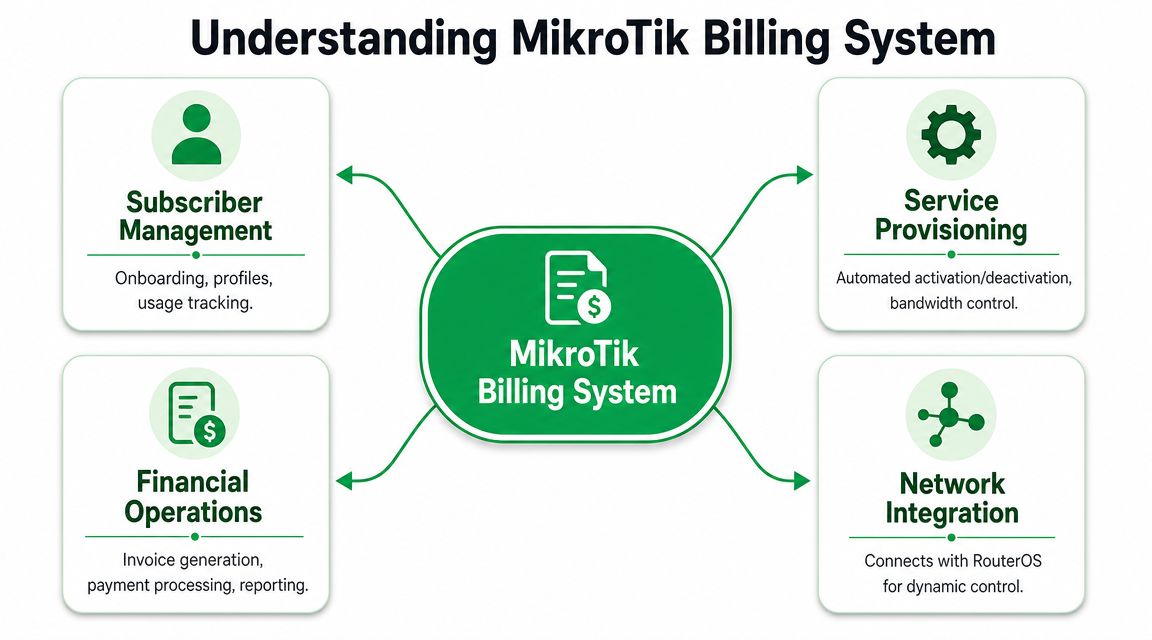
A modern system should connect all four operational areas:
Area | What it should control | Failure if missing |
|---|---|---|
Subscriber management | Profiles, plan assignment, account status | Support lacks a clean customer record |
Provisioning | Activation, suspension, profile changes | Staff still edit routers manually |
Financial operations | Invoices, payments, overdue actions | Collections stay slow and inconsistent |
Network integration | RouterOS enforcement and session control | Billing and service drift out of sync |
If one of those pieces is weak, the whole automation chain breaks.
Connecting Billing with RouterOS for Seamless Access
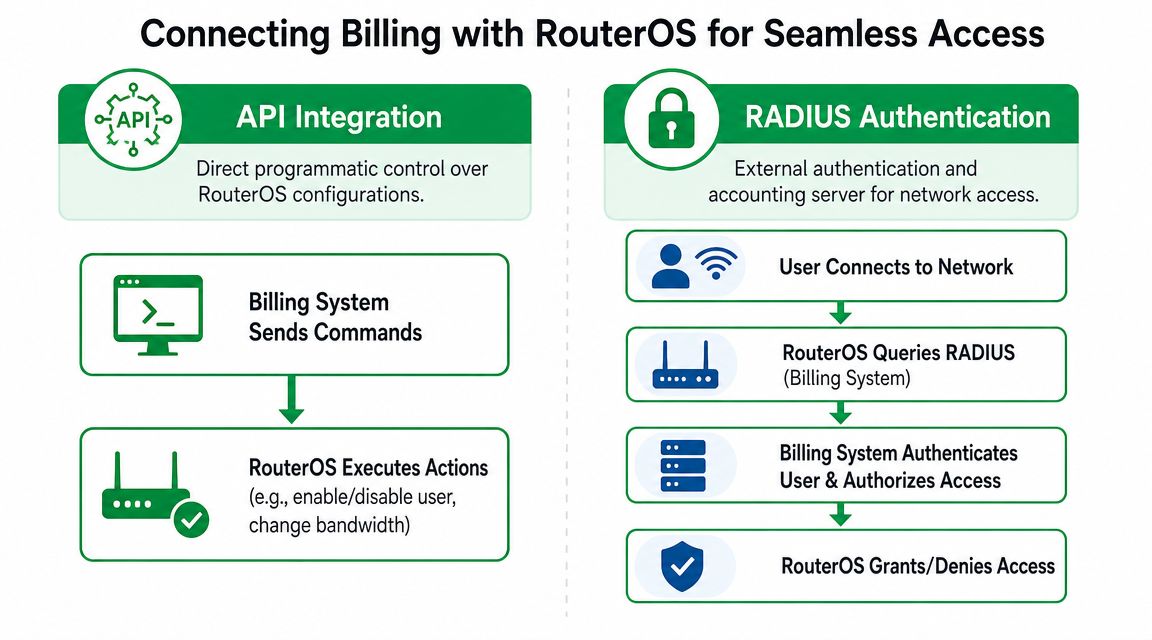
The integration only matters if it works in day-to-day operations. For most MikroTik deployments, the practical paths are PPPoE with RADIUS or Hotspot with captive portal control. Both can work well. The right one depends on your service model.
Kenya is a useful example because fixed internet subscriptions there are dominated by wireless access technologies commonly deployed by WISPs using MikroTik for PPPoE or hotspot control. In that environment, integrating billing and AAA with RouterOS matters because failed renewal can block access and successful mobile money payment can restore it immediately, as described by Tikman Billing's overview of Kenyan ISP operations.
PPPoE with RADIUS
For residential and business subscriptions, PPPoE is usually the cleaner model.
The workflow is simple:
A subscriber device tries to establish a PPPoE session.
MikroTik checks credentials against a RADIUS-backed billing platform.
The billing platform confirms whether the account is active.
If the account is valid, RouterOS applies the correct profile.
If the plan has expired or payment failed, access is denied or restricted.
This is why PPPoE scales well for recurring subscriptions. The router doesn't need a human to decide what to do. The billing platform already holds the account state.
A good implementation should also support profile changes without someone logging into every router. If you upgrade a customer from a basic plan to a faster one, the change should flow through policy and authentication, not through manual edits.
For operators comparing implementation patterns, this guide to a MikroTik RADIUS server setup for ISP automation is useful because it focuses on the relationship between authentication and subscriber control rather than treating RADIUS as an isolated network task.
Hotspot and captive portal workflows
Hotspot billing is different. It fits guest Wi-Fi, estates, campuses, cafes, hotels, and prepaid access environments.
The event chain usually looks like this:
User joins the Wi-Fi network
Captive portal appears
User enters voucher or account credentials
Billing platform validates entitlement
RouterOS grants session with the right limits
Session ends when time, data, or validity is consumed
Hotspot environments need good front-end control. Voucher generation, expiry logic, anti-sharing policy, and session visibility matter more than complex recurring invoicing.
What works and what doesn't
What works:
Single source of truth: Subscriber status lives in the billing system.
Immediate enforcement: RouterOS follows billing state without delay.
Remote management: Staff can change plans and troubleshoot centrally.
Consistent profiles: The same rule gets applied every time.
What doesn't work:
Manual overrides as routine process: If staff constantly enable users by hand, your automation isn't trusted.
Separate payment and access systems: Payment confirmation should not wait for someone to read a statement.
Router-by-router administration: That approach collapses once you manage multiple sites.
When billing and RouterOS are properly linked, support stops answering “Have you reconnected me?” and starts handling real network issues.
Core Features Your Billing System Must Have
A MikroTik billing system should do more than turn access on and off. It should reduce admin effort across the full revenue cycle. That means subscriber records, plan logic, invoicing, payment handling, reminders, and reporting must all fit together.

Subscriber and service management
Your team needs one clean record for each customer. That record should show current service, account status, payment history, and support context.
On the service side, flexibility matters. You should be able to define:
Recurring plans for home and business users
Prepaid access for hotspot environments
Speed and validity rules without editing routers manually
Add-ons and changes without rebuilding customer records
The dashboard matters here. If support staff can't tell what plan a customer has, whether it expired, and what should happen next, the system is too fragmented.
If you're reviewing platform architecture, this article on an ISP subscriber management system is a useful reference point because it focuses on how account records and service state should stay aligned.
Billing and payment operations
Many setups continue to fall short. They can create invoices, but they don't close the loop between collection and access control.
Kenya highlights the issue clearly. The country processed over 6 billion mobile-money transactions in 2024, with total value above KSh 8 trillion, according to the verified market summary in this Kenya-focused billing analysis. For ISPs in that environment, the hard part is often payment reconciliation, not RouterOS integration.
That changes the feature checklist. A modern billing platform must handle:
Feature area | What to expect in practice | Operational outcome |
|---|---|---|
Invoice automation | Recurring invoice creation and status tracking | Less manual finance work |
Payment callbacks | Real-time confirmation from supported gateways | Faster restoration after payment |
Reconciliation | Correct matching of payment to customer account | Fewer disputes and fewer missed activations |
Dunning | Scheduled reminders before and after due dates | Better collections discipline |
Self-service | Customer can pay and view account status directly | Lower support load |
Notifications and support reduction
Most avoidable ISP support work sits around billing confusion. Customers ask whether payment was received, when the next due date is, or why service stopped.
Good notification flows reduce that pressure. The system should notify customers before expiry, after failed renewal, and once payment succeeds. If you're also looking at ways to reduce repetitive billing questions at the support layer, this piece on Automating billing inquiries with AI gives a useful view of how teams handle routine account queries before they reach staff.
Field note: If customers have to send screenshots after every payment, the payment workflow is the problem.
Cloud versus old on-premise habits
Cloud-based platforms demonstrate a practical edge. Older on-premise systems often force operators to maintain local servers, backups, updates, and availability themselves. That adds one more thing to break.
A cloud billing platform removes most of that maintenance burden. Staff can work from anywhere, multi-site operations can use the same dashboard, and the billing engine doesn't depend on a single office computer staying healthy.
Centipid is one example of this model. According to its documentation, the platform supports MikroTik RouterOS integration for PPPoE and hotspot workflows, recurring billing, payment automation, subscriber portals, and centralised operational management. Those are the right building blocks if your goal is to reduce manual service administration rather than just digitise invoicing.
A Checklist for Selecting Your Billing Partner
Choosing a billing system is really choosing how your business will operate every day. The wrong tool leaves you with digital paperwork but the same old manual work. The right one changes how payments, support, and RouterOS control fit together.
Start with the operating model
The first question isn't feature count. It's where you want operational responsibility to sit.
If you pick an on-premise system, your team owns the server environment, updates, uptime concerns, and recovery planning. Some operators prefer that control. Most small and midsize ISPs don't benefit from carrying that extra burden.
Cloud-based systems usually make more sense when you need central access, multi-site visibility, and less infrastructure to maintain internally. That doesn't remove the need for process discipline, but it does remove a lot of avoidable overhead.
Use this checklist before you commit
Evaluation Criteria | What to Look For | Why It Matters |
|---|---|---|
Deployment model | Cloud-based access or a clearly justified on-premise design | Affects uptime responsibility, remote access, and maintenance workload |
MikroTik integration depth | PPPoE, hotspot, AAA, profile control, suspension and reactivation support | Weak integration means staff still touch routers manually |
Payment support | Gateways your customers actually use, plus automated reconciliation | Payment acceptance without matching and enforcement still creates manual work |
Dunning and reminders | Automated pre-due and overdue communication | Supports collections without constant staff follow-up |
Multi-site management | Central dashboard for several routers or locations | Important for WISPs, hotspot chains, and expanding providers |
Self-service portal | Customer access to invoices, payments, account state, and renewals | Reduces support traffic and shortens payment cycles |
Reporting clarity | Revenue, overdue accounts, active services, and payment history | You need usable oversight, not raw logs |
Documentation and support | Clear setup guides and responsive technical help | Good software with poor onboarding still delays rollout |
Pricing model | Charges that scale sensibly with your service model | Prevents cost surprises as subscriber count grows |
The trade-offs new operators often miss
A low-cost product can still be expensive if it creates manual reconciliation work. A feature-heavy platform can still be the wrong fit if its MikroTik integration is shallow. And a system with strong billing logic can still fail you if customers can't pay with the methods they already use.
One more thing matters more than many buyers expect: documentation. If the setup guides are unclear, every router connection, payment workflow, and provisioning rule becomes harder than it should be. That's one reason many operators look for platforms with public technical guidance and a simpler rollout path, such as the considerations discussed in this guide on the best billing system for wireless ISPs.
Buy for the process you want six months from now, not the workaround you can tolerate this week.
How Different Providers Win with Automated Billing
The value of a MikroTik billing system becomes obvious when you look at different operating models. The same automation backbone solves different problems depending on the provider.
A multi-site WISP
A small WISP with several coverage areas usually starts by managing each site almost like a separate business. One router here, another there, a few local notes, and too much dependence on whoever knows that specific setup.
With automated billing, the operator can manage subscriber status, service changes, and payment-linked access from one cloud dashboard. The main gain isn't just convenience. It's consistency. Staff stop applying different rules at different sites, and management gets one view of overdue accounts and active services.
A hotel selling guest Wi-Fi
Hotels and guest properties often need a voucher-based hotspot model rather than monthly recurring subscriptions. Front desk staff need a simple way to issue access, and guests expect service to start immediately.
A billing platform tied to captive portal control makes that possible. The hotel can create voucher products, issue access codes, track validity, and avoid manual intervention after each sale. In those settings, billing isn't just internal admin. It's part of the guest service flow and a direct revenue tool.
A new FTTH or estate broadband provider
A startup fibre or estate ISP usually has a lean team. That means every manual task competes with network rollout, installs, and customer support.
PPPoE automation solves a lot of that pressure. New accounts can be provisioned with the right profile, renewals can enforce service state automatically, and support can work from subscriber records instead of scattered notes. If your model also includes scheduled bank collections or account-to-account recurring payments, this overview of direct debit advantages for your company gives a useful lens for thinking about predictable collections, even though local payment habits will differ by market.
The common result across all three cases is simple. The provider spends less time on repeated admin and more time on network quality, customer retention, and growth.
Taking the Next Step Towards ISP Growth
If you're still running your ISP with spreadsheets, manual payment checks, and router-by-router account changes, the bottleneck isn't your network gear. It's the operating model around it.
A proper MikroTik billing system gives you a cleaner way to run the business. It connects subscriber records to service rules, turns payment events into access decisions, and removes the routine admin that slows down collections and frustrates customers. That matters even more in markets where mobile money is part of normal customer behaviour and fast restoration after payment is expected.
The shift from legacy on-premise thinking to cloud-based operations also changes what your team has to carry. Instead of maintaining billing infrastructure yourself, you focus on plan design, customer support, collections workflow, and network delivery.
If you're evaluating your next step, keep it practical:
Review the product features on Centipid Billing's main site to see whether the service model matches your network.
Check the technical documentation so you understand how RouterOS integration, billing logic, and subscriber workflows are handled.
Test the payment flow first, especially if mobile money reconciliation is one of your biggest pain points.
Run a small pilot with real plans, real customers, and real suspension and reactivation logic.
For operators working through local payment workflows, this guide to ISP billing with M-Pesa mobile money integration is a sensible next read because it focuses on the part that often breaks first in live deployments.
A billing system isn't just a finance tool. It's operating infrastructure. Once you treat it that way, growth gets easier to manage.
If you want to move from manual billing to automated subscriber control, explore what Centipid Technologies Ltd. offers, review the documentation, and try the 14-day free trial to see how the workflow fits your ISP.