Paying your monthly bills, especially for essentials like your internet connection, shouldn't be a headache. With Equity Bank, you’ve got several solid options to get it done. You can use their mobile app, the simple *247# USSD code, their online banking portal, an ATM, or even pop into a local agent or branch. It’s all about finding what works best for you.
Making Bill Payments with Equity Bank Simple
We all know the routine of juggling monthly bills. The real goal is to find a payment method that's not just easy but also reliable, so you can be sure your services stay on without any hitches. Equity Bank gets this, offering a whole range of payment channels that cater to everyone, from those who live on their phones to people who prefer handling things in person.
This guide is here to break it all down. We'll walk through the practical steps for paying bills through Equity Bank, whether you're a customer sorting out your home Wi-Fi or an ISP managing payments from your subscribers.
Why Having Payment Choices Is a Big Deal
Offering different ways to pay is more than just a nice-to-have feature; it’s essential in today's world. Not everyone has a smartphone or reliable internet, so tried-and-true options like agent banking and branch visits are still incredibly important. At the same time, digital options give you the freedom to handle your finances instantly, wherever you are.
Equity Bank’s setup covers all the bases:
- Digital Convenience: The mobile app and online banking are perfect for making quick, on-the-go payments or even scheduling them in advance.
- Simple & Accessible: The USSD service is a brilliant feature. It means you can manage payments securely even without a smartphone or data.
- Face-to-Face Service: For those who prefer a more personal touch, ATMs, agents, and branches offer a supported and tangible way to pay.
For businesses, especially Internet Service Providers (ISPs), this flexibility is a game-changer. When you connect these payment channels to a smart billing system, you automate revenue collection and slash the time spent manually matching payments to customer accounts.
Getting the Payment Details Right Matters
No matter which payment method you choose, one detail is absolutely critical: the payment reference. This is usually your account number or a unique invoice ID. It's so easy to forget or mistype it, but that small mistake can cause major delays. Without the right reference, the company you're paying can't automatically link the money to your account.
This is especially true for businesses like ISPs that depend on automation to run smoothly. You can see how modern billing platforms make this seamless for businesses at https://docs.centipidbilling.com. Taking a second to double-check your details ensures your payment is credited right away, keeping your service active and saving everyone a lot of trouble.
Paying Your Bills Instantly with Equity Mobile and USSD
When a bill is due, you want to pay it quickly and know it’s done. Thankfully, paying bills straight from your phone is now the norm, and Equity Bank has made it incredibly straightforward. You've got two great options: the Equity Mobile App for those with smartphones, and the simple *247# USSD code that works on any phone. Both let you pay bill equity bank accounts in an instant.
For smartphone users, the Equity Mobile App is your best bet. It’s a clean, modern app that’s easy to navigate. Once you’re logged in, just tap your way to the bill payment section. You’ll see a list of billers, where you can find your Internet Service Provider (ISP).
From there, it’s just a matter of keying in the amount you're paying and, this is the most important part, the payment reference. Give it a final check, confirm the payment, and you'll get a notification almost immediately. It’s that simple.
No Smartphone? No Problem. Use the USSD Service.
But what if you don't have a smartphone, or you’re running low on data bundles? Equity’s *247# USSD service has you covered. It's a lifesaver because it works on any phone, no internet required.
Just dial *247# and follow the simple text menu:
- First, choose the option for bill payments.
- Next, find your biller, like your internet provider, from the list.
- The system will then ask for your account number and the amount to pay.
- Finally, you’ll enter your PIN to confirm everything.
It’s a reliable and fuss-free way to settle your bills, ensuring you can make payments from literally anywhere.
Why Your Payment Reference is So Important
Let’s put this into a real-world context. Imagine Amina needs to pay her internet bill before the deadline. She opens her Equity Mobile App, finds her ISP, and enters her unique account number,ACC102543, into the payment reference field. She hits confirm, and within seconds, her phone buzzes with an SMS from Equity confirming the payment.
What happens next is where the magic is. Her ISP’s billing system, perhaps an automated platform from a provider like Centipid Technologies, instantly sees the payment come through. Because she used the correct reference, "ACC102543," the system automatically matches the money to her account and marks her bill as paid. No delays, no risk of disconnection.
This smooth, automated process only works with the right reference. If she had typed "Internet Bill" or left it blank, someone at the ISP would have to manually track down her payment, leading to frustrating delays and maybe even a service interruption.
For those who prefer a bigger screen and more control over their finances, Equity Bank's online banking portal is the way to go. While the mobile app is great for quick payments, the desktop experience gives you a full command centre for managing everything from one-off bills to complex, scheduled payments.
Once you log in, you get a bird's-eye view of all your accounts. Making a payment is straightforward, just find the bill payment section to manage your payees and kick off a transaction.
Setting Up Billers to Save Time
One of the best features of the online portal is the ability to save your regular billers. Instead of digging up your ISP's details every single month, you can set them up once and forget about it. This doesn't just save you a few minutes; it drastically cuts down on the chances of sending money to the wrong place.
Adding a new biller, like your internet provider, is simple. You'll head over to the "Add Biller" or "Manage Beneficiaries" area, find your provider in the list, and plug in your account details (like your customer ID). Once saved, paying that bill becomes a two-click affair.
This is a lifesaver if you're juggling multiple monthly payments. You can build a whole library of your regular payees, from your power company to your Zuku or Safaricom Home Fibre bill. It's also worth thinking about how this fits with other payment methods. For a deeper dive on that, check out our guide on ISP billing with M-PESA and mobile money integration.
The real game-changer, though, is payment scheduling. You can set up your internet bill to be paid automatically a few days before it's due, which is a fantastic way to avoid late fees and the dreaded "your service has been suspended" message.
This "set it and forget it" approach is more than just convenient; it's a great tool for financial discipline. It takes the mental load of remembering due dates off your plate and ensures your bills are paid on time, every time.
To help you decide which payment method works best for you, here’s a quick comparison of the different channels available through Equity Bank.
Equity Bank Payment Channel Comparison
| Payment Channel | Best For | Speed | Reference Requirement |
|---|---|---|---|
| Mobile App/USSD | Quick, on-the-go single payments | Instant | Simple; often uses account or phone number |
| Online Banking | Scheduled payments, managing multiple billers | Instant for bill pay; up to 24 hrs for EFT | Requires saved biller or specific narrative for transfers |
| Bank Transfer (EFT/RTGS) | Large one-off payments, business transactions | EFT: a few hours to 1 business day. RTGS: near-instant. | Critical: Must have a unique ID in the narrative |
| ATM | Cash deposits or quick bill pay without a phone | Instant | Usually requires account or invoice number |
| Agent/Branch | Cash payments, assisted transactions | Instant | Requires clear instructions to the teller/agent |
Each channel has its strengths. For routine bills, the online portal's scheduling feature is hard to beat, but for large, non-standard payments, you'll likely need to use a direct bank transfer.
Why the Payment Narrative Is So Important
Sometimes, you need to pay a business or individual who isn't on Equity's pre-approved biller list. In these cases, you'll use a direct bank transfer like an Electronic Funds Transfer (EFT) or Real-Time Gross Settlement (RTGS). You'll need the recipient's full bank details: account number, name, and branch.
But here’s the most critical part: the payment narrative or "details" field. This single line of text is your only way to tell the recipient what the money is for.
Let's take a common scenario. A customer pays their ISP using a bank transfer and writes "Internet Bill" in the narrative. This is a nightmare for the ISP's finance team. They get dozens of payments a day, and a generic description makes it impossible to know whose account to credit. This leads to frustrated customers whose service might be cut off even though they've paid.
This is exactly why automated billing systems from providers like Centipid Technologies generate a unique reference for every customer or invoice.
Instead of a vague description, the narrative must contain that specific ID. For example, using "Payment for CUST-4821" allows the ISP's system to instantly match the payment to the right account. The transaction is reconciled automatically, no phone calls needed, and the customer's service continues without a hitch.
Paying In Person: ATM, Agent, or Branch
Sometimes, you just want to handle payments face-to-face. Even with all the digital options, there's a certain peace of mind that comes with getting a physical receipt or having someone guide you through the process. Equity Bank gets this, offering solid in-person ways to pay bill equity bank through their ATMs, widespread agent network, and traditional bank branches.
Let's start with the ATM. It's a great middle-ground, no queues, but you still get a printed slip. After you insert your card and key in your PIN, simply find the "Bill Payments" option on the menu.
You'll then pick your Internet Service Provider (ISP) from the list of billers. Now for the most important part: entering your payment reference. This is usually your account number. Take a moment here. A single wrong digit can cause a massive headache, so it’s worth double-checking before you hit confirm. The machine will print a receipt for your records.
Getting Help from an Equity Bank Agent
Equity Agents are everywhere, bringing banking services right into your neighbourhood. This is probably the easiest in-person method, as the agent does all the heavy lifting. It's perfect if you're not completely sure about the process.
Just walk up to an agent with this info handy:
- The name of your ISP
- Your unique internet account number
- The exact bill amount
- Your phone number, so you can get a confirmation SMS
The agent will key everything into their terminal and complete the payment. You’ll get an immediate M-PESA confirmation message or a printed receipt. Hold onto this proof of payment until you see the payment reflected on your ISP account. It’s your safety net if something goes astray.
For the ISP on the other end, all these different payment methods could be a nightmare to track. This is where a system like Centipid comes in. It's designed to automatically catch and reconcile these payments from ATMs, agents, and bank deposits, matching them to the correct subscriber account without anyone having to lift a finger.
Going Old-School at a Bank Branch
And of course, there's the most traditional route: paying over the counter at an Equity Bank branch. This is often the best choice for larger payments or if you're depositing cash directly to your ISP’s account. You'll just need to fill out a standard bank deposit slip.
Be extra careful when filling this out. You’ll need the ISP's full company name and their corporate account number. Then, in the section labelled "Deposited By" or "Reference," you must write your own customer account number.
This part is non-negotiable. Without that reference, the ISP's finance team has no way of knowing who that money came from. Once you hand the slip and cash to the teller, they'll process it and give you a stamped copy. That stamped slip is your official proof of payment, keep it safe.
As an ISP, you know the drill. Payments trickle in from every direction: the Equity Mobile app, Eazzy 247 USSD, online banking transfers, ATM deposits, and even over-the-counter at an agent or branch. Keeping track of it all can feel like a full-time job, and a frustrating one at that. Manually matching each payment to the right subscriber account is a recipe for headaches and costly mistakes.
This is where you move from just collecting payments to intelligently managing your revenue. A smart billing platform like the one you'll find at centipidbilling.com is designed specifically to solve this operational nightmare. Instead of your team spending hours poring over bank statements, the system automates the entire reconciliation process, a feature you can learn more about at https://docs.centipidbilling.com.
The secret sauce is the payment reference. Every transaction, whether it's from a mobile app or a bank transfer, comes with a unique identifier. This little piece of data is the key that unlocks automation.
The Magic of Automated Reconciliation
So, how does it actually work?
Centipid's system is built to listen for and instantly understand these payment references. When a subscriber pays their bill, our platform captures that unique ID and automatically matches the payment to the correct customer and their outstanding invoice. It all happens in the background, in real-time, as detailed at https://docs.centipidbilling.com.
There's no more manual data entry. No more "Payment Received" spreadsheets.
This shift from manual to automated reconciliation brings immediate, tangible benefits:
- Frees Up Your Team: Think of all the hours your finance staff could get back. That’s time they can spend on growth activities instead of tedious administrative work.
- Wipes Out Human Error: Automation eliminates the typos and miskeyed account numbers that lead to payments being misapplied or lost in limbo.
- Stops Wrongful Disconnections: Because payments are credited the moment they're made, you’ll never accidentally disconnect a customer who has already paid. This alone can dramatically reduce customer churn and support calls.
By automating the entire payment-to-reconciliation cycle, ISPs get a crystal-clear, real-time picture of their cash flow. You know exactly how much money has come in and where it’s been allocated, right down to the minute.
This efficiency isn't just about convenience; it's about building a scalable business. When your team isn't bogged down chasing payments, they can focus on what really moves the needle: improving your service and bringing in new subscribers. If you’re thinking about expanding the payment options you offer, our guide on the Lipa na M-PESA portal is a great place to start.
Visualising the Payment Flow
To give you a clearer picture, here’s how payments flow from your customers when they choose to pay in person.
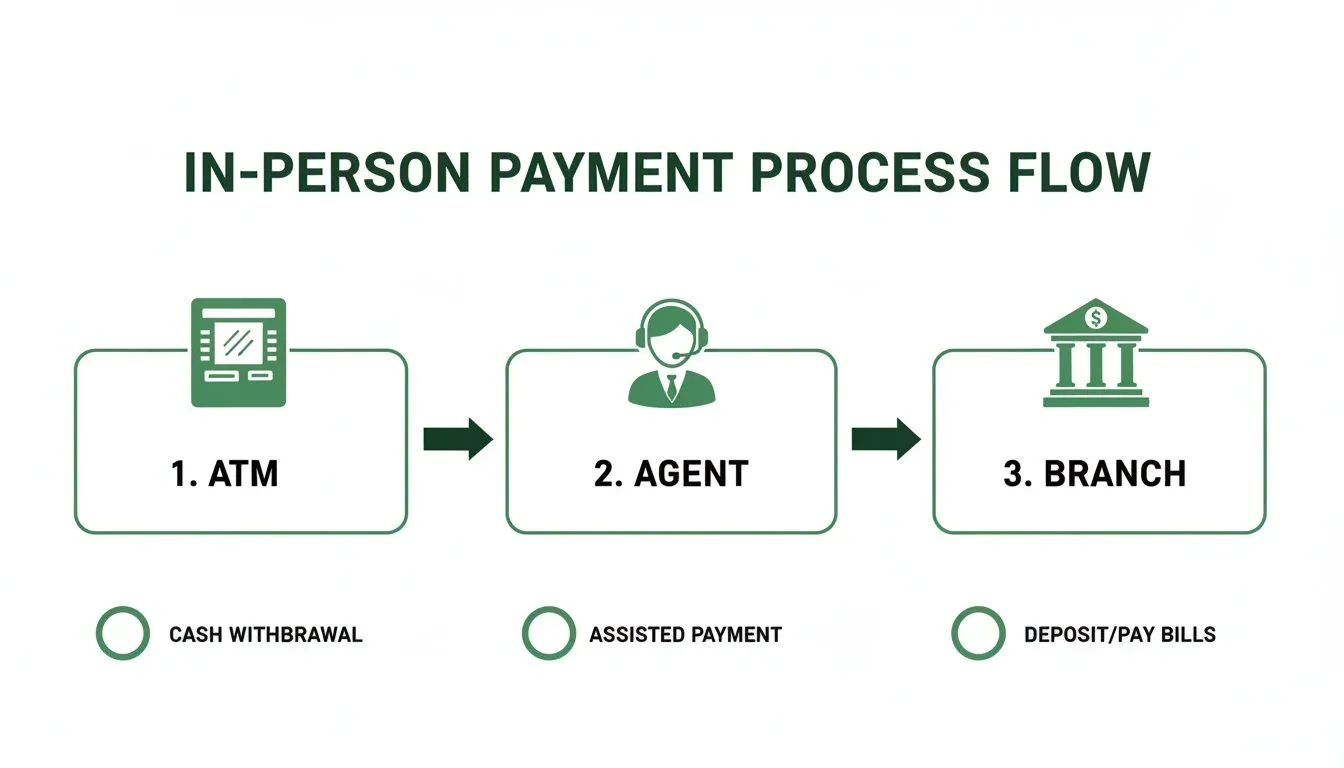
Each of these touchpoints, the ATM, the agent's desk, and the bank teller, creates a digital footprint. A powerful billing system, whose features are documented at https://docs.centipidbilling.com, simply picks up that footprint and follows it directly to the right customer account, no human intervention required.
While Centipid is tailor-made for the unique challenges of an ISP, the core concept of automation is universal. Businesses in any industry can benefit from exploring the wide range of accounts payable automation tools available today. Making this strategic shift is fundamental to scaling your operations without drowning in manual work.
Even after you’ve gone through the steps, a few questions always pop up when it comes to using Equity Bank to pay a bill. It’s completely normal. Let's walk through some of the common hurdles people face so you know exactly what to do if you hit one.
Answering Your Top Questions
So, what happens if you key in the wrong reference number? It’s a surprisingly common slip-up. The moment you realise it, get in touch with your service provider, your ISP, for instance. Have your transaction receipt or the confirmation SMS ready. With those details, they can often track down the "lost" payment on their end.
Another point of confusion is how long a payment takes to go through. While mobile app and *247# USSD payments are typically instant, a bank transfer (EFT) can take a few hours or, in some cases, until the next business day to reflect. If your payment is still missing after that window, it’s time to check in with both Equity Bank and the company you paid.
Quick Troubleshooting Tips on the Ground
What about when an Equity Bank channel is down just as your bill is due? This is exactly why it’s great to know all the options. If the mobile app is giving you trouble, the *247# USSD service is a solid fallback. If you happen to be out and about, you can always swing by an Equity ATM.
Here's a pro tip: never just assume a failed transaction will sort itself out and reverse automatically. Always double-check your bank statement to confirm whether the money actually left your account. Taking that extra minute can save you from the headache of making a double payment.
Here are a few more quick fixes for common issues:
- Hitting Your Limit: Remember that each payment channel has a daily transaction limit. If you're paying a particularly large bill, like rent or a business supplier, you might need to do an EFT or pop into a branch.
- No Confirmation SMS: If that confirmation message doesn't arrive, don't panic and pay again. First, check your bank statement to see if the money was debited. That’s the real source of truth.
- Saved Biller Problems: Is a saved biller on your app suddenly acting up? A quick fix that often works is to simply delete the biller from your list and add them back again. It’s the classic "turn it off and on again" solution.
For more complex problems, particularly if you’re an ISP trying to figure out how to reconcile all these different payment references, feel free to get in touch with our team for expert advice.
At Centipid Technologies Ltd., we build the billing systems that help automate these payment workflows, making the entire process smoother for both customers and service providers. You can learn more at https://centipidbilling.com.