If you run a MikroTik-based ISP in Kenya, you already know the pattern. Payments come in. SMS alerts arrive. Sometimes a statement lands in email. Then someone has to compare those records against subscribers, invoices, suspended accounts, and overdue balances.
That is where most operators misuse the phrase mpesa business email. They treat email as the end of the process. In practice, email should sit inside a bigger payment workflow that validates the transaction, matches it to the right subscriber, updates billing, and restores service if the account was blocked for non-payment.
For an ISP, the problem is never just “did money arrive?” The core problem is whether the payment reached the right customer ledger, whether MikroTik enforcement changed at the right time, and whether your team can prove all of it later during reconciliation, support, or dispute handling.
Why Your ISP Needs More Than an M-PESA Business Email
A plain email statement is useful. It gives finance and operations a record. It helps with audits. It helps when a customer insists they paid and your support desk needs to confirm the reference.
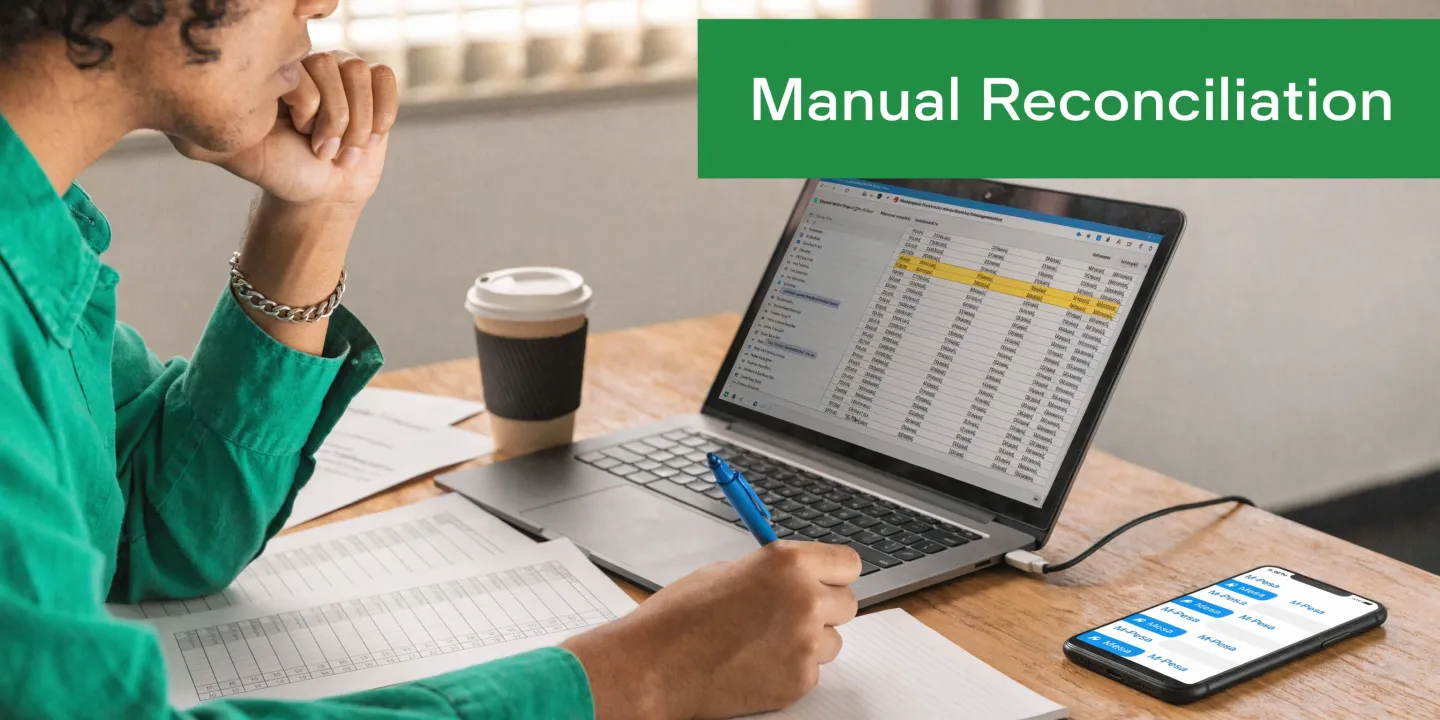
But a mailbox is not a payment engine.
Passive reporting versus active billing
The operational gap is simple. Email is passive. Your billing stack needs active events.
When a subscriber sends money through PayBill, the ideal flow is:
- Payment arrives: M-PESA accepts the customer transaction.
- System receives confirmation: Your billing platform gets the callback and records the result.
- Account is matched: The payment is tied to the right subscriber or invoice.
- Policy changes immediately: MikroTik PPPoE or hotspot access updates based on account status.
- Finance retains records: Email confirmations and statements remain available for later review.
That difference is where many ISPs lose time. The payment succeeded, but the subscriber remains offline because the back office is still catching up.
What breaks when you rely on email alone
Relying only on mpesa business email usually creates three recurring problems:
- Manual matching errors: A payment reference may not cleanly identify the customer.
- Delayed restoration: Support has to react after the customer calls.
- Weak audit trails: The finance team has the email, but network enforcement history sits somewhere else.
Tip: If your support team still searches inboxes before checking the subscriber account, your payment workflow is too dependent on email.
An ISP billing platform should convert M-PESA events into account actions. That is the operational standard to aim for, especially in multi-site WISP deployments.
A useful benchmark is whether your billing system can handle payment posting, invoice settlement, and access control from one workflow. If you need a reference point, this overview of the best ISP billing system in Kenya is a good place to compare what mature automation should look like.
Gathering Your M-PESA and Centipid Prerequisites
Most integration delays happen before the API call. They start with the wrong business account, missing permissions, or incomplete billing setup.
For an ISP, the cleanest starting point is to verify your commercial and technical prerequisites before touching Daraja.
Confirm the M-PESA side first
The first question is whether you are collecting subscriber payments through a PayBill or a Till. For recurring internet subscriptions, PayBill is usually easier to reconcile because it fits account-based billing better than walk-in merchant flows.
You also need the right business access on the M-PESA side. That means the person doing the setup must be able to request or access:
- Business shortcode details: You will need the shortcode tied to the account that receives customer payments.
- Portal access: Confirm you can log in to the relevant M-PESA business tools and view operational settings.
- Support path: If anything on the account is incomplete, resolve it with Safaricom before starting API configuration.
If you are still deciding how your collection setup should look, this guide to the Lipa na M-PESA portal is useful background.
Prepare the billing platform properly
On the billing side, the integration only works well if the customer records are already structured for matching and enforcement.
Before activation, check these items in your ISP billing environment and in the product documentation at https://docs.centipidbilling.com:
| Area | What to verify | Why it matters |
|---|---|---|
| Subscriber records | Customer phone numbers and account references are consistent | Payment matching fails when records are messy |
| Service plans | Packages, due dates, and suspension rules are configured | Payments need to trigger the correct policy response |
| MikroTik integration | Routers or hotspots are already linked to billing | A posted payment should be able to affect live access |
| Invoice logic | Recurring billing is active and current balances are accurate | Reconciliation depends on a correct ledger |
| Notifications | Email workflows are ready for confirmations and account updates | Finance and support need traceable communication |
The checklist that saves time
A practical readiness test looks like this:
- You know which M-PESA business account receives ISP payments.
- You have the authorised person available for approvals and support requests.
- Your subscriber data is clean enough to match incoming transactions.
- Your billing system already controls account state for MikroTik users.
- Your finance team agrees on how email confirmations will be stored and reviewed.
What does not work is trying to “figure it out during go-live”. If the shortcode owner, the API owner, and the billing administrator are not aligned, the integration stalls fast.
Activating Your Safaricom Daraja API Credentials
This is the point where mpesa business email stops being a reporting topic and becomes an integration project.
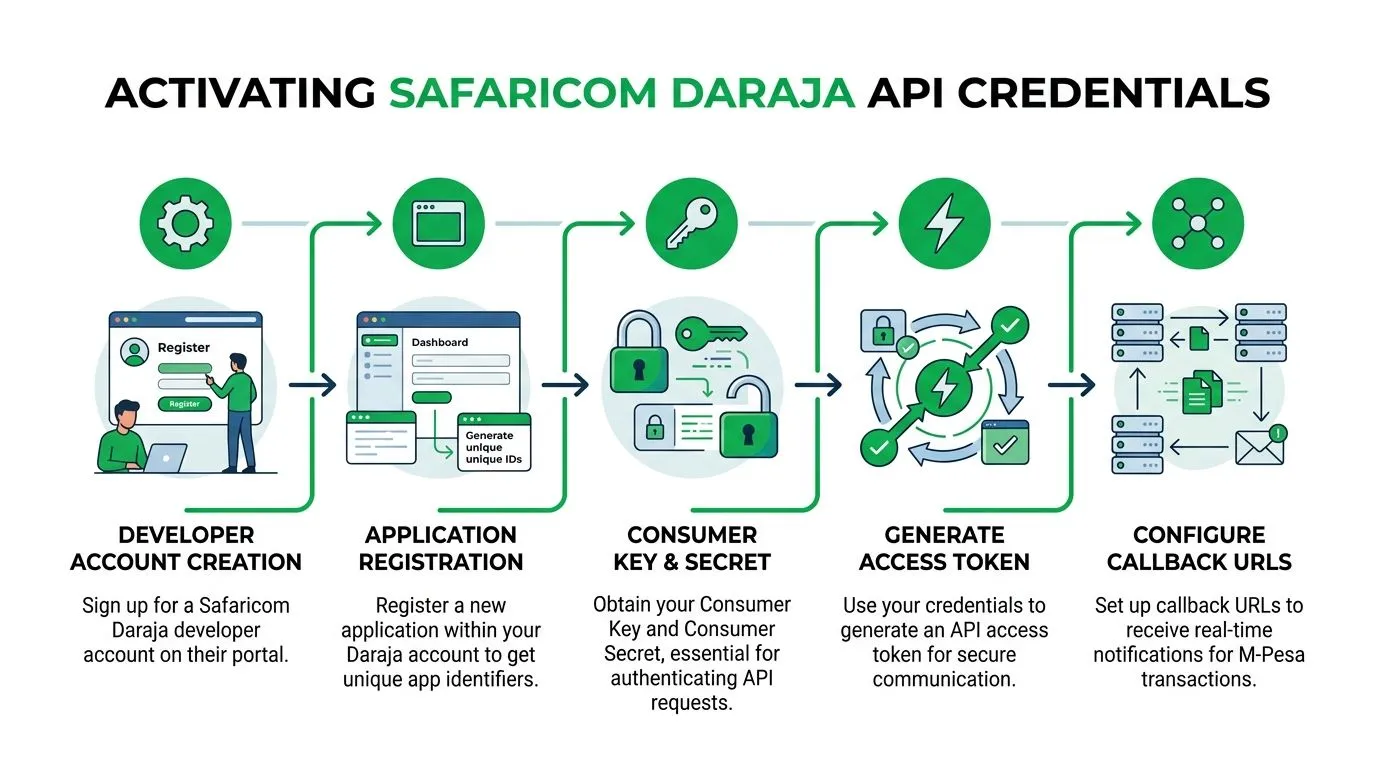
For Kenyan ISPs using M-PESA inside billing and service enforcement, the four credentials that matter are the Consumer Key, Consumer Secret, business shortcode, and Passkey.
Start with Daraja registration
The integration path begins on the Safaricom Daraja developer portal. You register a developer account, create an application, and obtain the Consumer Key and Consumer Secret used for API authentication.
The setup flow described in this M-PESA integration guide for Kenya also notes the need to configure a secure server endpoint with fields such as customer phone, shortcode, transaction type, and callback URL. It further notes that strong idempotency using CheckoutRequestID is important, because initial callbacks in rural Kenya can frequently fail.
That last point matters more than many operators realise. A failed initial callback does not always mean a failed payment. It often means your system must be able to retry safely without double-posting.
Know what each credential does
These credentials are often mixed up during setup. Keep them separate.
- Consumer Key and Consumer Secret: Used to generate the OAuth token that lets your application talk to Daraja.
- Business shortcode: Identifies the M-PESA business account involved in the transaction.
- Passkey: Used with the shortcode during Lipa Na M-PESA Online requests.
If you confuse sandbox and production credentials, authentication errors follow quickly. If you use the wrong shortcode with the wrong passkey, requests may look valid locally but fail at Safaricom’s side.
Sandbox first, production later
A good habit is to treat sandbox and production as different systems, not different tabs in the same browser.
Use sandbox to confirm:
- Token generation works
- Your request payload is accepted
- Callback handling is functional
- Transaction status parsing is correct
Only then should you request or confirm the production credentials and move to live processing.
Key takeaway: Most “invalid credentials” issues come from environment mismatch, not from a broken API.
Practical issues that delay operators
The technical work is only half the job. The administrative side causes just as many delays.
A few issues come up repeatedly:
- Passkey request bottlenecks: The passkey may require an email request or support follow-up from the business account owner.
- Approval waiting time: Production access can take time depending on the business type and approval path.
- Phone number formatting mistakes: If the billing system stores subscriber numbers inconsistently, requests and matching logic break later.
Keep your credentials in a secure internal record. Do not scatter them across chats, screenshots, and personal inboxes. Once those values exist, the next job is linking them to the callback workflow cleanly.
Connecting M-PESA Callbacks Directly to Centipid
A callback URL is the endpoint M-PESA contacts after a transaction event. In plain language, it is where M-PESA sends the answer after the customer has attempted payment.
For many ISPs, this is the point where a DIY integration starts to hurt. Building your own callback service means hosting it securely, parsing JSON correctly, dealing with retries, validating transaction state, and then mapping the payment to a subscriber before MikroTik policy changes.
What the callback must achieve
For an ISP, a good callback process does more than acknowledge receipt.
It should:
- Accept the M-PESA response reliably
- Record the transaction event in billing
- Prevent duplicate posting
- Map the payment to the correct customer or invoice
- Trigger service updates for PPPoE or hotspot accounts
- Retain an internal trail for finance and support
That is a lot to ask from a script someone wrote in a hurry on deployment week.
Why a pre-built endpoint is usually better
Using the built-in payment workflow in your billing platform is usually the cleaner option. Instead of creating and maintaining your own middleware, you use the callback URL and payment settings already designed for the billing stack.
From an operator’s perspective, this solves several practical problems at once:
| DIY callback approach | Integrated callback approach |
|---|---|
| You host and secure the endpoint yourself | The billing platform provides the callback path |
| You build duplicate protection manually | The platform handles transaction state more consistently |
| You write your own account matching rules | Matching sits closer to invoices and subscribers |
| You create your own logging and audit trail | Events are easier to view inside billing operations |
| MikroTik actions need extra glue code | Service and billing logic already live together |
The result is less custom plumbing between payments and network control.
If you want a product-level view of how mobile money billing ties into ISP operations, this article on ISP billing with M-PESA mobile money integration is worth reviewing alongside the product documentation at https://docs.centipidbilling.com.
Where operators usually misconfigure it
Most callback problems are not mysterious. They come from simple mistakes:
- Wrong environment: Sandbox credentials entered into production settings, or the reverse.
- Bad callback registration: The URL in Safaricom does not match the one expected by the billing setup.
- Loose payment matching: The subscriber reference format is inconsistent.
- No duplicate handling: A retry is treated as a second successful payment instead of the same event.
A short demo can help visualise the workflow before you wire it into live subscribers.
Tip: If your callback endpoint receives the transaction but finance still cannot reconcile the invoice cleanly, the issue is usually account mapping, not transport.
What good looks like in operations
When the setup is correct, the workflow feels boring. That is exactly what you want.
A customer pays. The transaction lands in billing. The invoice state updates. The subscriber account reflects the payment. MikroTik enforcement follows the account state. Email remains available for statement delivery, internal confirmation, and later review.
That is much stronger than treating mpesa business email as the core mechanism. Email should support the record. The callback should drive the action.
Leveraging Advanced M-PESA B2B Features in Centipid
Once customer collections are stable, the next improvement is not more payment reminders. It is automating money that leaves the business as carefully as money that comes in.
For an ISP, that usually means refunds, supplier payouts, sales commissions, or internal settlement workflows across locations.
Where B2B becomes useful
The M-PESA B2B API supports payout scenarios such as supplier refunds or salaries. The operational detail that matters most is that the result is asynchronous. You initiate the request, then the system has to process the result later and keep the trail intact.
The technical guidance discussed in this video on advanced M-PESA B2B integration notes that handling asynchronous results through queue systems is critical for traceability. It also states that success rates are generally high, improve with pre-checks, and unfunded initiator accounts can cause transactions to fail.
For an ISP operator, that translates into one clear rule. Do not treat outbound money like a simple one-click action. Treat it like a workflow with state, validation, and retry visibility.
Strong use cases inside ISP operations
A few examples fit particularly well:
- Refunds for overpayments: If a subscriber pays twice or loads the wrong amount, finance can process the correction through a tracked payout workflow.
- Field agent commissions: Sales agents or local collection partners can receive scheduled disbursements with a better audit trail than manual transfers.
- Supplier and landlord payments: Multi-site WISPs often have repeated small operational payouts that benefit from a logged, system-driven path.
Why queueing and validation matter
The temptation is to focus on the payout request itself. The harder part is what happens after submission.
A sound implementation needs:
- Validation before sending so you do not push bad requests into production.
- A traceable queue so every payout can be followed by conversation or transaction identifiers.
- Clear final state handling so accounting, support, and management all see whether money moved.
Without that, your outbound payments become another manual spreadsheet exercise.
Key takeaway: Collections automation saves support time. Payout automation saves finance time and reduces disputes inside the business.
The best use of advanced M-PESA features is selective. Do not automate every edge case on day one. Start with the payout types that recur often and already have clear approval rules.
Testing and Securing Your M-PESA Integration
No ISP should go live on assumptions. Test the payment path, the billing path, and the network enforcement path separately, then test them together.
What to test before production
Use sandbox first. Confirm a test payment can move through all expected states inside billing.
A practical pre-launch checklist:
- Credential check: Verify the correct sandbox keys and shortcode-related settings are in place.
- Callback verification: Confirm the callback reaches the billing endpoint and creates the expected transaction record.
- Invoice matching: Check that the payment settles the intended test account.
- Access enforcement: Make sure the subscriber state change reaches MikroTik as expected.
- Email review: Confirm internal notification or statement workflows are readable and useful to finance.
Security habits that matter
Two controls deserve attention from the start.
First, keep your API credentials out of shared chats, exposed scripts, and ad hoc notes. Limit access to the staff who administer payment operations.
Second, use secure endpoints only. The integration guidance referenced earlier notes that Safaricom mandates TLS 1.2+ for callbacks in live setups. If your billing platform already handles the endpoint layer, that removes a major source of operator error.
Another practical lesson is system separation. If billing, CRM, and network management are split across tools, your payment event trail can become fragmented. This discussion of when you need billing, CRM, and NMS separately, not in one platform is useful when reviewing your own architecture.
The launch standard
Go live only when you can answer yes to all three questions:
- Can a payment be traced from M-PESA event to invoice entry?
- Can a subscriber’s service state change automatically after that payment?
- Can finance and support both confirm what happened without checking three separate systems?
If the answer is no to any one of them, keep testing.
Frequently Asked Questions on M-PESA Integration
Why am I not receiving callbacks after a successful payment
Start with the obvious checks. Confirm you registered the correct callback endpoint for the same environment as your credentials. A sandbox endpoint with production credentials will waste hours.
Then check the billing-side mapping. Sometimes the transaction exists, but your team thinks callbacks failed because the payment did not appear under the expected subscriber.
What does invalid credentials usually mean
Most of the time, it is not a broken Daraja account. It is one of these:
- Sandbox keys used in production
- Wrong shortcode paired with the wrong passkey
- Copied credentials with hidden formatting problems
- An old credential set left in the billing settings
Fix the environment mismatch first. That resolves a surprising number of cases.
How should I handle transaction timeouts or reversals
Do not post account changes on a timeout alone. Wait for the final transaction state recorded through the normal callback and reconciliation path.
For reversals or disputed payments, create an internal rule for who approves the ledger correction and when subscriber access should change. The technical flow matters, but the approval process matters just as much.
Is mpesa business email enough for multi-location ISP operations
Usually not. One of the recurring challenges for Kenyan ISPs is the lack of practical guidance for automating email confirmations for PayBill transactions across multi-location setups. A source discussing this gap notes that M-PESA handles a significant portion of Kenya’s GDP and that many rural ISPs report integration delays linked to email verification gaps and compliance under the Data Protection Act 2019, as covered in this discussion of the M-PESA business model and integration challenges.
That lines up with what operators see on the ground. Email helps with records. It does not replace proper callback processing, account matching, and service automation.
What is the first thing to troubleshoot when reconciliation looks wrong
Check the subscriber reference format and phone number consistency before blaming the API. In many deployments, the payment arrived correctly. The mismatch happened inside billing data hygiene.
If you want a billing stack built for MikroTik ISPs, recurring invoicing, M-PESA automation, and subscriber access control in one workflow, have a look at Centipid Technologies Ltd.. The platform is built for operators who want fewer manual reconciliations, cleaner payment tracking, and faster recovery of paid accounts without stitching together separate tools.