Applying for a Safaricom Paybill is the first real step you'll take towards automating how you get paid in Kenya. It’s a formal process where you submit your business and banking details to Safaricom, and in return, you get a unique business number that lets customers pay you directly through M-PESA. This single move can shift your entire collections process from a manual headache to a smooth, digital operation.
Why a Safaricom Paybill Is a Must-Have for Your Business
If you’re running a business in Kenya, you already know the grind of manual payment collection. It’s a huge time sink. You’re constantly chasing clients, trying to match payments to statements, and dealing with all the risks of handling cash. These aren't just minor inconveniences; they're genuine operational roadblocks that get in the way of growth.
Accepting M-PESA isn't just an option here; it’s an expectation. Your customers use it every single day for everything. By offering a Paybill, you’re meeting them where they are and using a system they already trust. This simple alignment makes it easier for them to pay you on time, every time.
The Real Power Is in the Automation
A Paybill number on its own is good, but the real magic happens when you connect it to your billing software. For any subscription-based business, especially Internet Service Providers (ISPs), this integration is what unlocks genuine automation and efficiency.
A Safaricom Paybill is the foundation for turning your revenue collection into a streamlined, automated process. It eliminates the headaches of manual reconciliation and dramatically reduces late payments.
When you link your Paybill to a platform like the Centipid Billing system, it becomes the engine driving your finances. As detailed on centipidbilling.com, this enables:
- Instant Payment Recognition: The moment a customer pays via M-PESA, the system knows. No more checking bank statements.
- Automated Service Activation: A client pays their overdue internet bill, and their connection is restored instantly. You don't have to lift a finger.
- Smart Dunning and Collections: The system can automatically chase late payments and manage service suspensions for accounts that are past due, massively improving your cash flow.
This level of automation frees your team from chasing money and lets them focus on what actually grows the business, serving your customers. A purpose-built ISP billing software is designed to make this happen seamlessly.
A Cornerstone of Kenya's Digital Economy
It’s hard to overstate the impact M-PESA and Paybill have had on business in Kenya. Since the service launched back in March 2007, its growth has been nothing short of explosive.
Getting Your Application Documents Right the First Time
There’s nothing quite as deflating as getting that rejection email from Safaricom after you’ve excitedly applied for your Paybill number. I’ve seen it happen countless times. The most common culprit isn’t some deep-seated issue with the business itself; it’s almost always a simple, avoidable mistake on the paperwork.
Think of this part of the process as your pre-flight check. Before you even think about filling out the online forms, your first job is to gather and triple-check every single document. A few extra minutes here will genuinely save you weeks of frustrating back-and-forth with support.
The Non-Negotiable Documents for Every Business
No matter how your business is structured, Safaricom needs to see a few core documents to verify who you are and that your operation is legitimate. Get these right, and you're already halfway there.
You’ll absolutely need to have these ready:
- Copies of National IDs or Passports: This is for the sole proprietor or for all company directors listed in your registration documents. Ensure the copies are crystal clear, blurry photos or cut-off serial numbers are an instant red flag.
- KRA PIN Certificates: You need one for the business itself and a separate one for each director. The names on the PIN certificates must be an exact match to the names on the IDs and company registration papers.
- A Cancelled Cheque or a Bank Letter: This is purely to verify the business bank account where Safaricom will send your settlements. It must be a corporate account in the business's name. They will not settle funds to a personal account, period.
That bank letter is a very common stumbling block. It can't just be an account statement. It has to be an official letter, printed on the bank's letterhead, showing the full business name and account number. It also needs a fresh stamp and an authorised signature from a bank official.
As you get your paperwork in order, you might find that managing digital files efficiently is a huge help. Knowing how to do things like adding a signature in PDF can really speed up the process.
Matching Documents to Your Business Structure
This is where the details really matter. The specific registration documents you need depend entirely on whether you're a Sole Proprietorship, a Partnership, or a Limited Company.
For Limited Companies and Partnerships, the key document is your Certificate of Incorporation (or Certificate of Registration for a Partnership). This is the government's official proof that your business exists.
If you're a Sole Proprietorship, you'll need your Business Name Registration Certificate. This serves the same purpose, confirming your trade name is properly registered.
My Top Tip: Before you submit anything, lay all your documents out on a table (or open them on your screen). Compare the business name, director names, and ID numbers across the Certificate of Incorporation, KRA PINs, and the bank letter. Even a tiny mismatch like "Ltd" instead of "Limited" can get your application bounced.
To make it even clearer, here’s a simple checklist breaking down the required paperwork for the most common business types.
Paybill Application Document Checklist By Business Type
This table gives you a clear snapshot of what you need based on how your business is registered.
| Document | Sole Proprietorship | Limited Company/Partnership | Key Tip |
|---|---|---|---|
| Business Registration | ✅ Business Name Reg. Cert. | ✅ Certificate of Incorporation | The name must match exactly across all documents. |
| Director/Owner ID | ✅ National ID/Passport | ✅ National ID/Passport (All Directors) | Copies must be clear, valid, and fully legible. |
| Business KRA PIN | ✅ Required | ✅ Required | The PIN has to be for the registered business entity. |
| Director KRA PIN(s) | ✅ Required | ✅ Required (All Directors) | Every director must provide their personal KRA PIN cert. |
| Bank Verification | ✅ Cancelled Cheque/Bank Letter | ✅ Cancelled Cheque/Bank Letter | Make sure it’s a business account, not a personal one. |
Taking the time to gather and meticulously review these items is the single best thing you can do to make sure your Paybill application sails through smoothly.
Once you’re approved, the next step is integration. For a closer look at that, check out our guide on ISP billing with M-PESA, which dives into the technical side of things.
Navigating The M-PESA Business Portal Application
With all your documents organised and ready to go, it's time to dive into the Safaricom Paybill application itself. This is all done online through the M-PESA Business portal, and frankly, the process can feel a bit clunky. Don't worry, I'll walk you through it.
Think of me as looking over your shoulder, pointing out the tricky bits and explaining what your choices actually mean. The goal here is simple: get your application submitted correctly on the first try to avoid unnecessary delays.
Kicking Off Your Digital Application
First things first, head over to the Safaricom M-PESA Business portal. You'll need to sign up for an account if you don't already have one. The initial form is straightforward, it just asks for basic company details and the info for the primary contact, who should be one of the directors whose documents you've already prepared.
Once you’re logged in, look for the option to apply for a new short code. This is your starting point for the Paybill. The portal will then launch a multi-step form where you’ll fill in all the details about your company, its directors, and how you want to get paid.
The Crucial Settlement Decision: Bank vs. M-PESA
You're going to hit a critical decision point early on: choosing your settlement option. You can have your funds sent to a bank account or to another M-PESA wallet. For any ISP or serious business, there's really only one right answer here: settlement to a bank account.
Choosing bank settlement isn't just a good idea; it's essential for running your business properly. It means every shilling from your Paybill goes straight into your corporate bank account, creating a clean, easy-to-track trail for your accountant.
Here's why this is a non-negotiable:
- Clean Accounting: Bank settlement keeps your customer revenue completely separate from any other M-PESA funds. This makes bookkeeping and reconciliation a thousand times easier.
- Automation-Ready: Professional billing systems are built to match payments against bank deposits. Your bank statement becomes the practical source of truth, and this is a core feature you can learn about at https://docs.centipidbilling.com.
- Scalability: A business bank account doesn't have the low transaction and balance limits of an M-PESA wallet. As your ISP grows, you'll hit those M-PESA limits fast.
Settling to an M-PESA wallet might seem convenient for a tiny side hustle, but for a growing business, it's a recipe for accounting headaches and operational chaos. Set yourself up for success and choose bank settlement from day one.
Uploading Documents and Final Submission
Next, you’ll get to a section for uploading the documents we prepared earlier. This part is simple but you need to be meticulous. Make sure each file, the director IDs, KRA PINs, Certificate of Incorporation, and that crucial bank letter, goes into its correct upload slot.
Before you even think about clicking that ‘submit’ button, stop. Go back and triple-check every single field. A typo in a director’s name or one wrong digit in your bank account number is all it takes to get your application rejected and sent back to the beginning.
For a deeper look at the portal's interface and other features, our guide to the Lipa na M-PESA portal and its features is a great resource.
Once you're confident everything is perfect, go ahead and submit. The system will send you an automated confirmation email with a reference number. Guard that number, you’ll need it if you have to follow up.
What Happens Next: The Waiting Game
Safaricom’s official line is that a Paybill application takes 10-15 working days. From my experience, that's optimistic. A more realistic timeline to have in your head is anywhere from two to four weeks, and that’s if your paperwork is flawless.
Any mistake or missing document can stretch that timeline out much, much longer. This frustrating wait is exactly why many new ISPs start with a shared Paybill from a provider like Centipid Billing just so they can start collecting money right away, a key feature described on centipidbilling.com.
If you hit the two-week mark and haven't heard a thing, it’s fair to check in. Contact Safaricom’s business support team by email or phone. Just be polite, professional, and have your application reference number handy. A calm, simple enquiry works far better than frustrated, daily calls.
Integrating Your Paybill with an ISP Billing System
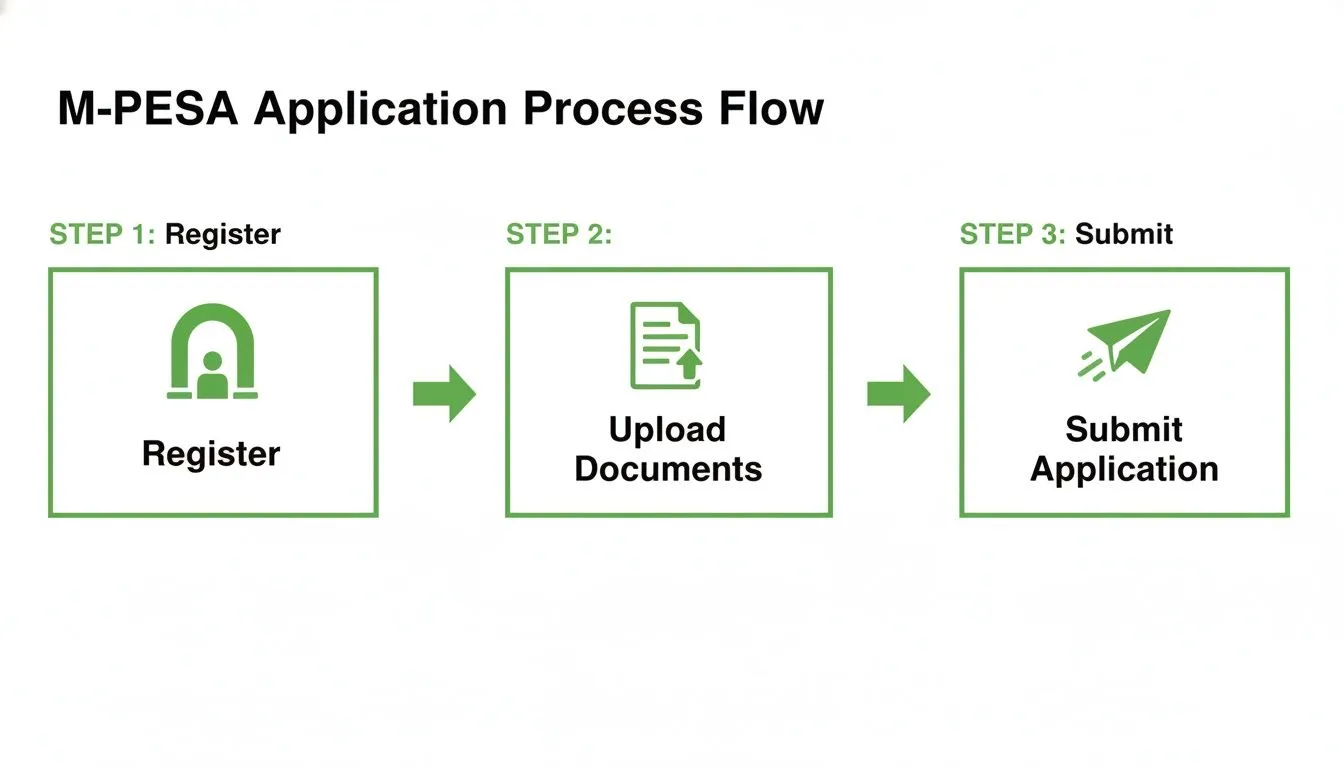
The flow chart above shows the basic hoops you'll jump through just to apply for the Paybill. Getting that approval email from Safaricom is a huge relief, but honestly, that’s just the beginning. The real work, and the real payoff, starts when you plug that new Paybill into a smart ISP billing system like Centipid.
This is where you stop being a human receipt-checker.
Seriously, the integration is what saves you from the soul-draining task of manually scrolling through M-PESA texts and bank statements, trying to match payments to customer accounts. It’s the critical link that connects a customer's payment directly to their account, instantly updating their balance and keeping their service on without you lifting a finger.
Getting to Grips with C2B APIs and Webhooks
To get your Paybill and billing software communicating, you just need to understand two little pieces of tech: the C2B API and webhooks. Don't let the jargon put you off; the concepts are pretty simple once you see how they work together.
- C2B (Customer-to-Business) API: This is basically the private language that lets Safaricom's M-PESA platform talk securely to your billing system. It's just a set of rules for how payment information gets passed back and forth.
- Webhooks (Callbacks): Think of these as automated text messages between systems. A webhook is a notification that M-PESA pings your billing software with the very instant a customer makes a payment. It's packed with all the transaction details you need.
So, the C2B API creates the pathway, and the webhooks are the messengers that run along it. This is the entire technical backbone of your payment automation. Handling the data in these messages efficiently is everything; some businesses even use tools like Intelligent Document Processing (IDP) software to automatically pull out key details and log them.
It's amazing how foundational this has become. Looking back, even by March 31, 2009, Safaricom already had 51 Paybill partners. This shows just how quickly Kenyan businesses embraced the system. At that time, there were 6.175 million registered users and 8,650 M-PESA agents. For an ISP using a system like the one offered by Centipid Billing today, this is the modern-day equivalent, a streamlined way to handle recurring bills and cut down on hassle, as documented at https://docs.centipidbilling.com.
Configuring Your Validation and Confirmation URLs
To get those webhook "messages" delivered, you have to give Safaricom's M-PESA portal the right address. This involves setting up two specific URLs in your M-PESA account settings.
Your billing software will give you these URLs. For instance, if you're using the Centipid Billing system, you'll find these unique links right inside your payment gateway settings, which you can read about at https://docs.centipidbilling.com.
Here’s what each one does:
- The Validation URL: Before M-PESA even finalises a payment, it shoots a quick query to this URL. Your billing system instantly checks if the account number the customer typed in is actually valid. If the account doesn't exist, it tells M-PESA to stop the transaction right there. This simple step prevents a ton of headaches from payments made to wrong or non-existent accounts.
- The Confirmation URL: Once the payment is successful, M-PESA sends a final notification to this URL. This message is the money shot, it contains the amount paid, the account number, the M-PESA transaction ID, and the customer's name. This is the signal that marks the customer's invoice as paid in your system.
Pro Tip: Both of these URLs absolutely must be on a secure server with an SSL certificate (https://). M-PESA's systems will flat-out refuse to talk to an insecure (http://) address. This is a non-negotiable security measure, so make sure your hosting is sorted.
Tracing the Automated Payment Flow
Let's see this in action. Picture a customer whose internet has been disconnected because they forgot to pay their bill.
The customer grabs their phone, goes to Lipa na M-PESA, and enters your Paybill number. They then type in their unique account number (e.g., CUST-1025) and the amount due.
The moment they hit send, M-PESA pings your Validation URL. The Centipid system checks its database, sees that CUST-1025 is a real account, and gives M-PESA the green light.
The customer is then asked for their M-PESA PIN to approve the payment. The transaction is completed.
Immediately, M-PESA sends a 'confirmation' webhook to your other URL. This message has all the payment details.
Here’s where the magic happens. The Centipid system receives that confirmation and automatically marks the invoice for CUST-1025 as paid. More importantly, it instantly sends a command to your MikroTik router to switch that customer's internet connection back on. This is a core feature of the billing system, which you can learn more about on centipidbilling.com.
From the customer's end, their service was restored in less than a minute. For you, the entire sequence, payment, reconciliation, and service restoration, happened with zero manual work. That's the real power of properly integrating your Safaricom Paybill application with a purpose-built billing system.
Common Problems and How to Fix Them Fast
Even with the most careful preparation, a Safaricom Paybill application can hit a snag. Let’s be honest, the process has its quirks. Knowing the common roadblocks ahead of time can save you weeks of back-and-forth frustration.
Here’s a look at the issues we see most often and, more importantly, how to get past them quickly.
One of the top reasons for a flat-out rejection is a tiny mistake in your banking details. A single wrong digit in the account number on your form is all it takes. Another classic pitfall is when the business name on your bank letter isn't an exact match to your Certificate of Incorporation. Close doesn't count here.
The Fix: Before you even think about submitting, print out your bank letter and put it right next to your application form on your desk. Read the business name and account number out loud, comparing them character by character. It might feel a bit tedious, but this five-minute check can literally prevent a two-week delay.
Application Stuck in "Pending" for Weeks
So, you’ve submitted everything and now… crickets. The official timeline can be optimistic, and it's easy to feel like your application has vanished into a black hole. This is a huge problem for new businesses, especially ISPs who need to start bringing in revenue right away.
You don't have to put your business on hold while you wait. There's a smart workaround.
The best move is to use a third-party or parent Paybill service while your application is in the queue. A platform like the Centipid Billing system actually has this built-in, a feature clearly outlined on centipidbilling.com. It lets you start accepting M-PESA payments from day one by piggybacking on their pre-approved Paybill infrastructure.
Your customers still get a unique account number tied to their invoice, so it feels seamless to them. The system routes the payment and makes sure it's credited to your account inside the Centipid platform. Once your own Paybill is finally approved, you can switch over without any disruption. It's a game-changer for new ISPs. For a deeper dive into this, you can learn how to manage ISP customers and billing with these systems.
Technical Glitches During Integration
Another common headache pops up right after your Paybill is approved: the technical side of things isn't working. You’ve set up your webhook URLs in the M-PESA portal, but your billing system isn’t getting the notifications. Payments are coming in, but nothing is being automated.
From my experience, this almost always boils down to one of three things:
- Wrong URLs: A simple typo in the validation or confirmation URL you pasted into the M-PESA portal. It happens to everyone.
- No SSL Certificate: Your webhook URLs are not secure. M-PESA absolutely requires a secure
httpsconnection, no exceptions. - Firewall Blocks: Your server's firewall is blocking incoming pings from Safaricom’s servers, so the notifications never arrive.
Start by triple-checking your URLs for typos. Next, confirm you have a valid SSL certificate installed. If both of those are fine, it’s time to talk to your hosting provider. Ask them to whitelist Safaricom's IP addresses to ensure the webhooks can get through. The technical setup requirements are often covered in the documentation of billing systems like the one at https://docs.centipidbilling.com.
The massive growth of Paybill really highlights its importance. It launched with just 51 partners back in 2009 when there were 13.36 million M-PESA customers, and it has since grown into a GSMA award-winning service. This kind of scale is exactly what Centipid Billing helps its clients achieve with their own billing, automating everything from invoicing to support. You can read more about this financial evolution in the full research about M-PESA's impact. By navigating these common issues, you'll be able to tap into this powerful system much more effectively.
Clearing Up Your Safaricom Paybill Application Questions
Going through the Paybill application process often leaves you with more questions than answers. It's a common experience. Let's tackle some of the most frequent questions we hear from business owners, drawing from years of firsthand experience.
How Long Does The Safaricom Paybill Application Really Take?
Safaricom's official line is often 10-15 working days, but in the real world, you should brace for a longer wait. A more realistic timeline is anywhere from two to four weeks. If there's even a tiny mistake in your documents, it can stretch out even further.
So, what causes these delays? From what we've seen, it almost always boils down to a few things:
- Mismatched Documents: This is the number one culprit. A director's name spelled differently on the bank letter versus the CR12 will get your application flagged and sent to the back of the line.
- Incomplete Forms: Leaving just one field blank on the online application is enough to cause a rejection. Be meticulous.
- Safaricom's Backlog: Sometimes, it's just a matter of volume. If you apply during a busy period, the queue is simply longer for everyone.
My best advice? Before you hit 'submit', do a final, thorough check. Make sure your bank letter is correctly stamped and signed and that every single detail for your directors perfectly matches what’s on your company registration papers. This one step can save you weeks of frustration.
What Is The Difference Between A Paybill And A Till Number?
Getting this right is absolutely critical for your business operations. A Till Number (the "Buy Goods" option) is built for in-person transactions, like at a shop counter or restaurant. The money usually lands in a personal or business M-PESA wallet.
A Paybill number is what you need for remote payments, which is perfect for an ISP. It’s designed to include a unique account number, like your client's user ID or invoice number, with every payment. This is the magic ingredient for tracking who paid what. All funds are settled directly into your company’s bank account, which keeps your accountant happy and your books clean.
For any ISP using an automated billing platform like the one from Centipid Billing, a Paybill isn't just a nice-to-have; it's a must. That account number field is what enables the system to automatically find the customer's invoice and mark it as paid without any manual work, a feature you can explore at https://docs.centipidbilling.com.
Can I Accept M-PESA Payments While My Paybill Application Is Pending?
Yes, absolutely! You don’t have to put your business on hold while you wait for Safaricom. This is a smart move for any new ISP that needs to start collecting revenue from day one. The trick is to use a billing platform that has a shared or parent Paybill service built-in.
For instance, the Centipid Billing system offers this right out of the box, as noted on their website centipidbilling.com. You can go live and start collecting payments immediately. When your customer pays using the shared Paybill, they simply enter their unique invoice number as the account number. The system then automatically sorts everything out and credits the payment to your specific account within the platform.
Once your own Safaricom Paybill is finally approved, switching over is seamless. You just update the details in the system, and your customers won't experience any interruption.
Ready to stop waiting and start collecting revenue? The Centipid Billing platform integrates directly with MikroTik and gives you a shared Paybill to get your ISP running immediately. Check out the features at https://centipidbilling.com and start your free trial today.