Your operations day usually breaks in the same place. A customer pays by M-PESA, sends a screenshot on WhatsApp, then calls five minutes later because the link is still down. Someone on your team checks the message, searches a spreadsheet, logs into MikroTik, re-enables the account, and hopes the amount matches the package. That workflow works when you have a handful of subscribers. It becomes messy fast once renewals, hotspots, overdue accounts, and multiple staff members get involved.
That is where safaricom internet paybill stops being just a payment option and starts becoming an operational system. If the paybill is connected properly to your billing layer and your router layer, payment, reconciliation, and service activation become one continuous process instead of three separate manual tasks.
Moving Beyond Manual M-PESA Reconciliation
Manual reconciliation creates two failures at once. Finance loses clarity, and support absorbs the pain.
When payments land in M-PESA but not in your billing system, staff start using side channels. They rely on SMS notifications, screenshots, and memory. That is how accounts get activated with the wrong package, expired users stay online longer than they should, and valid customers get cut off after they have already paid.
Where the manual process usually breaks
The weak points are predictable:
- Payment reference confusion. Customers type the wrong account number, phone number, plot number, room number, or leave the field blank.
- Human lag. Staff may be busy, offline, or working different shifts when the payment arrives.
- Router-only activation. A technician enables the user in MikroTik but forgets to update the invoice or subscription record.
- Split records. M-PESA statements, spreadsheets, and router user lists do not agree.
Centipid fixes this by giving the paybill a destination. Instead of payment data ending in SMS messages, it lands in a billing workflow that can match the transaction to a subscriber, update the account status, and trigger the network action. If you want a practical overview of that billing model, Centipid’s write-up on ISP billing with M-PESA mobile money integration is a useful starting point.
What changes after integration
A key benefit is not “accepting M-PESA”. Everyone already accepts M-PESA in some form. The benefit is removing staff from repetitive payment handling.
Once the payment path is automated:
- the customer pays using the correct reference,
- the billing platform records the transaction,
- the subscriber account moves to the correct state,
- MikroTik receives the update,
- service is restored or extended without a call.
Tip: If your office still depends on forwarding M-PESA statements, screenshots, or manual attachments between teams, it is worth looking at how other back-office functions use automated document processing. The same principle applies in ISP collections. Data should move into a system, not through inboxes.
Small operators should also resist building a “temporary” process in spreadsheets. Temporary payment workflows usually become permanent technical debt.
Preparing for Your Paybill Application
Most paybill delays are not technical. They come from mismatched business records, unclear settlement ownership, or applying before the ISP has decided how customers will be identified in the billing system.
The business side and technical side must line up before you submit anything.
Business records to organise first
Have your company paperwork clean, current, and consistent. The names on your registration documents, bank details, and tax records should match how you intend to operate the paybill.
In practice, prepare these items before the application journey starts:
- Business registration documents. For a company, keep your incorporation paperwork and related records ready.
- KRA records. Make sure the tax identity tied to the business is available and current.
- Bank settlement details. Use a business account that matches the legal entity applying.
- Authorised contacts. Decide who will receive approval emails, portal access, and settlement notices.
This step is important because an ISP payment setup is not just a checkout form. It is a regulated revenue channel. If the settlement account or legal name is inconsistent, approvals tend to slow down and later changes become painful.
Technical choices to settle before approval
Do not wait for the paybill number to decide how your customers will be billed. Sort that out early.
Ask yourself three practical questions:
- Are you running PPPoE, hotspot, or both? The subscriber identifier is different in each environment. PPPoE often maps cleanly to a username or customer account. Hotspot deployments may need voucher codes, room references, or phone-based identifiers.
- What will the customer enter as the paybill account reference? Pick one format and keep it simple. If your staff accept five different references, matching payments becomes harder.
- Who owns package logic? The billing system should define package validity, renewal state, and suspension logic. The router should enforce access, not become your billing database.
Why readiness matters in the Kenyan market
A small ISP does not need Safaricom’s scale to learn the same lesson. Mid-tier internet packages are easiest to sell when the renewal experience is predictable.
Key takeaway: Before applying, decide the subscriber identifier, the billing model, and the settlement owner. A paybill attached to a confused backend only automates confusion.
Centipid-side readiness checklist
Use the billing platform as your control point, not as an afterthought. In Centipid, that means having the core account structure ready:
| Item | Why it matters |
|---|---|
| Active billing account | You need a place to map payment events and customer records |
| Service plans created | Payments must attach to real packages, not generic labels |
| Customer records cleaned | Duplicate or inconsistent customer references create failed matches |
| MikroTik connection prepared | Payment automation only feels complete when access follows payment |
If your customer base includes both home links and public Wi-Fi users, decide early whether each segment needs a different payment reference pattern. That small decision prevents many reconciliation headaches later.
Navigating the Safaricom Paybill Registration Process
A paybill application usually stalls long before any technical integration starts. The common failure point is simpler. The ISP submits a generic business description, gets approved without clear payment references, or hands the process to admin staff who do not understand how Centipid and MikroTik will consume the payment data later.
Safaricom wants to see a real collection use case. Write the application like an operator that sells internet access and needs clean subscriber payment matching. If you provide fibre, fixed wireless, hotspot vouchers, PPPoE subscriptions, or SME links, state that plainly. If customers renew monthly or buy timed access, say that too. Those details help Safaricom understand why account references matter and why you need dependable settlement reporting.
The wording matters more than many teams expect.
How to present the business correctly
Use the same service names you already use in invoices, package names, and customer records. If Centipid has packages labelled Home 10 Mbps, Business 20 Mbps, or Hotspot Daily Pass, keep the commercial description aligned with that structure. A vague label such as "IT solutions" creates questions you do not want during review.
Be equally clear about who receives settlement funds. The legal business name, bank details, and merchant ownership should match across your registration documents. I have seen approvals delayed because the company applying for the paybill was not the same entity named in the settlement account paperwork. That is not a technical issue, but it becomes one later when finance starts disputing payouts.
If you need a clearer picture of the merchant setup you will manage after approval, the Lipa na M-PESA portal workflow for billing teams is worth reviewing before submission.
What causes delays
The avoidable problems are usually operational:
- Generic business activity descriptions that do not clearly say you bill internet access.
- Unclear account reference rules for what the customer will enter during payment.
- Mismatched business and banking details across the application documents.
- No named internal owner for the merchant portal, statements, and callback coordination.
- Tariff decisions left until after approval, which leads to rushed pricing changes and customer confusion.
The account reference point is where many ISP teams get caught. Safaricom may approve the paybill, but your integration still breaks if nobody decided whether the customer enters an invoice number, phone number, username, account number, or router-linked subscriber ID. In Centipid, that field has to map to something real. In MikroTik-driven environments, a bad reference format means payment is received but service renewal still needs manual intervention.
A practical application flow
Handle the application the same way you would handle a network rollout. Gather the business registration documents, KRA records, bank confirmation, and contact details first. Then review the names and identifiers against what already exists in your billing system. Do not let the finance team submit one naming format while operations uses another.
After that, define three items before the form goes in: the customer reference format, the settlement owner, and the fee policy. Decide whether the customer will pay against an account number or another unique identifier. Decide who reconciles failed or unmatched payments. Decide whether transaction charges are absorbed in pricing or passed into package economics. Those trade-offs affect support load later.
Approval is only the administrative checkpoint. Once the paybill is issued, log into the merchant side immediately, confirm access rights, and record every credential and contact person properly. An approved paybill with no clear portal ownership becomes a support problem the first time a callback fails or finance asks for a settlement report.
Tip: Publish the paybill to customers only after the reference format, reporting access, and Centipid mapping rules are fully agreed internally. That extra discipline prevents the classic ISP mistake of collecting money first and identifying subscribers afterward.
Connecting Your Safaricom Paybill to Centipid
Once the paybill is approved, stop thinking like an applicant and start thinking like a systems integrator. The main job now is to make sure payment notifications reach the billing platform in a form Centipid can validate and use.
This part lives in two places. One side is your Safaricom merchant or API configuration. The other side is your billing configuration in Centipid.
Start inside the billing platform
Before touching callback settings, prepare the billing environment properly. According to docs.centipidbilling.com, the exact field names and gateway steps should be followed as documented in your current version of the platform. That matters because payment gateways fail on small mistakes such as wrong reference mapping, disabled modules, or incomplete credentials.
In practical terms, work through these checks in your Centipid account:
- Enable the M-PESA or Paybill payment method in the relevant payment settings area.
- Enter the approved business details exactly as issued. Do not improvise labels.
- Define the expected account reference format so inbound transactions can match a subscriber or invoice.
- Confirm currency and account behaviour if your setup supports multiple payment channels.
If you need a broader view of how the portal side of M-PESA collections fits together, this guide to the Lipa na M-PESA portal gives useful operational context.
The callback URL is the part many teams mishandle
A paybill without a working callback is only half integrated. Centipid needs to receive the transaction notification so it can post the payment automatically.
That means your Safaricom-side configuration must point to the correct callback or IPN endpoint generated or specified by the billing platform. Use the exact URL format shown in the Centipid documentation and merchant setup instructions. One wrong character, one outdated endpoint, or one disabled route is enough to create the dreaded situation where money is received but no account is updated.
Here is the working sequence:
- Customer pays through the paybill.
- Safaricom records the transaction.
- Safaricom sends a notification to the configured endpoint.
- Centipid validates the notification.
- The payment is matched to the right customer, invoice, or service account.
- The customer account state changes based on your billing rules.
Field mapping that deserves extra attention
Do not treat all payment references as equal. Pick one rule and enforce it.
A clean mapping strategy usually looks like this:
| Payment field | Good practice in Centipid |
|---|---|
| Account reference | Match to a unique subscriber or invoice identifier |
| Phone number | Useful for support, but should not be the only identifier unless your process is designed that way |
| Amount paid | Validate against package, invoice, or allowed partial-payment logic |
| Transaction record | Store for audit, reporting, and dispute review |
If you allow customers to pay with loosely formatted references, the billing system will spend more time needing manual review. Tight input rules give you cleaner automation.
What works better than “smart guessing”
Some operators try to build a fuzzy matching workflow. They let the system infer the customer from amount, phone number, and timing. That usually creates support work later.
A more reliable approach is:
- one unique account reference,
- one documented customer instruction,
- one matching rule,
- one callback destination.
Key takeaway: The best safaricom internet paybill setups are boring in the backend. Consistent references and verified callbacks beat clever workarounds every time.
After the payment lands cleanly in Centipid, the next layer is the one customers experience. Network access on MikroTik must change automatically.
Automating Network Access with MikroTik
This is the layer that turns a payment system into an ISP system. Once Centipid has confirmed the payment, MikroTik should apply the network decision without anyone logging into RouterOS manually.
For public Wi-Fi, that means a voucher or hotspot profile becomes valid. For subscriber links, it usually means a PPPoE account is enabled, extended, or moved back into an active state.
A simple process view helps:
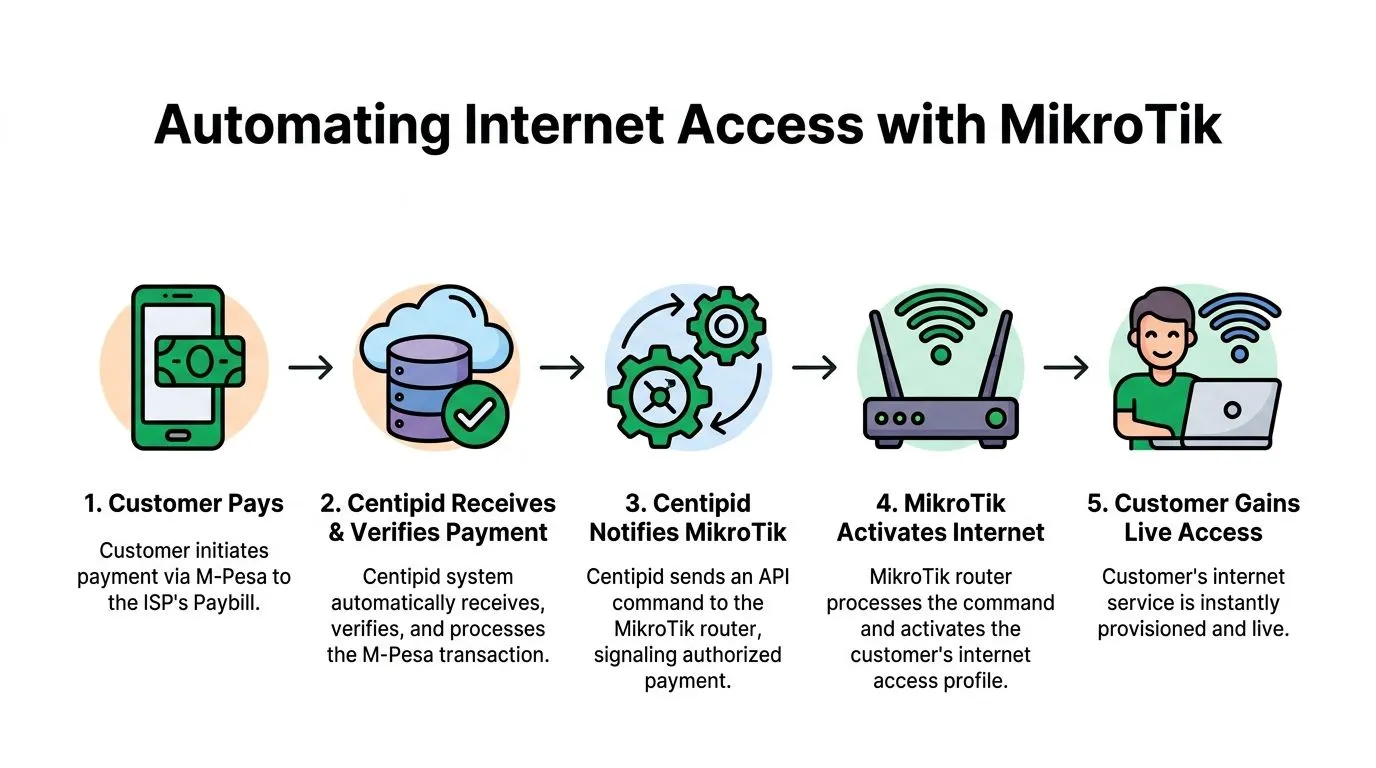
The PPPoE workflow
In a PPPoE environment, the cleanest model is that Centipid owns the commercial state and MikroTik enforces the access state.
That usually means:
- the customer exists in Centipid with a linked service plan,
- the PPPoE account or secret exists on the MikroTik side,
- payment updates the subscription state in billing,
- billing sends the required action to RouterOS.
The action itself depends on your policy. Some setups re-enable a disabled secret. Others extend expiry logic tied to a profile or account validity. The exact implementation depends on how your MikroTik environment is structured, but the principle is the same. The router should not decide whether someone is paid up. It should receive that decision from billing.
If you want a router-focused overview of the integration model, Centipid’s MikroTik page is here: MikroTik integration for ISP automation.
The hotspot and voucher workflow
Hotspot operators often need a different style of automation. The customer may not have a persistent subscriber account. They may buy access in a café, hotel, bus park, event venue, or campus environment.
In those cases, Centipid can sit between payment and access issuance:
- payment is received and verified,
- the platform generates or validates the voucher logic,
- the corresponding hotspot user or profile becomes usable,
- the captive portal reflects the correct session conditions.
Many MikroTik admins improvise here with local scripts, printed vouchers, or manual user creation. It works, but it becomes brittle when you scale across multiple sites.
What the API logic is doing under the hood
The exact API methods and synchronisation options depend on your Centipid setup and RouterOS version, but the underlying pattern is simple.
Centipid sends a structured instruction to MikroTik after the payment event has been accepted. MikroTik processes that instruction against the relevant user object, service profile, or hotspot record. The router then applies the access policy already defined on that network.
That means your automation is only as good as your object design. If PPPoE profiles are inconsistent, or hotspot users are not linked cleanly to billable services, payment automation will be messy no matter how good the gateway integration is.
A short explainer is useful here:
What works and what does not
Consider this trade-off, which many teams only learn after painful support hours:
| Approach | Result |
|---|---|
| Billing platform controls service status, MikroTik enforces it | Predictable, auditable, easier to troubleshoot |
| Router scripts decide payment state locally | Hard to scale, hard to reconcile |
| Single service-profile design per package type | Cleaner renewals and fewer mismatches |
| Frequent manual edits on router users | Drift between billing and network records |
Tip: Keep your MikroTik naming, service profiles, and user identifiers aligned with Centipid. Most “paid but not connected” tickets come from inconsistent identifiers, not from the payment itself.
For both PPPoE and hotspot setups, the principle is the same. Payment should create a verified billing event, and that event should trigger a defined router action. No spreadsheet. No midnight login to re-enable one user manually.
Testing Reconciliation and Security Best Practices
Friday evening is where weak Paybill integrations usually show themselves. A customer pays, M-PESA accepts the money, Centipid records something, the router state lags, and support gets the call. The fix is not more manual checking. The fix is a test plan that proves each handoff works under normal and broken conditions.
One successful payment is not enough. Validate the whole chain, from customer reference entry to settlement review and service restoration.
Test the full transaction path
Start with a controlled account in Centipid that you can safely suspend, renew, and expire without affecting a real subscriber. Use the same naming format, package mapping, and router policy you use in production. If your test account is cleaner than your live accounts, the result will be misleading.
Then run live transactions and record what happens at each step:
- Create a test subscriber with a known package and a known router identifier.
- Place the account in a billable state such as expired, suspended, or pending activation.
- Send a real M-PESA payment using the exact account reference format customers will use.
- Confirm the payment posts correctly in Centipid with the right customer match and amount.
- Check the router outcome in MikroTik. The user should regain the expected level of access, not just any access.
- Test from the client side by browsing, authenticating, or reconnecting, depending on your service model.
- Review timestamps across M-PESA records, Centipid logs, and router changes so you know your normal processing delay.
After the happy path, test the cases that usually create billing tickets. Use a wrong account reference. Post the same amount twice. Pay for an already-active account. Check how reversals are handled. If Centipid cannot match a payment cleanly, staff should see a clear exception, not a silent failure.
Reconciliation needs a daily operating routine
Reconciliation is where an integration stops being a demo and becomes operational. Compare what Safaricom settled, what Centipid posted, and what service changes happened on the router. If those three views do not line up, the error will surface later as revenue leakage, customer disputes, or both.
In practice, the cleanest process is a short daily review and a stricter month-end review. Use Centipid payment history, settlement records, and your router event history to find:
- Unmatched payments
- Duplicate postings
- Manual activations with no payment trail
- Reversed transactions that did not trigger service rollback
- Accounts credited to the wrong reference
If your team is still relying on spreadsheets for this step, review what modern ISP billing software for automated reconciliation and service control should already handle. The trade-off is simple. Manual reconciliation feels familiar, but it hides errors until volume grows.
Security controls that protect money and service state
Payment automation touches two sensitive systems at once, billing and network access. Treat both as production infrastructure, not as a side integration someone can patch later.
Focus on controls that reduce real operational risk:
- Restrict admin access by role. Billing staff do not need full router permissions, and network staff do not always need full payment configuration access.
- Protect callback endpoints. Validate requests, log failures, and alert on repeated invalid callback attempts.
- Keep API credentials out of shared chat threads and router notes. Store them in a controlled secret management process.
- Define reversal handling before go-live. Decide whether service is cut immediately, queued for review, or handled by account status rules in Centipid.
- Preserve audit logs. Do not delete awkward transactions to make reports look tidy. Investigations depend on those records.
- Review manual override use. Every exception path that bypasses normal posting or activation should leave a trace.
For a broader operational checklist, this guide on 10 Essential Cyber Risk Management Best Practices is a useful companion.
A reliable Safaricom internet paybill setup is not judged by how it handles the clean payment. It is judged by how quickly your team can spot, explain, and correct the messy one.
Your Path to Automated ISP Growth
A good safaricom internet paybill setup does not just collect money. It standardises how your ISP operates.
When Safaricom Paybill, Centipid, and MikroTik are connected properly, renewals stop depending on phone calls and screenshots. Customers get a clearer payment journey. Staff stop wasting time on repetitive activation work. Reconciliation becomes an operational routine instead of an an end-of-month scramble.
That matters whether you run a neighbourhood WISP, a fibre reseller, or multi-site hotspot deployments. You get room to focus on support, package design, and expansion instead of chasing M-PESA messages.
If you are reviewing platforms for that move, Centipid’s overview of ISP billing software is a practical next step.
Centipid Technologies Ltd. builds the Centipid ISP Billing System for providers who want to automate billing, M-PESA collections, and MikroTik-based service control from one place. If you are replacing manual reconciliation or stitching together scripts that no longer scale, their team can help you move to a cleaner, supportable workflow.