A lot of MikroTik-based ISPs hit the same ceiling before they expect it.
The network is working. New customers are coming in. PPPoE accounts are added in WinBox, hotspot vouchers are created when needed, and payments are tracked in spreadsheets, chat threads, and memory. Then growth turns those habits into operational debt. A missed suspension means free service. A forgotten reactivation means an angry customer who already paid. A tower goes unstable at night and nobody notices until the phone starts ringing.
MikroTik ISP management software stops being a nice extra and becomes core infrastructure at this point. It is not only about configuring routers faster. It is about turning RouterOS into a controlled service delivery system that ties access, billing, support, and customer communication together.
The Growing Pains of a Manual MikroTik ISP
The early stage usually looks efficient from the outside.
One technician provisions PPPoE users directly on the router. Someone in the office sends payment reminders over WhatsApp. Hotspot vouchers are printed or typed out on demand. Suspensions happen when staff remember to do them. Reconnection happens after someone confirms a transfer and logs in to make the change.

That model works for a small subscriber base. It breaks the moment volume rises across multiple estates, schools, trading centres, or tower sites.
Where the manual grind shows up first
The first failure is usually not technical. It is procedural.
A customer pays and waits because nobody has linked the payment to a service plan yet. Another customer should have been suspended last week but is still online. Support cannot quickly tell whether a problem is non-payment, CPE failure, tower congestion, or a stale PPPoE session. Staff spend more time checking status than fixing issues.
A manual MikroTik setup often creates four recurring problems:
- Provisioning delays. New customers wait while staff create user records one by one.
- Collection gaps. Small missed payments add up when there is no automated dunning or clean payment reconciliation.
- Inconsistent enforcement. Some users are throttled correctly, others keep old queue settings, and delinquent accounts stay active too long.
- Poor visibility. The router shows sessions, but the business still lacks a single view of customer status, invoices, and device health.
Growth makes the cracks wider
That kind of traffic growth changes the economics of running a network manually.
More subscribers mean more sessions, more plan changes, more support requests, more temporary suspensions, and more pressure on available bandwidth. Video-heavy usage also exposes weak queue policies very quickly. If staff still depend on ad hoc scripting and manual follow-up, service quality drops while admin work rises.
Practical takeaway: When your team spends more time synchronising payments, plans, and access states than improving the network, the issue is no longer staff discipline. The operating model has outgrown manual control.
What operators usually realise too late
Many owners first look for relief in isolated tools. One platform for monitoring. Another for invoicing. A few custom scripts for suspension. A spreadsheet for vouchers. That reduces pain in one corner while creating confusion everywhere else.
The turning point is usually simple. The ISP needs one system to tell MikroTik what to do based on business rules. Not after someone remembers. Immediately, consistently, and with a visible audit trail.
What is a MikroTik ISP Management Platform
A MikroTik router can authenticate users, shape traffic, enforce queues, run hotspot services, and expose device controls through API and related services. What it does not do by itself is run the business around those functions.
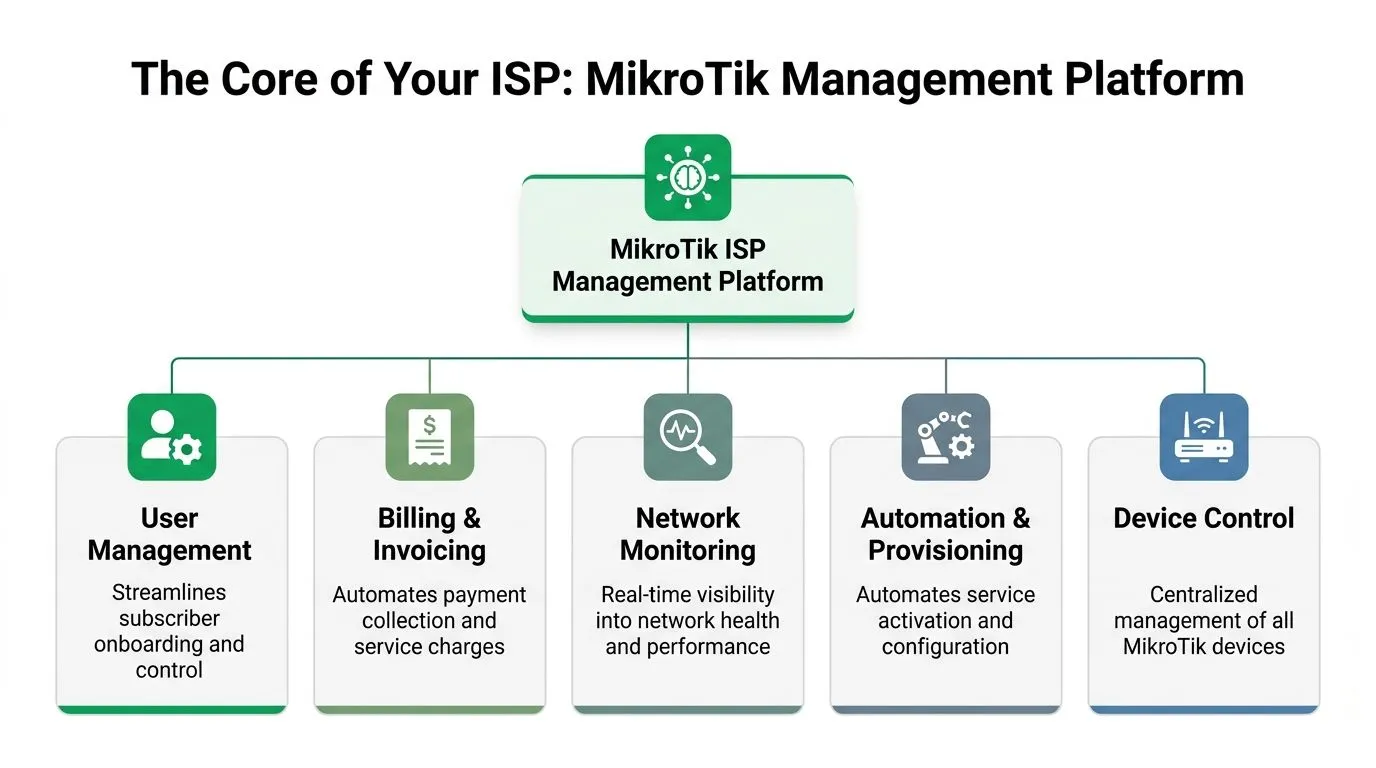
That missing layer is the MikroTik ISP management platform.
Think of it as the ISP’s control layer
The simplest way to explain it is this. RouterOS moves packets and enforces rules. The management platform decides when, why, and for whom those rules apply.
It sits between your MikroTik estate and your business workflows. When a subscriber signs up, pays, changes package, defaults, or requests a voucher, the platform translates that event into network action. That can mean creating a PPPoE account, updating a hotspot profile, changing bandwidth limits, suspending service, or restoring it.
A proper system combines functions that are often scattered across separate tools:
- Subscriber records tied to active services
- Billing and invoicing linked to access control
- Payment reconciliation across available gateways
- Provisioning logic for PPPoE and hotspot users
- Monitoring context so support can see both network state and account state
If you want a broader view of how subscriber lifecycle tooling fits together, this overview of an ISP subscriber management system is useful background.
It is not the same as WinBox or a monitoring dashboard
Many buyers get confused at this point.
WinBox gives direct device administration. The Dude and similar tools help with infrastructure visibility. Generic NMS platforms can alert on interfaces, CPU, memory, and reachability. Those are useful, but they do not solve the revenue and customer workflow problem on their own.
A management platform is different because it is built around service operations.
What basic device tools do well
They are strong at:
- pushing configuration changes
- checking interface state
- viewing logs
- troubleshooting live RouterOS behaviour
- confirming whether a device or service is up
What they usually do not do well
They are weak at:
- recurring invoicing
- automated suspensions tied to billing status
- self-service account actions
- voucher sales and access tracking
- subscriber-level policy automation across many routers
Why this distinction matters
A growing ISP can survive with average monitoring for a while. It cannot survive long with weak collections and inconsistent provisioning.
The strongest platforms treat access control, plan management, and payments as one workflow. That matters because a broadband business is not only a network. It is a chain of repeatable events. Customer signs up. Service is provisioned. Invoice is issued. Payment is confirmed. Access is maintained or changed. Usage is governed. Support has context.
Key test: If your current software can show that a router is online but cannot tell you whether a customer should be online, you still have a gap.
The operating result you are looking for
When the platform is set up well, staff stop jumping between chat apps, spreadsheets, routers, and bank statements just to answer a simple question.
They can see the subscriber, the package, the last payment state, the active session, and the policy applied to that user from one place. That is what makes mikrotik isp management software valuable. It professionalises the ISP, not only the router configuration.
Key Features Powered by RouterOS v7 Integration
Significant value in mikrotik isp management software comes from deep RouterOS v7 integration. Without that, the software becomes a billing front end with weak enforcement. The useful systems are the ones that can take a business event and turn it into a RouterOS action immediately.
RouterOS v7 gives operators a stronger base for API-driven control, policy application, and modern deployment patterns. The management layer should use those capabilities cleanly, not fight them.
PPPoE and subscriber authentication
For fixed broadband, PPPoE is still the backbone of many MikroTik deployments.
A management platform should handle the full account lifecycle around PPPoE. That means creating the user, assigning the correct service profile, activating access after payment, changing the package when the subscriber upgrades, and suspending the account when billing rules require it.
The technical path usually runs through RADIUS, the RouterOS API, or both. The important point is not which mechanism is fashionable. The important point is whether the integration is reliable and predictable.
If you need a refresher on the authentication side, this guide to a MikroTik RADIUS server covers the underlying role of centralised AAA in these deployments.
What good PPPoE automation looks like
- New activations happen without a technician editing user entries by hand.
- Package changes update policy consistently, instead of leaving old queue limits behind.
- Suspensions and restorations are driven by account state, not a reminder in someone’s notebook.
- Session handling is visible enough that support can distinguish auth issues from transport issues.
What does not work well is a half-automated flow where billing is centralised but access control still depends on logging into multiple routers manually.
Hotspot operations and captive access
Hotspot networks expose a different operational pattern.
Hotels, campuses, cafés, estates, and public Wi-Fi zones need flexible identity models. Some users get timed vouchers. Others buy access by volume or duration. Some need branded login pages. Others need social or account-based access. RouterOS hotspot functions can support that, but they become difficult to manage at scale without central tooling.
A proper management platform should handle:
- voucher creation and distribution
- user session rules
- captive portal branding
- package-based access windows
- account balances and renewals
- account visibility for staff and subscribers
Centipid’s product documentation at docs.centipidbilling.com describes the billing-system side of these workflows, including hotspot management, subscriber access handling, and payment-linked service control.
Engineer’s rule: If voucher creation, expiry handling, and suspension logic depend on staff memory, the hotspot business is already leaking revenue.
Policy enforcement and QoS
Most operators underestimate how much money and goodwill are lost through inconsistent policy enforcement.
Customers do not only buy bandwidth. They buy predictability. If one 10M package behaves like 10M on one POP and a best-effort mess on another, support queues grow and trust falls.
At this point, the management platform must speak RouterOS fluently. It should apply service plans as live policy, not just as labels in a billing record. That can include queue logic, hotspot profile limits, PPPoE profile changes, or firewall-based service state handling depending on the design.
The business question is simple. Can the software translate package rules into real RouterOS behaviour every time?
Useful RouterOS v7-linked enforcement patterns
- Plan-based shaping Residential plans, SME plans, and hotspot packages often need distinct bandwidth policies. The software should assign those automatically and keep them aligned with billing status.
- Cut-off logic that is reversible Delinquent control should be consistent and easy to reverse on payment confirmation. Manual firewall edits are fragile.
- Fair usage adjustments Operators who run contention-sensitive networks often need flexible shaping that changes by package or policy window.
- Real-time changes Support staff should be able to trigger a controlled change without editing queues device by device.
Monitoring is necessary, but not sufficient
Many teams start with pure NMS tooling because that pain is visible first. They need alerts, interface stats, and CPU visibility. That is sensible. A review of network monitoring tools is helpful if you are comparing the monitoring side of the stack.
But monitoring alone does not create a managed ISP operation.
A device can be healthy while the subscriber lifecycle is broken. CPU can look fine while collections are weak. A tower can be reachable while suspended users are still online because billing and access control are disconnected.
Why depth matters more than feature count
The market is full of platforms that claim MikroTik support. The wording matters.
Some systems only provide shallow visibility or bulk command shortcuts. Others reach into RouterOS enough to manage access, policy, vouchers, and service states as part of one workflow. Those are not equivalent.
The platform worth paying for is the one that reduces exceptions. Fewer manual edits. Fewer missed suspensions. Fewer cases where support says, “the payment is fine, but we still need engineering to touch the router.”
How to Choose the Right MikroTik Management Software
Most ISPs do not fail at software selection because they chose the wrong feature list. They fail because they chose a tool that looked good in a demo but did not match their operating model.
ISP Management Software Evaluation Checklist
| Feature Area | Key Questions to Ask | Why It Matters for Growth |
|---|---|---|
| Billing and payments | Does it support recurring invoicing, payment reconciliation, automated reminders, and local mobile money workflows? | Revenue collection must be tied to service state, especially where small frequent payments are common. |
| Subscriber management | Can staff view account status, plan, payment state, and live service details in one place? Is there a self-service portal? | Faster support and fewer avoidable tickets. |
| PPPoE and hotspot control | Does it automate activations, suspensions, restorations, package changes, vouchers, and captive portal logic? | Manual access control does not scale. |
| Multi-site operations | Can it manage several POPs, towers, or hotspot sites without forcing router-by-router admin? | Distributed WISPs need central control. |
| Reporting and analytics | Can you see payment trends, package uptake, delinquency patterns, and operational exceptions clearly? | Better pricing and cleaner collections depend on visibility. |
| Compliance and data handling | Does the platform support sound access control, auditability, and operational practices compatible with local regulatory duties? | Subscriber data and service actions need discipline. |
| Support and onboarding | Is implementation guided, and can your staff learn it without a custom project? | Good software still fails if deployment is chaotic. |
Questions that separate useful systems from pretty dashboards
Some selection questions expose weakness very quickly.
How does the platform handle failed or partial payments
This matters a lot in mobile money-heavy environments. A platform that invoices well but reconciles poorly will still leave staff doing detective work.
Can it run both network and business workflows together
If support must open one tool for status, another for payments, and a third for actual policy enforcement, staff will create shortcuts. Those shortcuts become inconsistency.
Does it support the customer after sign-up
Many tools are strong at activation and weak at day-to-day account management. Look for subscriber self-service, package changes, account visibility, and payment history.
A buyer comparing options should also review the criteria in this guide to the best billing system for wireless ISPs.
Buying advice: Ask every vendor to show the full workflow for one real scenario. Subscriber signs up, pays through a local channel, gets activated, misses the next payment, receives a reminder, is suspended, then pays and is restored. If the demo breaks at any point, the operations team will inherit that break.
Trade-offs worth accepting
Some operators overvalue flexibility and undervalue operational discipline.
A generic platform with endless customisation can sound attractive if your engineers are strong. But if every key workflow needs custom scripting, the software is pushing work back onto your team. That may be acceptable for a niche deployment. It is not ideal for a growing commercial ISP.
By contrast, a narrower platform that already handles ISP billing and access workflows well may look less glamorous, but it often produces cleaner operations.
Choose the system that reduces exceptions, not the one that gives the longest feature presentation.
Planning Your Deployment and Migration
Migration goes wrong when operators try to switch everything at once.
The stable way to deploy mikrotik isp management software is to treat it as an operations project, not only a software installation. Audit first. Standardise what you can. Integrate with a small subscriber group. Then widen the scope.

Phase one before touching customer accounts
Do not begin with imports.
Start with an audit of what already exists:
- Subscriber data. Check plan names, usernames, phone numbers, payment references, and duplicate records.
- Router standards. Confirm naming conventions, PPPoE profiles, hotspot profiles, and queue logic.
- Access methods. Decide whether the platform will control users through API, RADIUS, or a hybrid pattern.
- Exceptions. Identify legacy users, custom rate limits, manually whitelisted accounts, and special sites.
This stage often exposes the underlying issue. The ISP does not only need software. It needs a cleaner operating baseline.
Integration should be boring
The best migrations feel uneventful.
That matters because decentralised ISPs rarely have the luxury of perfect on-site reachability everywhere.
A simple migration roadmap
Prepare the data
Clean plan names and customer records before import. If two old plans mean the same thing but use different labels, merge that confusion now, not later.
Connect one pilot router or one pilot site
Start with a contained environment. A small PPPoE segment or a single hotspot location is enough to test the workflow.
Migrate in batches
Move a controlled group of customers first. Watch activations, suspensions, payments, and support feedback closely before adding more.
Train support before full go-live
The support desk must know what they can now do from the platform and what still belongs with engineering. Otherwise staff keep falling back to old habits.
A lot of operators also wrestle with whether billing, CRM, and NMS should all live together or be separated. This discussion on when you need billing, CRM, and NMS separately, not in one platform is worth reviewing before you finalise architecture.
Keep the technical cutover small and testable
A sample RADIUS client configuration is usually enough to prove the integration path in a pilot. The exact values depend on your environment, but the principle is straightforward.
/radius add service=ppp address=<radius-server> secret=<shared-secret> authentication-port=<auth-port> accounting-port=<acct-port> /ppp aaa set use-radius=yes accounting=yes interim-update=<interval>
/radius add service=ppp address=<radius-server> secret=<shared-secret> authentication-port=<auth-port> accounting-port=<acct-port> /ppp aaa set use-radius=yes accounting=yes interim-update=<interval>
/radius add service=ppp address=<radius-server> secret=<shared-secret> authentication-port=<auth-port> accounting-port=<acct-port> /ppp aaa set use-radius=yes accounting=yes interim-update=<interval>
That kind of change should be tested in a controlled group before wider rollout. The point is not the syntax. The point is the discipline around it.
A quick walkthrough can help teams visualise the implementation flow before they begin:
Migration habit that saves trouble: Freeze manual plan edits during the final migration window. If staff keep changing subscriber records in the old process while data is being moved, you create reconciliation errors immediately.
Centipid A Purpose-Built Solution for Growth
Many tools can talk to MikroTik. Fewer are built around the day-to-day commercial reality of a growing ISP.
For operators who need one platform to combine billing, payment collection, subscriber lifecycle control, hotspot operations, and RouterOS-linked enforcement, Centipid Technologies Ltd. provides that model through its cloud billing system and related documentation at centipidbilling.com and docs.centipidbilling.com.
Where it fits operationally
The strongest fit is with ISPs and hotspot providers who want business automation tied directly to network access.
That includes:
- PPPoE subscriber activation and control
- hotspot voucher and captive portal workflows
- recurring invoicing
- automated payment handling and dunning
- package management
- multi-location operational visibility
- subscriber self-service for account actions
The attraction is not that these are flashy features. It is that they belong in one operational loop.
Why that matters in the Kenyan context
A platform built for ISP operations needs to respect that reality.
When towers are distributed, power quality is uneven, and customers pay through local channels, the software has to reduce manual intervention rather than create more of it. Operators need access control, collections, and support processes to continue functioning even when field conditions are messy.
What to look for in practice
Useful indicators include:
- RouterOS v7-aware workflows rather than shallow device visibility
- Payment-linked service control so access changes follow account status
- Support for localised billing operations including mobile money flows where relevant
- Central management across locations without constant router-by-router work
- Customer-facing tools that reduce repetitive support calls
The practical benefit is straightforward. Staff stop improvising around disconnected systems and start running repeatable processes.
If your current stack still relies on manual reconciliation, hand-built vouchers, and after-the-fact suspensions, moving to a more integrated platform is usually less about adding software and more about removing friction.
Advanced Tips and Best Practices for Management
Once the platform is running, the next gains come from discipline.
A mature MikroTik operation protects the management layer, limits human error, and uses automation carefully. That matters whether you run a small hotspot business or a multi-site WISP.
Secure the control plane
Do not treat the billing and management system like a casual admin tool.
Place it on a dedicated management segment. Limit which systems can reach RouterOS management services. Use scoped credentials for API access so the platform has the permissions it needs, but not more than that. Review those credentials whenever staff roles change.
Standardise before you automate harder
Automation amplifies good design and bad design equally.
If towers, PPPoE profiles, and hotspot packages all follow different naming habits, your reports become messy and your scripts become brittle. Clean naming conventions first. Then automate on top of them.
Backup what matters
Operators often back up router configs and forget the business state.
Protect both sides:
- RouterOS configuration backups for device recovery
- Billing database backups for subscriber, invoice, and payment history
- Exportable plan definitions so service templates can be recreated cleanly
- Change logs for major policy edits and package revisions
Field advice: Test restore procedures, not only backups. A backup you have never restored is still an assumption.
Keep QoS and policy logic readable
Complex queue trees and address-list logic can be powerful, but they become dangerous when only one engineer understands them.
A common advanced pattern is to let the management platform populate service groups or status lists, then let RouterOS apply matching queue or firewall behaviour. Keep those rules documented in plain language. Future troubleshooting will be faster.
You can also watch adjacent trends shaping service delivery, including the move towards artificial intelligence WiFi for ISPs for predictive optimisation and support automation. The value is not in chasing buzzwords. It is in adopting tooling that reduces reactive firefighting.
Review exceptions every month
Most operational mess accumulates in exceptions.
Check:
- manually overridden subscriber statuses
- custom packages created for one-off deals
- stale hotspot users
- dormant routers still linked to active plans
- support-driven temporary changes that were never reversed
A clean monthly review keeps the platform trustworthy. Once staff believe the system is inaccurate, they stop relying on it. That is how manual work creeps back in.
If you want to replace manual provisioning, patchy collections, and router-by-router administration with a more organised ISP workflow, start with Centipid Technologies Ltd.. Review the product documentation, test the 14-day free trial, and use the free technical support to map your PPPoE or hotspot setup into a cleaner operating model.