Your network probably already has a network access control problem, even if you haven't labelled it that way.
A hotspot password gets shared across a building. A suspended subscriber still finds a way online through an old profile. A guest lands on the same flat network as staff devices. Support keeps handling “please reconnect this user” tickets that should've been automatic. Each one looks small. Together, they drain revenue, increase abuse, and make operations harder than they need to be.
For a growing ISP or public Wi-Fi operator, network access control isn't only a security layer. It's an operating model. It decides who gets in, what they can use, how long they stay connected, and what happens when their status changes. In a MikroTik environment, that decision has to work with real subscriber workflows such as PPPoE sessions, hotspot vouchers, suspended accounts, package upgrades, and multi-site management. If NAC stays separate from billing and automation, the team ends up doing manual clean-up all day.
Why NAC is Essential for Modern ISPs
If users can connect without clean policy enforcement, you lose money first and security second.
That order matters. Many small operators think about NAC only after a breach, but the daily pain usually starts with unauthorised use. Shared credentials, reused vouchers, stale accounts, and unmanaged guest devices all consume capacity that should be serving legitimate customers. The bigger the network gets, the harder it becomes to track who should be online and under what policy.
The business problem is access, not just login
A login page alone doesn't solve much. If a user pays late, changes package, exceeds fair-use conditions, or moves between sites, the network should respond automatically. If it doesn't, staff have to bridge the gap by hand. That's where errors creep in.
Three common symptoms show up in growing ISP teams:
- Revenue leakage: access stays active after suspension, or users keep reusing credentials meant for a single session.
- Support overload: the team spends time creating users, resetting vouchers, and pushing one-off changes on routers.
- Weak guest isolation: public Wi-Fi users get internet access, but the network doesn't properly separate them from internal services.
A proper subscriber platform helps tie these events together. If you want a practical view of how customer records, plans, and access states should stay aligned, this overview of an ISP subscriber management system is worth reading alongside your NAC design.
Practical rule: If access decisions depend on a technician remembering to make a change later, you don't have effective NAC. You have a manual workaround.
Why this ties directly to Zero Trust
ISPs and hotspot operators don't always use the term “Zero Trust”, but the principle fits perfectly. Don't assume a device, user, or session is safe just because it reached the network edge. Verify identity, apply the right policy, and keep checking. That's the same direction described in Purple's guide to protecting sensitive data through zero-trust access, and it maps cleanly to MikroTik deployments where PPPoE, hotspot, and RADIUS already sit close to admission control.
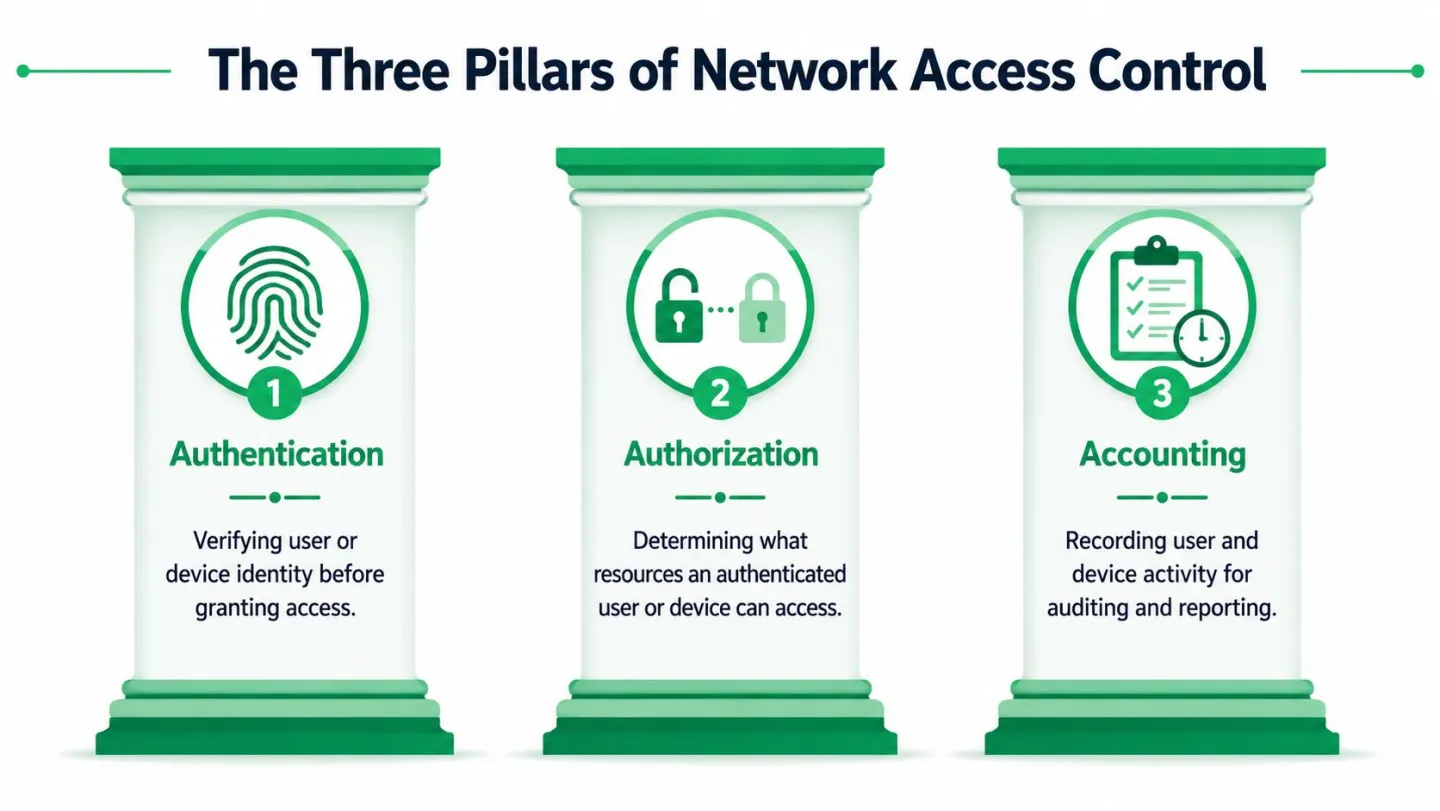
The Three Pillars of Network Access Control
At the practical level, NAC is easier to run when you reduce it to three questions.
Who is connecting? What should they be allowed to use? What record do we keep of that session?
Authentication
Authentication is the front desk checking ID.
In ISP terms, that might be PPPoE credentials, hotspot username and password, a voucher code, MAC-based recognition for a constrained device, or 802.1X with RADIUS for a controlled access edge. The point is simple. The network should know who or what is asking for entry before it grants useful connectivity.
Good authentication is reliable and repeatable. Weak authentication often looks convenient at first, then creates noise later. Shared static passwords are the classic example. They're easy to deploy and hard to control.
Authorisation
Authorisation is what happens after identity is accepted. The receptionist doesn't only confirm your name. They decide which floors you can enter.
For an ISP, this means mapping a valid user to the correct network policy:
- Subscriber package: speed profile, session limits, and service class
- User type: guest, staff, contractor, resident, tenant, or managed device
- Access scope: internet only, selected internal services, or quarantine access
- Location context: branch, hotel, campus block, or tower sector
Many deployments fail at this specific stage. They authenticate correctly, then dump everyone into one broad policy. That isn't network access control. That's identity followed by flat access.
Accounting
Accounting is the audit trail. It records what happened, when it happened, and under which identity.
That matters for support, abuse handling, and payment disputes. If a customer says service failed at a certain time, you need session history. If a voucher was abused, you need logs that show how it was used. If compliance questions come up, accounting gives you evidence instead of guesses.
A simple way to view the three pillars is below.
| Pillar | Question answered | Typical ISP implementation |
|---|---|---|
| Authentication | Who are you? | PPPoE, hotspot login, voucher, 802.1X, RADIUS |
| Authorisation | What can you use? | Rate limits, VLAN, session rules, guest policy |
| Accounting | What happened? | Session logs, usage records, connection history |
NAC breaks down fast when one of these pillars is missing. Most often, accounting gets neglected because teams focus on getting users online first.
Comparing Common NAC Technologies
The right NAC method depends on the type of user and the amount of control you have over their device. There isn't one perfect option for every ISP network.
802.1X with RADIUS
That result matches what engineers see on well-managed networks. If devices must authenticate before they get proper network access, random endpoints and borrowed credentials become much harder to abuse.
Use 802.1X when:
- You manage the endpoint base: staff devices, managed CPE, controlled enterprise Wi-Fi
- You need stronger policy enforcement: per-user or per-device access decisions before admission
- You already run RADIUS well: because poor RADIUS hygiene makes 802.1X painful
Trade-offs are real. Deployment takes planning. Older devices may not support the method cleanly. Guest onboarding is usually worse than a captive portal unless you've invested in certificates or well-defined onboarding flows.
Captive portal and hotspot login
Hotspot NAC is usually the right answer for public Wi-Fi. It's familiar to users and practical for cafés, hotels, campuses, waiting areas, and temporary access. A captive portal can tie access to voucher use, account status, terms acceptance, or branded login flow.
Its biggest strength is flexibility. You can onboard almost any user device without changing endpoint settings. Its biggest weakness is that portal access isn't the same thing as deep endpoint trust. It's better for broad guest access than for tightly controlled internal access.
MAC authentication
MAC-based access is useful, but only in narrow cases. It works for devices that don't handle interactive logins well, such as some printers, cameras, TVs, or embedded systems. It also appears in temporary operational shortcuts.
Don't treat MAC authentication as strong identity. It's best used as a convenience layer around devices you already understand and segment properly.
Side-by-side decision view
| Method | Security level | User experience | MikroTik operational fit |
|---|---|---|---|
| 802.1X with RADIUS | High | Good for managed devices, awkward for unmanaged guests | Strong if RADIUS policy is organised |
| Captive portal | Moderate | Familiar and flexible for visitors | Strong for hotspot and voucher environments |
| MAC authentication | Low to moderate | Invisible to the end user | Useful for special cases, risky as a default |
A practical design often mixes methods. Use 802.1X for staff or managed subscriber environments. Use hotspot flow for guests and temporary users. Use MAC-based exceptions only where interactive methods aren't realistic.
For teams evaluating where NAC should sit among billing, CRM, and monitoring, this article on when billing CRM and NMS should be separate systems helps frame the operational trade-offs. Compliance-heavy environments may also want stronger audit logic and a verifiable governance system for compliance around access decisions, especially when multiple teams manage policy.
The best NAC technology is usually the one your team can operate consistently, not the one with the longest feature list.
NAC Deployment Models for ISPs and Public Wi-Fi
One of the easiest ways to understand NAC is to follow the customer journey.

PPPoE for subscriber networks
A residential WISP installs CPE at a customer site, provisions a package, and expects the connection to behave the same way every day. In that model, NAC sits close to subscriber identity and service policy.
The user's router or endpoint initiates PPPoE. Credentials go to RADIUS. The reply decides whether the session comes up, which service profile applies, and what restrictions should be enforced. If the account is active, the session lands in the correct plan. If the account is suspended, the session shouldn't receive normal internet access.
This model fits subscription internet because the access decision is directly tied to a named customer record. It's clean, predictable, and easy to automate once the billing system and RADIUS workflow agree on status.
Hotspot for public and semi-public Wi-Fi
Now take a café, hotel, bus park lounge, or campus guest network. The user doesn't want PPPoE. They want to connect, open a browser, and get online with minimal friction.
The hotspot model handles that far better. A customer joins Wi-Fi, hits a captive portal, enters a voucher, logs in with an account, or completes the required access flow. The NAC layer then applies the appropriate policy for guest internet, session duration, or location-specific rules.
Branding and operations intersect at this point. The portal is visible to users, while the policy engine is visible to your team. If the flow is badly designed, users abandon the connection or support gets flooded. If the flow is too loose, access gets abused.
Why the ISP model is growing fast
That projection fits what operators are dealing with on the ground:
- More device variety: customer routers, phones, laptops, TVs, and unmanaged IoT
- More distributed sites: towers, branch hotspots, hospitality venues, and campus zones
- More policy events: upgrades, suspensions, reactivations, guest access, and package changes
PPPoE and hotspot aren't competing models. Most growing operators end up using both. The important part is making sure both point back to the same policy logic, so a change in subscriber status reaches the network quickly and consistently.
Automating Access with MikroTik and Centipid
Manual NAC doesn't scale. It also creates the exact mistakes that upset customers and leak revenue.
The gap shows up most clearly in small ISP environments. Enterprise NAC content often assumes a separate security stack, dedicated NAC specialists, and room for complex rollouts. That doesn't reflect a team running towers, hotspot sites, customer support, collections, and provisioning with a small staff. One of the most important operational gaps in the market is the need to tie access decisions to billing state in real time, especially in PPPoE and hotspot networks, as noted in this discussion of billing-integrated NAC for operators.

What automation should actually do
In a MikroTik environment, access automation should handle the boring but critical events without waiting for a technician:
- New service activation: create or enable the subscriber's access profile
- Payment success: restore or continue service under the correct plan
- Non-payment or expiry: suspend normal access according to policy
- Package change: move the user to the updated bandwidth or service profile
- Voucher lifecycle: issue, redeem, expire, and invalidate access cleanly
- Multi-site consistency: apply the same business rule across many routers and locations
If those actions live in separate systems with no reliable sync, the network and the billing ledger drift apart. That's when a disconnected customer still browses, or a paying customer stays blocked longer than necessary.
How MikroTik and the billing layer should connect
The practical architecture is straightforward. MikroTik handles enforcement at the edge through PPPoE, hotspot, queues, and RADIUS-driven policy. The billing platform becomes the policy trigger for commercial events such as account creation, invoicing, suspension, and reactivation.
One option in this category is Centipid Technologies Ltd., whose platform and MikroTik RADIUS billing system setup guidance describe how PPPoE and hotspot access can be synchronised with subscriber status, vouchers, bandwidth control, and centralised operations. The useful idea isn't brand-specific. It's that access control should follow the subscriber lifecycle automatically.
Where teams usually get it wrong
Some operators try to keep NAC “pure” by separating it from commercial workflows. That sounds tidy on paper but creates manual joins in real life. The network doesn't care why a user should be blocked or restored. It only needs a reliable policy source.
Others over-automate without defining fallback behaviour. If a payment gateway delays confirmation, what should happen? If a RADIUS update fails at one site, who gets alerted? Good automation includes exception handling, not just happy paths.
A billing-integrated NAC design works best when suspension, restoration, package changes, and voucher expiry are treated as network events, not office tasks.
Security operations benefit too. If your team is already thinking about scripted quarantine, log review, and faster response to suspicious events, it helps to study broader approaches to automating incident response workflows. The same operational discipline applies inside ISP access control.
Security Best Practices for NAC Implementation
A working login flow isn't enough. A solid NAC deployment keeps checking devices and sessions after admission.
Segment first, then trust less
Flat networks make every mistake worse. If guests, staff devices, CPE management, and internal systems sit too close together, a single bad endpoint can create noise across the whole site.
Use segmentation deliberately:
- Guest traffic: internet-only paths with no access to internal management networks
- Staff access: tighter policies, stronger authentication, and narrower internal reach
- Untrusted devices: limited VLANs or quarantine segments until they meet policy
- Infrastructure services: kept away from public or subscriber-facing traffic
Add post-admission checks
Pre-admission controls decide who gets in. Post-admission controls decide what happens if behaviour changes. In practice, that means watching for unusual session patterns, repeated failures, suspicious traffic, or devices that no longer match their expected profile.
Useful controls include:
- Session review: check that connected users still match active subscriber status
- Dynamic quarantine: move suspect devices to a restricted policy instead of waiting for manual action
- Credential abuse detection: watch for repeated login anomalies that suggest sharing or stuffing
- Scripted response: use RouterOS tools and RADIUS logic to cut response time
Don't build a NAC policy that assumes every authorised session stays safe for its entire lifetime.
Keep the policy set small and readable
Overly detailed NAC rules are hard to debug. Start with a small number of clear classes. For example: active subscriber, suspended subscriber, guest, staff, unmanaged device, and quarantine. Then expand only when there's a real business need.
A compact rule set makes troubleshooting far easier. It also helps when multiple engineers work on the same environment across sites.
Treat logs as operational tools
Accounting data shouldn't sit unused until a complaint lands. Review it during normal operations. Good logs answer practical questions quickly: who authenticated, where they connected, which policy they received, and what changed during the session.
Your ISP Implementation Checklist
Print this and use it before you touch live subscriber traffic.
- Define your access classes: separate subscribers, guests, staff, unmanaged devices, and quarantine traffic.
- Choose the right admission method: use PPPoE where subscriber identity is persistent, hotspot where guest onboarding must stay simple, and stronger methods for managed internal access.
- Map billing events to network actions: activation, suspension, expiry, upgrade, downgrade, and restoration should all have defined policy outcomes.
- Prepare MikroTik enforcement points: review PPPoE, hotspot, RADIUS, queues, and VLAN policy before rollout.
- Design segmentation early: don't wait until after deployment to isolate guest and internal traffic.
- Test failure cases: verify what happens when payment is late, RADIUS is unavailable, or a user retries from another site.
- Train support staff: give them clear status views so they don't override policy blindly.
- Review customer operations: this guide to managing ISP customers and billing helps align front-office processes with network policy.
- Roll out in phases: start with one site or one access type, then expand after logs and support feedback look clean.
- Monitor continuously: session logs, voucher use, suspensions, and anomaly alerts should be part of weekly operations.
If you want to connect subscriber billing, hotspot control, PPPoE management, and MikroTik-based policy enforcement in one operational workflow, Centipid Technologies Ltd. provides tools built for ISP and public Wi-Fi environments. Use the documentation and product details to evaluate whether its approach fits your network design, automation needs, and support model.